
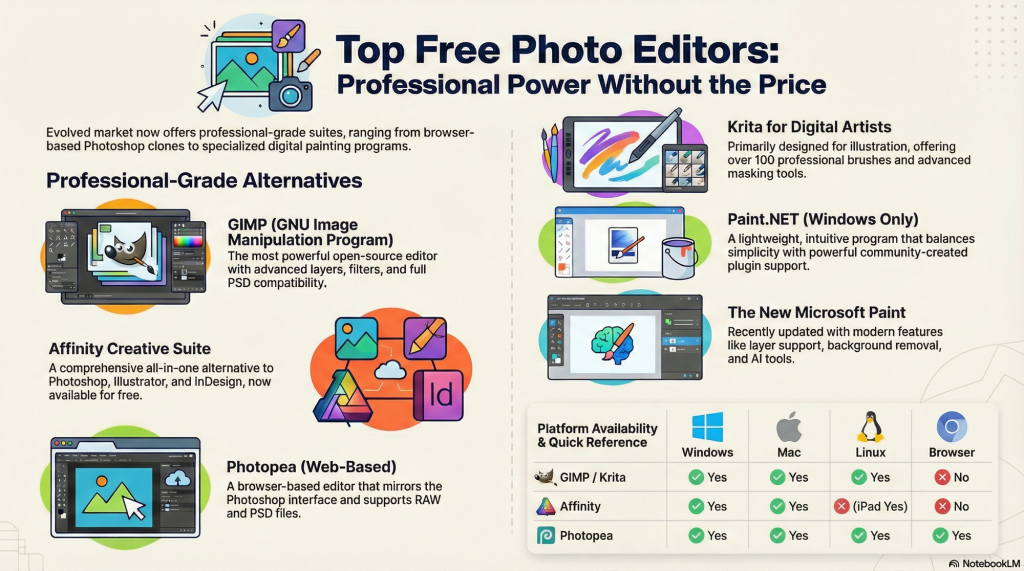
Your Creative Workflow No Longer Requires a Monthly Bill
For too long, digital creators have been forced to pay a perpetual rent on their own creativity. This “subscription tax” turned essential software into a recurring liability, locking professional-grade results behind a paywall that never expires.
The landscape has undergone a seismic shift, creating a new hierarchy where free tools are no longer “diet” versions of industry standards. These platforms have evolved into specialized powerhouses, offering a friction-killer for those ready to escape ecosystem lock-in.
The Surprising Redemption of Microsoft Paint
Once relegated to the status of a low-fidelity meme, Microsoft Paint has staged a legitimate comeback. Since its inception in 1985, it remained largely stagnant, but recent UI/UX overhauls have transformed it into a genuine utility for quick, high-impact workflows.
The modern iteration includes professional features like layer support, a revamped dark mode, and surprisingly accurate background removal tools. While it offers a trial AI image creator, users should be aware of the 50-credit limitation that governs that specific feature.
This redemption is a significant win for accessibility, providing a “no-download” solution for basic graphic design. By removing the friction of installation, Paint has become the ultimate tool for artists needing a simple, built-in editor for immediate tasks.
The Affinity Revolution: Professional Grade for $0
The most disruptive event in recent creative history is the acquisition of the Affinity suite by Canva. In a move that challenged the entire Adobe ecosystem, Affinity Photo, Designer, and Publisher have transitioned from paid licenses to free, professional-grade tools.
This “three-in-one” suite allows users to pivot between pixel editing, vector design, and page layout within a single environment. Crucially, this disruption extends beyond the desktop, as the iPad versions (Photo 2, Designer 2, and Publisher 2) are also included in this free shift.
Affinity serves as a “direct Photoshop alternative” with “professional image editing and retouching tools,” maintaining 100% compatibility with industry-standard PSD files.
Photopea and the Power of the Browser
Browser based Photopea has shattered the myth that high-level editing requires a local installation. By operating entirely within a web browser, it offers a “device-agnostic” workflow that allows a creator to start a project on a Chromebook and finish it on a high-end workstation.
Technically, it punches well above its weight by offering RAW file support and a workspace that mirrors the Photoshop interface. For power users, the platform even supports extended history steps, ensuring that complex, non-destructive workflows remain intact without a bulky software footprint.
Krita and the Rise of the Specialist Tool
While many editors try to do everything, Krita has found success by doubling down on a specific niche: digital painting and illustration. This open-source specialist offers a toolkit of over 100 professional brushes, vector templates, and advanced masking tools.
One of its most acclaimed UI innovations is the unique pop-up brush palette, accessible with a simple right-click to keep the artist’s focus on the canvas. While it presents a steeper learning curve than basic editors, the professional reward for illustrators is unmatched in the free software world.
Unlike the often “clunky” interface found in general-purpose tools like GIMP, Krita utilizes an artist-first UI that prioritizes creative flow over traditional menu diving. It proves that free software is no longer a “one-size-fits-all” compromise but a targeted professional choice.
GIMP’s Enduring Open-Source Legacy
Ranked as the #1 free Photoshop rival, GIMP (GNU Image Manipulation Program) remains the gold standard for open-source power. Since 1996, it has been the go-to choice for serious photo editing across Windows, Mac, and Linux.
Its extensibility is its greatest asset, rivaling Photoshop’s suite of filters and transformations while allowing for deep interface customization. Whether you are creating YouTube thumbnails, complex graphics, or performing high-end retouching, GIMP provides a depth of control that few paid tools can match.
Though the interface is highly flexible—allowing users to toggle between single-window and floating layouts—it remains a tool for those who value power over immediate simplicity. Its enduring legacy is built on a community-driven model that ensures it stays relevant for professional users.