
ON 1 – Sky Swap
ON1 Sky Swap AI eliminates the users memory block using machine learning and curated 8K UHD aerial imagery from OcuDrone.
Read moreSupporting Analysis
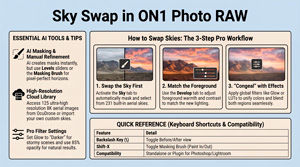
ON1 Sky Swap AI eliminates the users memory block using machine learning and curated 8K UHD aerial imagery from OcuDrone.
Read more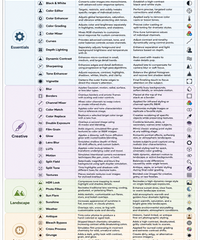
In ON1 Effects 2026, the 37 stackable editing filters are organized into four primary tool groups (categories) inside the streamlined Add Filter window: Essentials, Creative, Landscape, and Legacy. Below is the complete classification of all 37 filters, structured in a tabular layout matching the style used in the mobile photography[…]
Read more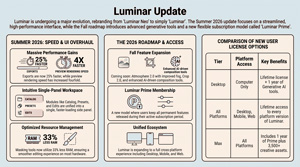
Jim Nix’s video details upcoming user interface enhancements for Luminar, specifically focusing on a free update scheduled for August; Anthony Morganti focuses mainly on their roadmap and continues the discussion on the User interface; Freewill focuses about pricing.
Read more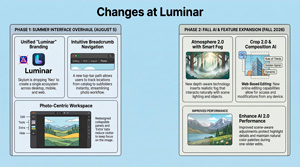
Skylum is consolidating its software by rebranding its primary editor simply as Luminar, aiming to create a unified ecosystem across desktop and mobile platforms.
Read more
Fully familiarizing yourselves with these vital tool will help you stop fumbling with the camera, catch the odd shot you wouldn’t have previously
Read more
The ON1 2026.5 release focuses on the parts of the app you feel everyday: a modernized AI Inference Engine, an updated graphics rendering engine, and a faster, more predictable start-up and shutdown.
Read more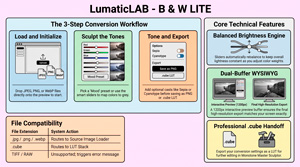
B & W Lite is a streamlined, offline image processing FOUNDATION tool designed to help beginners understand how to convert photographs into monochrome masterpieces using a precise, unified transformation engine.
Read more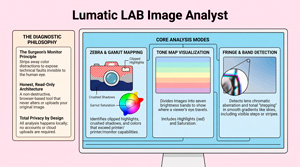
Image Analyst is a FREE browser-based diagnostic tool designed by LumaticLAB to help photographers identify technical flaws without altering the original file. The software functions as a non-destructive monitor, providing objective data on issues like tonal distribution, colour gamut, and lens aberrations allowing YOU to make informed creative decisions with confidence. Use it on its[…]
Read more
Until July 31, 2026, On1 Software is giving away NoNoise AI 2024.5 (latest version) for FREE. In his tutorial, Anthony Morganti, tells you how to get it. ON1 No Noise is designed to remove digital grain from high-ISO images while preserving fine details like feathers and fur. The guide demonstrates how the[…]
Read more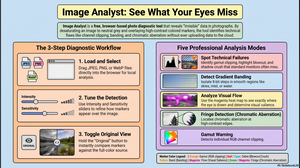
Every photograph hides information your eye glosses over. A sky that looks smooth is quietly banding into steps. A highlight you thought was bright is actually clipped, its detail gone for good. A corner of the frame is pulling attention away from your subject without you noticing. Image Analyst is[…]
Read more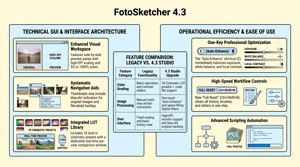
FotoSketcher, is a specialized, FREE desktop application designed to convert digital photographs into various artistic mediums such as paintings, sketches, and cartoons.
Read more
Professional Digital Asset Management (DAM) software addresses the challenge. of large numbers of images. Excire Photo 2027 is designed specifically for managing very large photo libraries spread across multiple drives.
Read more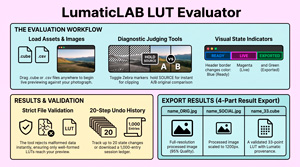
The friction of “blind” LUT application ends here. The LUT / CSV Evaluator provides the instant, offline environment needed to verify looks before they reach your workflow.
Read more
The primary purpose of the LUMATIC LAB Resampler is to enable a User to standardise the 3D LUTs they use by converting various cube sizes (such as 17³, 64³, and 65³) into a universally compatible format,
Read more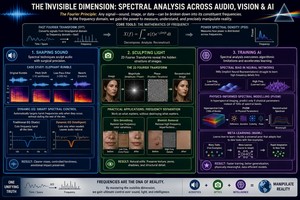
Spectral analysis or frequency domain across audio, visual arts, and AI
Read more
The text identifies significant updates introduced in on1 Photo RAW 2026.4, with a specific focus on the capabilities and limitations of its new Restore AI tool.
Read more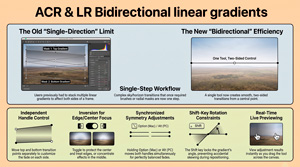
The June 2026 update for Adobe Camera Raw (18.4) has included greater integration within the Creative Cloud ecosystem.
Read more
The XMP Converter, is a browser-based utility designed to transform Adobe Lightroom and Camera Raw presets into more portable 33-point .cube LUTs ensuring your creative vision remains consistent across diverse production environments. XMP files serve as the underlying “recipe” for Lightroom Presets, enabling non-destructive editing by storing adjustments as text metadata. When you edit a photo, you are merely[…]
Read more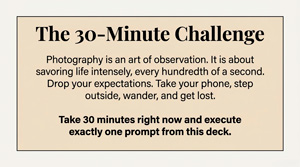
SEEING THE EVERYDAY provides a comprehensive collection of creative exercises and technical tutorials designed to help novice, or practiced, cell (mobile) phone photographers overcome artistic ruts and enhance their skills. The material suggest practical “jump-starts”, such as shooting with a single focal length, limiting shot counts, or capturing two dozen unique images from[…]
Read more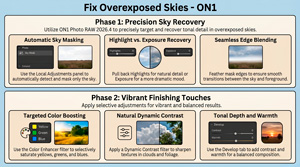
This ON1 video tutorial demonstrates a step-by-step workflow to enhance an overexposed image using ON1 Photo RAW 2026.4. It introduces the new home module features, specifically focusing on how users can access dedicated practice files to follow along with the lesson. The workflow prioritises precision sky masking and local adjustments to recover lost tonal detail[…]
Read more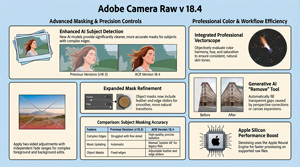
In the video, Julianne Kost details the functional upgrades and creative tools introduced in Adobe Camera Raw version 18.4, with a primary focus on AI-driven masking and colour precision. Significant improvements have been made to subject isolation and mask refinement, including the addition of a bidirectional linear gradient for more complex exposure adjustments. A professional vectorscope is now integrated into the[…]
Read more
Julieanne Kost talks about Adobe’s Lightroom Classic 15.4 update that introduces a suite of AI-driven enhancements designed to streamline photographic workflows and improve editing precision. She highlights key elements in the release, discussing refined masking capabilities and assisted culling tools that use intelligent scoring to evaluate subject focus and facial expressions. The software now includes a robust duplicate detection[…]
Read more
Adobe’s 2026 Creators’ Toolkit Report reveals that creative AI has become a foundational pillar of the modern creator economy, with the vast majority of users reporting significant gains in business growth and audience engagement. While these tools have dramatically increased production speeds, the data suggests that human taste, judgment, and a unique point of[…]
Read more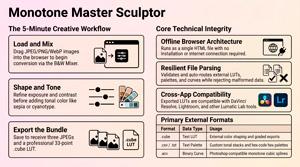
The Monotone Master Sculptor has a 4-stage workflow that can be summarised as Load, Build, Sculpt, and Export. Here is how you use each stage to edit your photos: Stage 1: Load (Input) Stage 2: Build the Foundation Stage 3: Sculpt theTones This stage involves manipulating light, contrast, and chemical[…]
Read more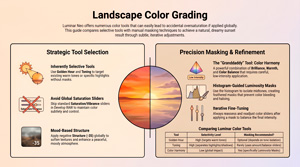
Jim Nix outlines a systematic workflow for landscape colour grading using Luminar Neo (that may be applied to most other suites inc. our own Colour Sculptor) , with a specific focus on achieving natural results. It highlights the common pitfall of excessive saturation and advocates for a subtle, approach to photo editing. By Luminar Neo specific tools like Golden[…]
Read more
We’ve made a small update to this little tool. It is similar to Adobe’s Photoshop Color Picker and has saved us quite a lot of time when creating and the website and documenting our apps. Creative professionals often grapple with the subjectivity of color—the “which blue?” ambiguity. This friction compromises[…]
Read more
Lumatic LAB – Mono Sculptor – Is For You There is also a Technical Reference Guide that provides an in-depth reference covering the signal processing pipeline, mathematical operations, file formats, architectural constraints, and advanced usage guidance. As this is really quite technical it is not included in the downloads but[…]
Read more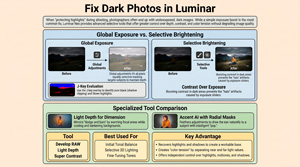
Jim Nix explores Techniques to Brighten Dark Photos Protecting your highlights shouldn’t mean burying your subject in the dark. While underexposing to save detail is a smart capture strategy, a simple global exposure boost is a blunt fix that often destroys the mood; professional results require a nuanced, selective approach[…]
Read more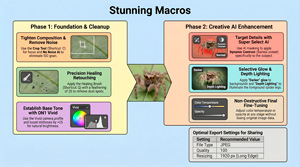
Capturing professional macro detail is challenging, but ON1 Photo RAW 2026.4 transforms workflows with surgical precision. These intelligent tools allow photographers to enhance intricate textures and atmospheric mood with ease.
Read more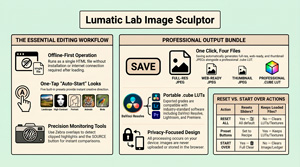
Lumatic Lab – Image Sculptor – whilst not being aimed at professional photo-editors and colourists, the app has many of the features Users need to complete their work. The app is continually being updated and more features will be added as further functionality is made available to web browsers
Read more