
Sept 2026 Affinity 3.3 Update
The September 2026 update introduces over 60 new features, focusing on finer creative control, workflow automation, and enhanced photography tools.
Read moreUse the E for Educator

The September 2026 update introduces over 60 new features, focusing on finer creative control, workflow automation, and enhanced photography tools.
Read more
Skylum is consolidating its software by rebranding its primary editor simply as Luminar, aiming to create a unified ecosystem across desktop and mobile platforms.
Read more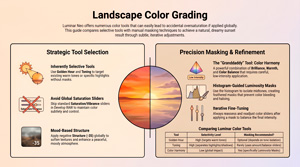
Jim Nix outlines a systematic workflow for landscape colour grading using Luminar Neo (that may be applied to most other suites inc. our own Colour Sculptor) , with a specific focus on achieving natural results. It highlights the common pitfall of excessive saturation and advocates for a subtle, approach to photo editing. By Luminar Neo specific tools like Golden[…]
Read more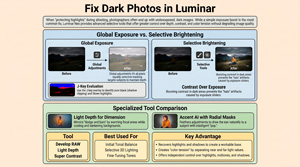
Jim Nix explores Techniques to Brighten Dark Photos Protecting your highlights shouldn’t mean burying your subject in the dark. While underexposing to save detail is a smart capture strategy, a simple global exposure boost is a blunt fix that often destroys the mood; professional results require a nuanced, selective approach[…]
Read more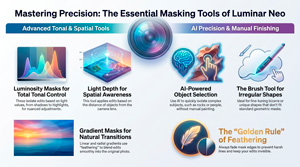
https://youtu.be/fAOkO3bJZa4 Jim’s tutorial provides a comprehensive guide to Luminar Neo’s masking capabilities, highlighting how targeted adjustments significantly improve image quality over global edits. He explores essential tools such as Light Depth, Gradient, and Luminosity masks, that allow photographers to isolate specific regions based on spatial distance, shape, or tonal values. Key emphasis is placed[…]
Read more
https://youtu.be/RAmsdsem2Nc Summary In this video, Jim admits he’s going overboard on the Light Depth feature introduced in the fall upgrade and provides an in-depth exploration of it as he feels it is the most significant and versatile addition to Neo as it allows users to apply lighting effects selectively based[…]
Read more
https://youtu.be/rUVR8NKTmwg Summary This video provides an in-depth exploration of the upcoming Luminar Neo fall upgrade, focusing specifically on the new AI-based Restoration tool designed to bring old photos back to life. The tool offers three modes: full restoration (color and scratch removal), colorization only, and scratch removal only. Jim demonstrates[…]
Read more
https://youtu.be/ZkcCU-R_nMo Summary This video focuses exclusively on the new “Light Depth” feature in the Luminar Neo fall upgrade. Jim highlights how this depth-based masking tool revolutionizes photo editing by allowing precise control over lighting adjustments, simulating a 3D light effect on 2D images. Unlike traditional linear or radial gradients, Light[…]
Read more
https://youtu.be/QHgn7YL1KaQ Summary The video presents an enthusiastic overview of the upcoming fall upgrade to Luminar Neo, highlighting several new features designed to enhance photo editing workflows. The central focus is on the new Light Depth tool, a reimagined replacement for Relight AI, which provides powerful depth-based lighting adjustments that significantly[…]
Read more
https://youtu.be/azW13ZRyVYo Summary In this video, the presenter shares expert tips for enhancing fall color photography using Luminar Neo, demonstrated through a recent image captured near Telluride, Colorado. The focus is on making warm autumn hues pop without oversaturating or overwhelming the image. The presenter debunks common assumptions about simply increasing[…]
Read more
https://www.youtube.com/watch?v=WAbGQQNwRQI Summary In this tutorial video, Jim Nix demonstrates how to achieve a dark, moody, gritty urban aesthetic commonly seen in cityscape photography on Instagram, using Luminar Neo software. The process begins with a photo that has already undergone basic cropping and minor adjustments. The key to creating this distinctive[…]
Read more
https://www.youtube.com/watch?v=QestybWv3Lk Summary In this tutorial, Jim Nix demonstrates a detailed landscape photo editing workflow using Luminar Neo, focusing particularly on colour grading techniques. Using a raw landscape photo from Madeira, the tutorial begins with an auto adjust to establish a baseline, followed by manual tweaks to contrast, highlights, shadows, temperature,[…]
Read more
https://www.youtube.com/watch?v=rw2oyCFn3mE Summary of Fall Color Accentuating Techniques in Lightroom Classic This text discusses techniques to enhance fall colors in photographs using Lightroom Classic, focusing on two primary tools and specific color adjustments. The author shares a practical walk through on how to emphasize the rich yellows, oranges, reds, and greens[…]
Read more
Simple Secrets for Striking B&W in Lightroom https://www.youtube.com/watch?v=Dyr9Qzv9Hj8 Summary In this video tutorial, Jim explores the process of transforming a colorful landscape photo into a dramatic monochrome using Adobe Lightroom Classic, (though the methods used may be found in most photo editors). Emphasizing the power of monochrome photography to convey[…]
Read more
https://www.youtube.com/watch?v=HYtqK_7XgSQ Summary In this Luminar Neo tip, the presenter explains an alternative approach to correcting tricky white balance issues. Instead of relying on the global adjustments in Develop Raw (temperature and tint), which affect the entire image equally, he demonstrates using Color Harmony’s Color Balance tool. This method allows selective[…]
Read more
https://youtu.be/eABIxazSEFM Summary The video demonstrates how to enhance golden tones in sunset photos using Luminar Neo’s Golden Hour tool combined with luminosity masking for precise control. Starting with a Colorado landscape, the creator shows how Golden Hour globally warms tones but can oversaturate skies and trees. By applying a luminosity[…]
Read more
In this video, the Jim Nix explains that despite the many tools available in Luminar Neo, he primarily relies on just three: Develop Raw, Super Contrast, and Color Harmony. He demonstrates how he uses these tools to adjust light and color in order to transform a flat image into a[…]
Read more