
Capturing and editing stunning Autumn (Fall) foliage requires careful attention to timing, equipment, and atmospheric light, as vibrant fall colours often appear flat on camera and benefit greatly from targeted post-processing techniques.
Photographers can enhance their Autumn images in the field by utilizing specialized filters like circular polarizers to reduce glare, neutral-density filters for long exposures of moving water, and graduated filters to balance bright skies with darker foregrounds. To achieve a luminous glowing effect, practitioners can either position foliage directly between the camera and the sun for natural backlighting or employ advanced digital editing workflows.
Additionally, achieving professional results depends on selecting the right focal lengths, maintaining proper shutter speeds to prevent motion blur, and applying subtle, localized enhancements to contrast, texture, and vibrance rather than over-saturating the entire scene.
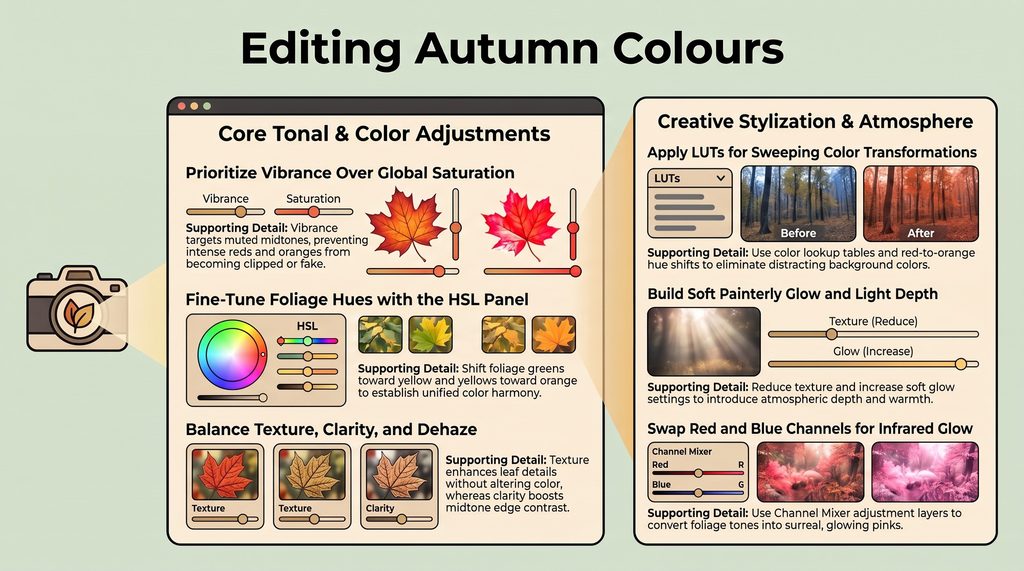
Autumn photos look flat on screen because camera sensors capture light differently than human eyes, diluting natural colour contrast. Maxing out saturation sliders usually pushes autumn colours into an unnatural, cartoonish realm. Truly stunning fall colour comes from mastering camera angles, light physics, and selective post-processing rather than relying on digital gimmicks.
How Do You Make Autumn Leaves Glow Using Backlighting?
You can make Autumn leaves glow by placing foliage directly between your camera and the sun, allowing backlight to pass through translucent leaves. This physical backlighting reveals internal leaf textures and makes reds and yellows glow natively.
“The secret to stronger fall color isn’t adding saturation in editing. It’s simply putting the light on the other side of the leaf.”
How Does Background Contrast Create Vibrant Colors?
Background contrast creates perceived color vibrancy without digital manipulation by placing bright subjects against darker tones. Even a glowing leaf disappears against a washed-out white sky. Position bright autumn foliage against dark, shaded forests or buildings so your subject immediately pops out of the frame.
How Do You Avoid Leaf Glare On-Location?
Avoiding leaf glare is quite easily done using a circular polarizer because once surface reflection is recorded, no post-processing software can undo the damage. Leaf glare destroys raw colour saturation, leaving photos flat. To maximize polarizing efficiency, keep your camera at a 90-degree angle to the sun to physically block glare before pressing the shutter.
Should You Use Vibrance or Saturation for Fall Editing?
You should use Vibrance and selective HSL adjustments rather than global saturation to protect natural tones during editing. Global Saturation uniformly boosts every pixel, forcing intense colors into a harsh, cartoonish look. In contrast, Vibrance discriminately targets muted midtones while protecting already saturated areas.
In the HSL panel, shift greens toward yellow and yellows toward orange for authentic warmth. Finally, boost Texture instead of global Clarity; Texture selectively sharpens fine leaf veins without over-brightening scene highlights or shifting color balance.
Master Autumn Photography On Your Next Walk
Clean Autumn photography relies on smart lighting, optical filtration, and precise adjustments over heavy-handed editing. On your next outdoor walk, spend 15 minutes practicing a backlit foliage exercise to see how light placement transforms your autumn images.