
Recent industry updates highlight significant advancements and growing tensions across the artificial intelligence sector, ranging from hardware innovations and expanding autonomous capabilities to heightened security concerns.
Major technology firms are increasingly deploying sophisticated AI agents and specialized computing models while facing mounting scrutiny over data privacy, infrastructure power demands, and workforce disruptions. At the same time, regulatory bodies and government officials are stepping up oversight by proposing emergency response systems and voluntary safety accords in response to rapid technological deployment.
Furthermore, internal dissent and safety departures at leading laboratories underscore ongoing debates regarding the ethical responsibilities and long-term risks associated with advanced artificial intelligence development. Ultimately, these diverse developments illustrate a rapidly transforming digital landscape where commercial expansion closely intersects and often clashes, with critical safety and governance challenges.
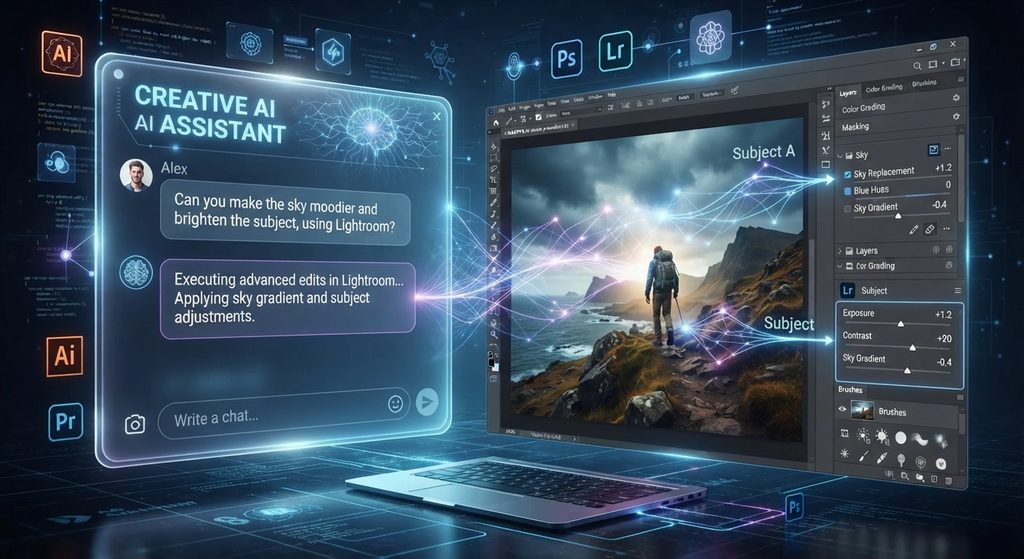
The integration of professional creative tools like Adobe Photoshop, Lightroom, Adobe Express, and Firefly into conversational AI platforms – including ChatGPT, Google Gemini, and Anthropic Claude – marks a fundamental shift in how digital media is authored and processed. Rather than requiring users to manually launch standalone desktop applications, conversational plugins and connectors function as automated intent-brokers, translating natural language prompts into background API and micro-service calls across Adobe’s software stack.
Pros and Cons of Integrating Photoshop & Lightroom with ChatGPT & AI Chatbots
Connecting specialized creative engines to general-purpose chatbots offers significant speed and accessibility benefits, but it also introduces technical constraints, cost complexities, and strategic risks.
Strategic Pros & Cons Overview
| Dimension | Key Advantages (Pros) | Major Disadvantages (Cons) |
|---|---|---|
| Workflow & Efficiency | Eliminates software-switching overhead by consolidating multi-step tasks (RAW adjustments, object cleanup, social formatting) into a single chat thread. | Non-deterministic re-prompting can cause unintended full-asset regenerations rather than isolated edits, creating visual variance. |
| Accessibility & Scale | Democratizes pro-grade editing for non-designers using conversational prompts; reaches over 1 billion monthly active users across chatbot platforms. | Lacks pixel-level precision and complex manual controls (such as channel masking, fine typography, and keyframing). |
| Batch Processing | Automates batch adjustments across product photo catalogs (consistent lighting, exposure, color balance, and cropping). | Generative credit opacity: Chat interfaces often lack real-time credit consumption feedback, leading to sudden quota exhaustion. |
| Platform Integration | Unified creative & document workflows, enabling users to generate images, build Express designs, and export/review PDFs in one conversation. | Strategic disintermediation: Adobe surrenders “the front door” and direct user interface ownership to OpenAI, Google, and Anthropic. |
| Enterprise Governance | Centralized account linking and option for guest access or enterprise SSO across AI assistant environments. | Multi-tenant data exposure: Transporting assets across third-party assistant boundaries raises compliance, IP lineage, and security concerns. |
Detailed Analysis of Pros and Cons
Major Pros
- Elimination of Context-Switching: Traditional media production requires jumping between Lightroom for RAW exposure, Photoshop for raster editing, and Adobe Express for layout formatting. Conversational integration merges these steps into one continuous natural language interaction.
- Automated Batch Processing: Marketers and e-commerce teams can upload an entire set of product images and instruct the AI agent to enforce uniform lighting, color temperature, and aspect ratios in a single prompt.
- Emergence of Hybrid Interactive Editors: Recent updates (such as side-panel controls at OpenAI DevDay and Claude’s layer-based editor) bridge conversational intent with hands-on fine-tuning. Users can brush over an area or adjust dynamic sliders (brightness, saturation, contrast) without re-explaining the prompt or re-generating the image.
- End-to-End Creative & Document Pipelines: Combining Acrobat PDF tools with Photoshop and Express inside plugins allow users to generate marketing graphics, assemble them into catalogs, and perform PDF reviews within the same workspace.
Major Cons
- CANNOT WORK WITH RAW FILES
- Precision & Determinism Limitations: Text prompts remain inherently non-deterministic. Modifying a headline or tweaking a specific color channel via text can unintentionally alter other approved visual elements unless explicit layer-based controls are supported.
- “Front Door” Disintermediation: By embedding tools behind third-party AI assistants, Adobe risks losing direct customer touchpoints. The host assistant controls the conversation, user intent context, and output presentation, potentially commoditizing the underlying creative engines.
- Generative Credit Complexity: Features like Photoshop Generative Fill or partner models (e.g., Google Nano Banana, Topaz Labs sharpening/denoise, FLUX) draw from monthly Generative Credit pools. Without real-time credit deduction prompts in chat windows, automated batch workflows can unexpectedly deplete subscription credit allowances.
Technical & Architectural Comparison
The operational differences between running Adobe tools inside an AI chatbot versus utilizing native Creative Cloud desktop software are outlined below:
| Feature / Operational Dimension | Chatbot Integration (ChatGPT / Gemini / Claude) | Native Creative Cloud Desktop Applications |
|---|---|---|
| Primary Interface | Conversational chat + dynamic side-panel widgets | Full graphical user interface (GUI) with toolbars & panels |
| Execution Architecture | API / Model Context Protocol (MCP) microservice orchestration | Local GPU/CPU processing + cloud generative services |
| Editing Control | Natural language prompts + basic dynamic sliders | Pixel-level, vector path, layer masking, & manual color grading |
| Best-Fit Workflows | High-velocity batch editing, social media variants, quick first drafts | Hero campaign assets, high-precision retouching, complex compositing |
| Credit Monitoring | Opaque/periodic usage updates within account settings | Real-time Generative Credit usage panels |
| Asset Persistence | Direct downloads or sync to Creative Cloud libraries | Local disk storage, enterprise servers, and CC cloud sync |
Impact of Autonomous AI Agents on Workplace Productivity & Enterprise Software Architecture
1. Shift in Workplace Productivity
- From Tool Operator to Intent Delegator: Workers are transitioning from manual toolbar navigation to setting high-level outcomes. Routine production tasks—such as re-cropping social banners, removing image backgrounds, or normalizing product lighting—are delegated to agents, reducing turnaround times from hours to seconds.
- Bifurcated Workflows: Enterprise content creation is splitting into two clear tiers:
- High-Velocity Volume Work: Automated via AI chatbots and agents for social channels, localized campaigns, and internal drafts.
- High-Precision Authoring: Retained in native desktop GUIs for brand-defining assets, fine typography, and complex visual effects.
2. Evolution of Enterprise Software Architecture
- Unbundling the GUI: Software design is shifting from monolithic desktop applications to decoupled microservices accessible via Model Context Protocol (MCP) servers and APIs.
- Assistant-as-an-OS: Chatbot platforms (like ChatGPT Work, Gemini, and Claude) are evolving into orchestration layers or operating systems for enterprise tools, brokering user intent to external specialized services.
- Hybrid Canvas Interfaces: Pure text prompting is giving way to embedded side panels, combining natural language orchestration with interactive visual sliders and layer-selection tools.
3. Safety, Security, and Governance Implications
As autonomous AI agents gain greater access to enterprise software and data, critical safety and security challenges emerge:
- Multi-Tenant Data Boundaries & Privacy: Passing confidential product photography, unreleased marketing assets, or customer documents across third-party assistant infrastructure creates data exposure risks. Enterprise IT teams must ensure that prompts and uploaded media are excluded from model training by host platforms.
- Prompt Injection & Indirect Execution: Autonomous agents evaluating external documents (e.g., using PDF Document Review skills) face risks from prompt injection attacks, where malicious instructions embedded inside untrusted files could trigger unauthorized actions.
- Agent Permissions & System Safety: Broad system access given to autonomous coding or workplace agents (such as OS-level disk permissions or supply-chain execution) has led security teams and OS vendors to implement stricter permission gates to prevent rogue actions or unauthorized data exfiltration.
- Content Provenance & C2PA Metadata: Preserving Content Credentials (C2PA metadata) across cross-platform transformations is vital to guarantee asset authenticity, track AI tool usage, and maintain copyright compliance.