
Stop Guessing. Start Directing.
Great AI image editing isn’t about luck – it’s about the prompt. Yet writing complex, reliable prompts from scratch every time you want to re-imagine a photo is slow, frustrating, and inconsistent.
Prompt Studio eliminates the blank-page struggle.
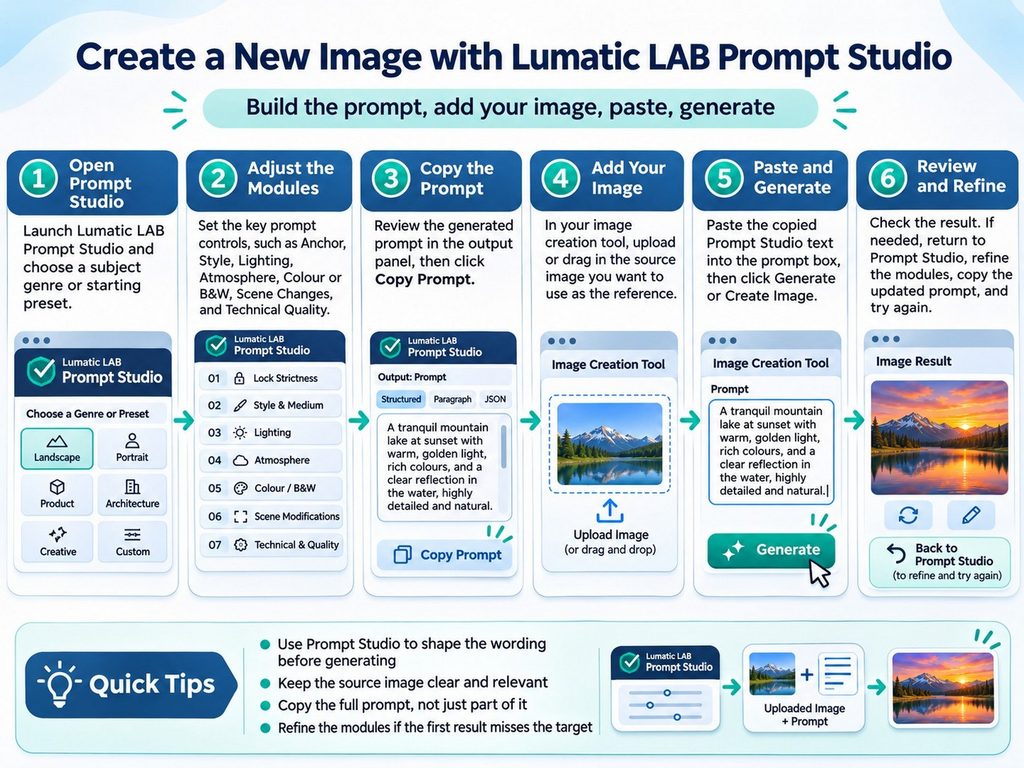
How It Works
- Start with Subject-Genre Presets: Jump straight into your workflow with reusable presets designed around specific subjects and visual styles, giving you a rock-solid foundation in a single click.
- Customize with 7 Independent Modules: Fine-tune your output by toggling and configuring seven distinct prompt modules—giving you granular control over your edits without cluttering your workflow.
- Plug Into Your Favorite AI: Prompt Studio focuses 100% on crafting the perfect instruction set. Once your prompt is assembled, simply copy and paste it into your preferred image-capable AI model or editing application to bring it to life.
Why Use Prompt Studio
- Zero Prompt Fatigue: Never rewrite repetitive framing, lighting, or stylistic instructions again.
- Consistent, Repeatable Results: Modular assembly means your prompts stay structured, predictable, and easy to iterate on.
- Model-Agnostic Freedom: Because it outputs clean, structured text prompts, it works seamlessly alongside whatever image generator or AI editor you already use. Remember to select the ‘Create Image’ option first !
- Export your favourite prompts: When you hit on a ‘look’ you want to use again – just use the ‘Export JSON’ function and of course, when you ant to use it again it’s a simple matter to ‘Import’
Stop wrestling with words and start getting the edits you actually envisioned.
Built directly in your browser, Prompt Studio is a dedicated prompt-engineering workspace that does the heavy lifting for you. Instead of manually typing out lengthy, trial-and-error descriptions, you act as the creative director while the workspace assembles precision text prompts tailored to your exact vision. It does not edit images itself; it produces text prompts for use in a separate image-capable application or model.
PRO TIPS – Prompt Studio creates prompt text; it does not edit or render images. The result depends on the external image.
Don’t forget to set your AI to ‘Create Image’ – see this page if you have forgotten how.
Save a snapshot before loading another genre because genre selection replaces the current module text.
A ‘Quick Start’ page is available here, with full documentation available here.