LumaticLAB – LUT/CSV Evaluator
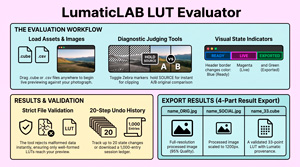
The friction of “blind” LUT application ends here. The LUT / CSV Evaluator provides the instant, offline environment needed to verify looks before they reach your workflow.
Read moreOur free apps
The friction of “blind” LUT application ends here. The LUT / CSV Evaluator provides the instant, offline environment needed to verify looks before they reach your workflow.
Read more
The primary purpose of the LUMATIC LAB Resampler is to enable a User to standardise the 3D LUTs they use by converting various cube sizes (such as 17³, 64³, and 65³) into a universally compatible format,
Read more
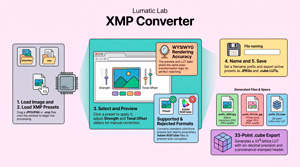
The XMP Converter, is a browser-based utility designed to transform Adobe Lightroom and Camera Raw presets into more portable 33-point .cube LUTs ensuring your creative vision remains consistent across diverse production environments. XMP files serve as the underlying “recipe” for Lightroom Presets, enabling non-destructive editing by storing adjustments as text metadata. When you edit a photo, you are merely[…]
Read more
We’ve made a small update to this little tool. It is similar to Adobe’s Photoshop Color Picker and has saved us quite a lot of time when creating and the website and documenting our apps. Creative professionals often grapple with the subjectivity of color—the “which blue?” ambiguity. This friction compromises[…]
Read more
Lumatic LAB – Mono Sculptor – Is For You There is also a Technical Reference Guide that provides an in-depth reference covering the signal processing pipeline, mathematical operations, file formats, architectural constraints, and advanced usage guidance. As this is really quite technical it is not included in the downloads but[…]
Read more
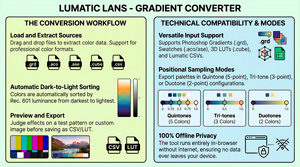
The Gradient Converter v3.4, is an offline tool designed to transform various colour data formats into Lumatic Sculptor palettes. Users can import files such as Photoshop gradients, Adobe swatches, and 3D LUTs to extract colour information, which the software automatically organises by luminance from dark to light. The interface includes a preview viewport where users can judge[…]
Read more
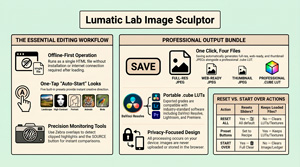
Lumatic Lab – Image Sculptor – whilst not being aimed at professional photo-editors and colourists, the app has many of the features Users need to complete their work. The app is continually being updated and more features will be added as further functionality is made available to web browsers
Read more
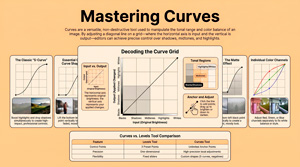
The following offers a guide to utilizing Curves image editing software such as Adobe, ON 1, Liminar and provides valuable background reading to our own Lumatic Labs Converter.
Read more
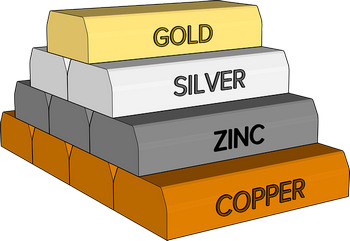
A number of LUTs have been added to the FREE Presets Page Metals – Brass, Chrome, Copper, Iron & Steel – solid colour overlays Plants – LUTs based on Parts of Plants There are 9 LUTs in the set. Fruit 1 – First in a series of ‘fruit’ based LUTs,[…]
Read more
One of the stays on the Bridge of Oich. The bridge is a taper principle suspension bridge, designed by James Dredge, across the River Oich near Aberchalder in Highland, Scotland. The bridge was opened in 1854, after floods swept through the Great Glen and destroyed the old stone bridge over[…]
Read more
Delivering clean, striking black & white photos without complicated software, B & W Master Sculptor gives you a simple, fast way to get there – no installs, no accounts, and absolutely FREE. Your images stay yours — always This is the core principle behind everything here: What it actually does[…]
Read more
Today we are posting an update to the ACO Convertor including a support pack (ZIP) format containing a demo image, ACO file and full documentation. The ACO Convertor is one part of the collection of Lumatic LAB modular software utilities designed to convert diverse design assets into industry-standard 3D LUTs. Have[…]
Read more
Lumatic LAB offers a suite of free, browser-based tools designed to transform various file formats, such as Adobe gradients and presets, into universal Look-Up Tables (LUTs).
Read more
The Lumatic Lab Style Matcher is a sophisticated image processing utility designed for tonal and colour distribution transfers. It is a tonal remapper and should not be confused a basic pixel replacement or colour overlays, so often shown as ‘night scope’ colouring, this engine employs histogram matching and cumulative distribution function mapping to align the[…]
Read more
The converter is designed to require no technical knowledge. As with all our Apps it is FREE, runs on modern web browsers and entirely locally so your personal data is not at risk and your images will not be ‘scraped’ or used for AI training purposes.You do not need a login, there is no fee to pay,[…]
Read more
Built in accordance with the Absolute Rendering Standard, this build primarily serves as an ACV Curve Parser, utilizing Cubic Spline Interpolation to transform Adobe curve data into high-precision 3D Look-Up Tables (LUTs). Key functionalities of the ACV Convertor include a split-screen comparison tool, real-time luma histograms, and the ability to batch-process multiple presets into professional grading assets. Throughout[…]
Read moreLUTs Should Work Everywhere – Not Just Where They Were Made Creative tools don’t agree on standards – Some LUTs are built at 17³ for speed – Others at 65³ for cinematic precision. But most real-world editing environments quietly expect something in between but 33³ is the practical sweet spot[…]
Read more
A QUICK UPDATE – we have joined forces with our sister site Alnessphoto to develop the Lumatic Lab, that will be a FREE, browser-based platform designed to simplify the complex world of photo editing by providing universal portability for visual adjustments. By utilizing AI technology, the application translates software-specific files—such as XMP, ACV, and GRD—into standardized Look-Up Tables (LUTs) that function[…]
Read more
Lumatic LAB – Match – This is the first element in our collection of FREE apps designed to help amateur photo-editors add colour grading to their images without having to have expensive hardware or software. MATCH allows you to capture the colour grading of one image (the SOURCE) and apply[…]
Read more
Understanding tone and contrast is fundamental to creating compelling black and white photography, as these elements replace color to provide structure, mood, drama, and visual interest. The Enhancement Provided by Tone Tone refers to the lightness or darkness of an element, regardless of its original color. Black and white photographs rely purely on tone.[…]
Read more
If you’ve spent time building colour palettes or managing design assets, you probably have piles of colour data sitting in .csv, .xlsx, .ods, or even plain .txt files. These formats are great for storage and sorting, but not so great when you want to move into the world of color grading and cinematic effects.[…]
Read more
Bring your visuals to life with our Look-Up Tables—LUTs made by professional photographers whose experience has shown them how much color shapes a story. We know color grading isn’t just some box to check off. It’s where your work finds its mood, whether it’s the desaturated split-tones of 70s photochemical[…]
Read more
An Adobe color swatch is a saved, reusable color, gradient, or pattern definition within Adobe Creative Cloud applications like Photoshop, Illustrator, and InDesign. It is essentially a way to keep track of specific colors and apply them consistently across your design. Key Characteristics and Uses: In short, an Adobe color[…]
Read more
AI is quickly changing how we make Look-Up Tables (LUTs), and by 2026, it looks like anyone will be able to whip up a LUT from a reference image in no time. That sounds awesome, but there’s a lot more to it—especially if you’re working in Photoshop or ON1 Photo[…]
Read more
Our FREE in-house developed app used to create harmonious palettes for classic photo editing and web site design projects has had a small upgrade. Each of the 9 harmony panels (Monochromatic, Complementary, Split Complementary, Analogous, Triadic, Square, Tetradic, Desaturated, and Grayscale) now has its own download button as has the[…]
Read more
The Colour Palette web app is a professional-grade, advanced color theory tool designed specifically for photographers and web designers. It integrates precise color controls, comprehensive harmony options, and robust accessibility features, making it a versatile solution for a variety of creative projects including photo editing, digital design, branding, and print work.[…]
Read more
Here are the top 5 browser-based alternatives to Photoshop, complete with website URLs, and links to introductory videos: 1. Photopea – rated GOLD Summary: Photopea is a powerful and free online photo editor that runs directly in your web browser. It is designed to be a close alternative to Adobe[…]
Read more