
Adobe Camera Raw 18.6
In this latest upgrade, the primary addition is the Glow tool, which offers three distinct styles—diffusion, bloom, and halation—to create ethereal, film-like lighting effects
Read moreBasically a holder for listing last 15
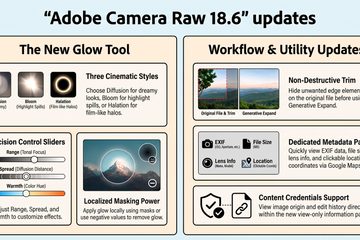
In this latest upgrade, the primary addition is the Glow tool, which offers three distinct styles—diffusion, bloom, and halation—to create ethereal, film-like lighting effects
Read more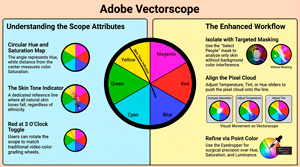
Adobe text details various manual and automatic sliders for managing exposure, contrast, and white balance, alongside advanced tools like Point Color and Curves for precise adjustments.
Read more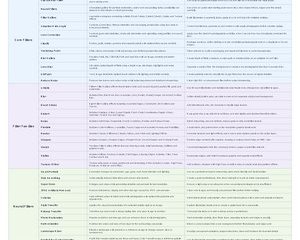
We have created a 44-entry Photoshop desktop reference covering core filters, filter families, Neural Filters and Preset systems.
Read more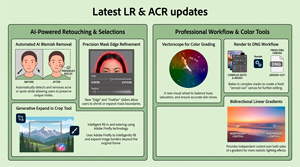
These updates provide the technical precision required to eliminate distractions while maintaining a subject’s authentic identity. At the same time they do support our White Paper on the future direction for Adobe products
Read more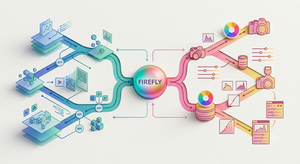
For years, enthusiast and amateur photo – editors have viewed Adobe Lightroom and Photoshop as two sides of the same coin – will it stay that way?
Read more
Photoshop success in 2026 requires a hybrid approach. Master the new AI-driven capabilities to remain competitive in speed, but anchor those tools in ACE-level foundations – non-destructive smart objects, precise masking, and 8-bit/16-bit awareness – to ensure your output is professional, relevant, and ready for publication.
Read more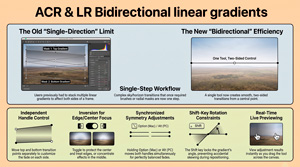
The June 2026 update for Adobe Camera Raw (18.4) has included greater integration within the Creative Cloud ecosystem.
Read more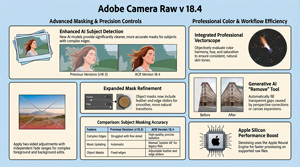
In the video, Julianne Kost details the functional upgrades and creative tools introduced in Adobe Camera Raw version 18.4, with a primary focus on AI-driven masking and colour precision. Significant improvements have been made to subject isolation and mask refinement, including the addition of a bidirectional linear gradient for more complex exposure adjustments. A professional vectorscope is now integrated into the[…]
Read more
Adobe’s 2026 Creators’ Toolkit Report reveals that creative AI has become a foundational pillar of the modern creator economy, with the vast majority of users reporting significant gains in business growth and audience engagement. While these tools have dramatically increased production speeds, the data suggests that human taste, judgment, and a unique point of[…]
Read more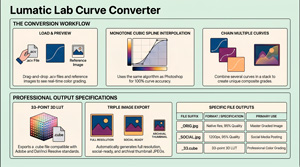
Technically, the application employs monotone cubic spline interpolation to ensure that colour translations remain mathematically precise and visually smooth. This produces smooth, correct curve shapes, the same algorithm used by Photoshop. Detailed instructions cover everything from batch processing and stack management to the underlying binary architecture of the files.
Read more
For decades, Adobe has reigned supreme as the creative industry’s gold standard, with iconic names like Photoshop, Lightroom, Illustrator, and Premiere Pro synonymous with creative excellence. However, a growing chorus of hobbyists is raising a pressing question: can they still afford to be part of this world? The Subscription Squeeze[…]
Read more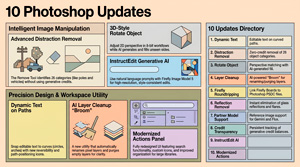
Julieanne Kost outlines ten significant enhancements to Adobe Photoshop aimed at streamlining creative workflows and improving image manipulation. She details advanced AI-powered tools designed for the automatic removal of distractions and reflections, alongside a new feature for adjusting the perspective of isolated objects. Significant updates to dynamic text allow for flexible placement along curved paths, while layer cleanup utilities help[…]
Read more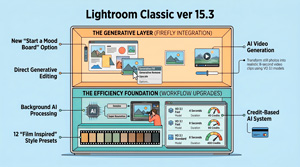
Adobe’s update to Lightroom Classic version 15.3 introduces significant enhancements centered on Firefly AI integration and improved workflow efficiency. More on Firefly here from Julieanne Kost of Adobe. Lightroom Classic has officially shed its “slider-only” skin, becoming a cloud-connected AI powerhouse. In version 15.3, your creative vision is no longer tethered to a progress[…]
Read more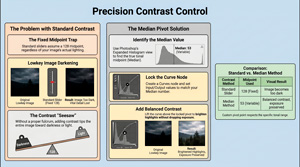
Todd Dominey video https://youtu.be/BTe0JLe5g2Y Tony Kuyper website https://goodlight.us/ MVA = Median Value Adjustment This blog entry introduces a sophisticated method for refining image contrast by identifying the true tonal midpoint rather than relying on default software settings. Standard adjustment tools often assume a universal balance point, which frequently leads to unwanted darkening in low-key photos or[…]
Read more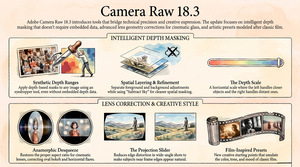
https://youtu.be/2WDnMKtmCeY The video tutorial by Julieanne Kost introduces the new features in Adobe Camera Raw 18.3, focusing on depth range masking, lens correction, and film-inspired presets. The provided text outlines the sophisticated updates introduced in Adobe Camera Raw 18.3, focusing on tools that refine both technical accuracy and creative expression. A[…]
Read more
https://youtu.be/-5crXx6GSHE This tutorial demonstrates how to use ON1 Photo RAW to create directional light using reflected gradients (the principles apply to most any app supporting such) to enhance dull images by creating directional lighting. The process begins with preliminary adjustments to tone and contrast, followed by a conversion to black and white to better focus the[…]
Read more
https://youtu.be/tVCV0VmoZnw Julieanne Kost uses custom Lightroom Classic presets to speed up photo editing by automating complex masking tasks using presets for masking. Rather than manually selecting individual elements, these tools allow photographers to generate sets of masks for landscape and portrait photography with a single click. She explains the technical process of importing the files and[…]
Read more
https://youtu.be/-T5RVvMLUTs – Jesus Ramirez For decades, digital artists have lived and died by the “perspective wall.” We have all found that perfect stock asset—a vintage car or a high-fashion model—only to realize the camera angle is just five degrees off from our background plate. Historically, this mismatch meant hours of[…]
Read more
The converter is designed to require no technical knowledge. As with all our Apps it is FREE, runs on modern web browsers and entirely locally so your personal data is not at risk and your images will not be ‘scraped’ or used for AI training purposes.You do not need a login, there is no fee to pay,[…]
Read more
Built in accordance with the Absolute Rendering Standard, this build primarily serves as an ACV Curve Parser, utilizing Cubic Spline Interpolation to transform Adobe curve data into high-precision 3D Look-Up Tables (LUTs). Key functionalities of the ACV Convertor include a split-screen comparison tool, real-time luma histograms, and the ability to batch-process multiple presets into professional grading assets. Throughout[…]
Read more
TK Brush Pilot is a new plugin for Photoshop that helps to navigate the Photoshop Paintbrush tool. It allows brush opacity, hardness, and flow to be set using clickable buttons on a panel that can be docked with other Photoshop panels. If you forget what each button does, just pull[…]
Read more
https://youtu.be/9aeuYeFtO-w Recent Adobe Lightroom updates have introduced generative AI features powered by Firefly, allowing users to create video or edit images through a web-based interface. While Lightroom Classic received minor performance boosts for assisted culling and new support for WEBP files, the cloud-based version added a generative upscale tool utilising Topaz technology. This upscaling feature requires Adobe credits, leading to criticisms regarding[…]
Read more
If Photoshop has ever felt: Inconsistent Slower than it should be Confusing in places you thought you understood Then this FREE Summit From February 23–27 is for YOU You’ll get FREE access to over 33 hours of training, taught in focused, easy-to-follow sessions. The Summit Begins in 2 DAYS, so don’t delay![…]
Read more
ON1 positions itself as a direct alternative to Adobe, specifically highlighting that it requires no subscription or monthly commitment, allowing users to own the software outright and edit on their own terms. In terms of workflow, ON1 claims to offer a familiar experience for those coming from Adobe:
Read more
Introduction The 2026 updates to Adobe Photoshop significantly expand traditional image editing capabilities by integrating advanced AI models directly into standard retouching workflows, introducing non-destructive adjustment layers previously reserved for raw processing, and automating complex compositing tasks. These features are designed to streamline professional workflows, offering greater precision and control[…]
Read more
https://youtu.be/YaTBt6nLOd0 The introduction of Clarity, Dehaze, and Grain as dedicated adjustment layers significantly enhances non-destructive workflows by removing the need for complex workarounds like Smart Objects and offering superior integration into the layer stack. Elimination of Smart Object Requirements Unlike traditional filters or the previous method of applying these effects via[…]
Read more
https://youtu.be/OZ4BSDXrRH8 In her tutorial, Julieanne Kost introduces the AI status icon in Lightroom Classic, a feature designed to alert photographers when edits are applied in a suboptimal sequence. To avoid the time-consuming process of manually updating calculations, she recommends a specific workflow order starting with Denoise, followed by distraction removal and Generative AI tools. This structured approach ensures that[…]
Read more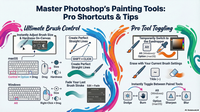
https://youtu.be/6Ealkbzfud0 Summary Julianne Kost provides 10 essential tips for efficiently using Photoshop’s painting tools, focusing on brush size, hardness, cursor options, tool switching, and advanced eraser functionalities. She explains how to quickly adjust brush attributes via keyboard shortcuts and HUD controls, customize cursor visibility for precision, and maintain brush settings[…]
Read more
https://youtu.be/bMXJwZuzP14 Summary In this detailed tutorial, Julieanne Kost demonstrates how to create a complex composite image in Photoshop by combining traditional and new techniques. Starting with setting up a high-resolution Photoshop document, she imports photos as smart objects from Lightroom Classic to preserve quality and allow non-destructive editing. The tutorial[…]
Read more
https://youtu.be/ufLkBKtmgZM Summary Adobe Photoshop 2026 has introduced a long-awaited tool: the Color and Vibrance adjustment layer, which now includes tint and temperature sliders similar to those in Adobe Camera Raw and Lightroom. While these white balance controls are not new to Adobe’s ecosystem, their integration directly into Photoshop opens significant[…]
Read more