https://youtu.be/-T5RVvMLUTs – Jesus Ramirez
For decades, digital artists have lived and died by the “perspective wall.” We have all found that perfect stock asset—a vintage car or a high-fashion model—only to realize the camera angle is just five degrees off from our background plate. Historically, this mismatch meant hours of destructive warping, “liquifying” pixels until they screamed, or, more often, abandoning the asset entirely.
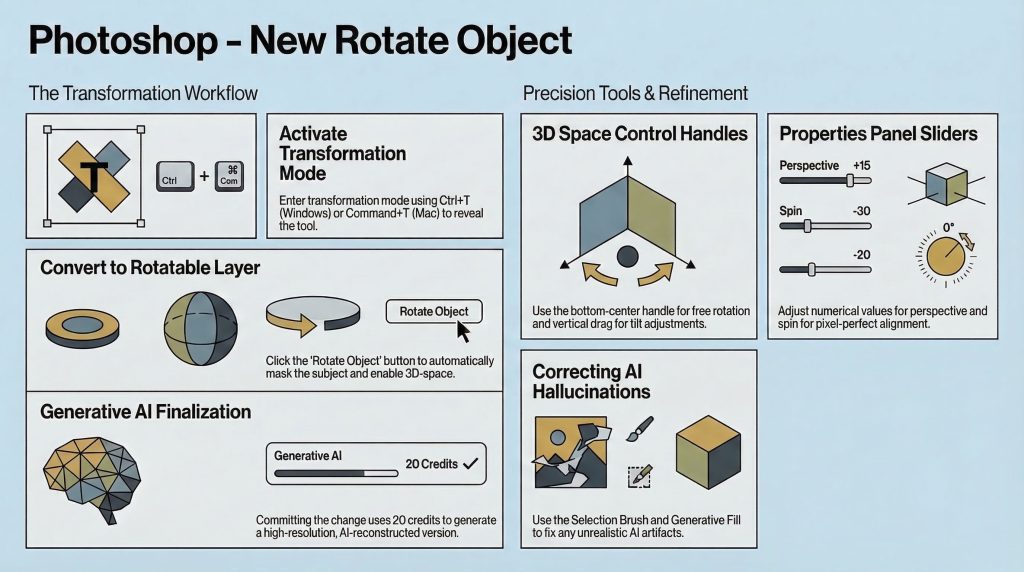
Photoshop Beta v27.5 marks the end of this era. With the introduction of the "Rotate Object" feature, we are witnessing a transition from the destructive perspective warp to the generative semantic edit. 1. Flat Pixels Are Now 3D Models (The Core Innovation)
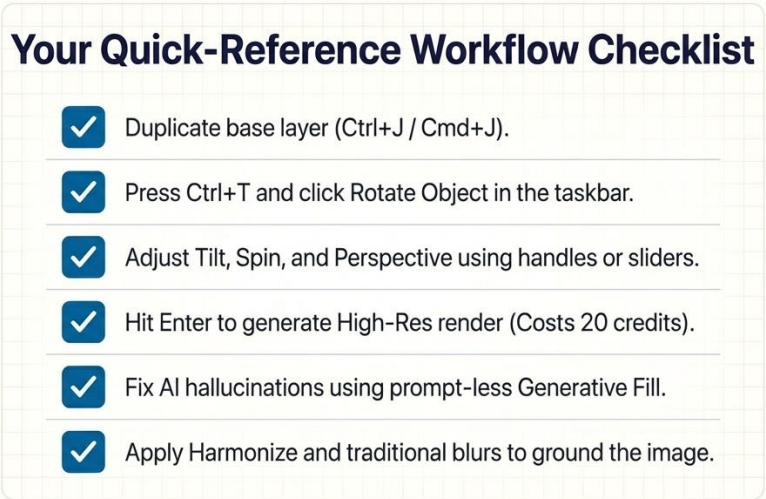
Essentially a deceptively simple process and interface (see this document). By using the standard Transformation Mode (Ctrl+T or Cmd+T), a new button appears in the taskbar. It triggers an automated sequence where Photoshop removes the background and converts the layer into a pseudo-3D object.
2. Words of caution for the workflow: the original pixel layer disappears on conversion, replaced by the rotatable entity. To maintain a non-destructive pipeline, you must duplicate your original layer before hitting that button. A generation comes with a price tag: 20 generative credits per transformation turning AI generation into a tangible project expense rather than a passive software feature. We are moving toward a world where “trial and error” has a literal cost.
3. Managing the “Hallucination” Factor
Because the tool uses generative AI to “imagine” parts of the object that weren’t in the original photo—like the far side of a vehicle or the back of a subject’s head—it is prone to “hallucinations.” These are artifacts where the AI misinterprets visual data, such as turning a stray hair highlight into a physical headband.
This is where the designer’s “eye” becomes the most valuable tool in the kit. To clean up these AI errors, a specific “Fix-it” workflow is required. This “pro-tip” ensures the repair remains stylistically consistent with the rest of the generated object.
4. The Firefly 5 Advantage: Global vs. Local Context
The secret sauce behind the realism of these rotations is the Firefly Image 5 model. Previous generative models often suffered from “local blindness,” looking only at the pixels inside a selection. Firefly 5, however, is globally contextually aware. It analyzes the entire image to inform what it generates in the rotated space.
Consider the “reflective windshield” challenge. When you rotate a car, the AI doesn’t just draw generic glass; it understands the road, the sky, and the lighting of the total composite. It generates reflections that actually match the environment of your background plate. This global awareness is the difference between an object that looks “placed” and an object that looks “integrated.”
5. Why Traditional Skills Aren’t Going Anywhere
Despite the “one-button” allure of AI, the best results still come from a hybrid workflow. The AI handles the spatial reorientation, but the artist must handle the physics of the scene. Furthermore, AI still struggles with procedural motion. To truly sell the illusion of a moving vehicle that has been rotated, you must revert to manual polish.
Conclusions: The Future of the “Smart” Canvas
This synergy – AI for the complex geometry and human skill for the environmental nuances is the future.
If we can rotate any subject to fit any scene, the specific camera angle of a stock photo or a studio shot becomes a secondary concern.The subject is now more important than the shot.