
Photoshop And Lightroom To Diverge ?
For years, enthusiast and amateur photo – editors have viewed Adobe Lightroom and Photoshop as two sides of the same coin – will it stay that way?
Read moreTips, techniques etc

For years, enthusiast and amateur photo – editors have viewed Adobe Lightroom and Photoshop as two sides of the same coin – will it stay that way?
Read more
Every class in PROJECT PHOTOSHOP is project-based. Instead of simply demonstrating a collection of tools and techniques, our instructors will take you through a complete creative project from start to finish.
Read more
PROJECT PHOTOSHOP! If you’ve joined one of the Virtual Summits before, this one is going to be a little different. This time, it’s all about learning by doing. Dates: September 14 – 18, 2026 Every class in PROJECT PHOTOSHOP is project-based. Instead of simply demonstrating a collection of tools and techniques, our[…]
Read more
Photoshop success in 2026 requires a hybrid approach. Master the new AI-driven capabilities to remain competitive in speed, but anchor those tools in ACE-level foundations – non-destructive smart objects, precise masking, and 8-bit/16-bit awareness – to ensure your output is professional, relevant, and ready for publication.
Read more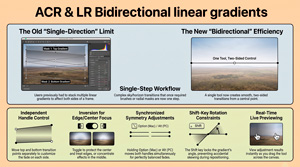
The June 2026 update for Adobe Camera Raw (18.4) has included greater integration within the Creative Cloud ecosystem.
Read more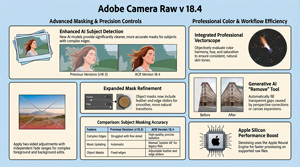
In the video, Julianne Kost details the functional upgrades and creative tools introduced in Adobe Camera Raw version 18.4, with a primary focus on AI-driven masking and colour precision. Significant improvements have been made to subject isolation and mask refinement, including the addition of a bidirectional linear gradient for more complex exposure adjustments. A professional vectorscope is now integrated into the[…]
Read more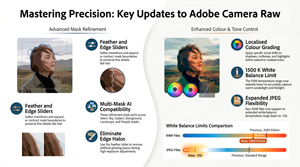
Julieanne Kost explores sophisticated software upgrades designed to improve the functionality of Camera Raw for digital photographers. The integration of AI-driven precision within Camera Raw (ACR) marks a significant evolution in the efficiency of modern post-processing, offering photographers a non-destructive workflow with unprecedented pixel-level fidelity. These enhancements represent a vital shift from[…]
Read more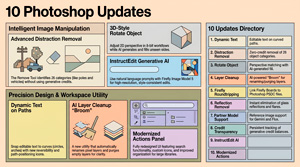
Julieanne Kost outlines ten significant enhancements to Adobe Photoshop aimed at streamlining creative workflows and improving image manipulation. She details advanced AI-powered tools designed for the automatic removal of distractions and reflections, alongside a new feature for adjusting the perspective of isolated objects. Significant updates to dynamic text allow for flexible placement along curved paths, while layer cleanup utilities help[…]
Read more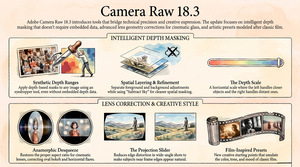
https://youtu.be/2WDnMKtmCeY The video tutorial by Julieanne Kost introduces the new features in Adobe Camera Raw 18.3, focusing on depth range masking, lens correction, and film-inspired presets. The provided text outlines the sophisticated updates introduced in Adobe Camera Raw 18.3, focusing on tools that refine both technical accuracy and creative expression. A[…]
Read more
https://youtu.be/-5crXx6GSHE This tutorial demonstrates how to use ON1 Photo RAW to create directional light using reflected gradients (the principles apply to most any app supporting such) to enhance dull images by creating directional lighting. The process begins with preliminary adjustments to tone and contrast, followed by a conversion to black and white to better focus the[…]
Read more
Lumatic LAB offers a suite of free, browser-based tools designed to transform various file formats, such as Adobe gradients and presets, into universal Look-Up Tables (LUTs).
Read more
https://youtu.be/-T5RVvMLUTs – Jesus Ramirez For decades, digital artists have lived and died by the “perspective wall.” We have all found that perfect stock asset—a vintage car or a high-fashion model—only to realize the camera angle is just five degrees off from our background plate. Historically, this mismatch meant hours of[…]
Read more
Introduction The 2026 updates to Adobe Photoshop significantly expand traditional image editing capabilities by integrating advanced AI models directly into standard retouching workflows, introducing non-destructive adjustment layers previously reserved for raw processing, and automating complex compositing tasks. These features are designed to streamline professional workflows, offering greater precision and control[…]
Read more
https://youtu.be/O_W8NDNu75s In his video, Anthony Morganti introduces and demonstrates Topaz Labs Sharpen integrated into Photoshop. This tool uses Adobe’s generative AI technology but requires premium generative credits to operate. Anthony explains how the tool works, its credit cost based on image size, practical usage tips, and compares it with traditional sharpening techniques[…]
Read more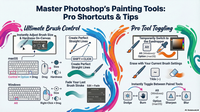
https://youtu.be/6Ealkbzfud0 Summary Julianne Kost provides 10 essential tips for efficiently using Photoshop’s painting tools, focusing on brush size, hardness, cursor options, tool switching, and advanced eraser functionalities. She explains how to quickly adjust brush attributes via keyboard shortcuts and HUD controls, customize cursor visibility for precision, and maintain brush settings[…]
Read more
https://youtu.be/bMXJwZuzP14 Summary In this detailed tutorial, Julieanne Kost demonstrates how to create a complex composite image in Photoshop by combining traditional and new techniques. Starting with setting up a high-resolution Photoshop document, she imports photos as smart objects from Lightroom Classic to preserve quality and allow non-destructive editing. The tutorial[…]
Read more
https://youtu.be/cbE1KNd-CeM Summary In this video, Anthony Morganti explores the capabilities of the new generative model in the current Photoshop version, Gemini 3 Nano Banana Pro, focusing on its ability to restore old photographs. Unlike many AI restoration tools that alter facial features and distort the image’s authenticity, Nano Banana Pro[…]
Read more
https://youtu.be/1C4-CIEFTcU Summary In this video, Anthony Morganti demonstrates two modern methods to remove chain link fences from images, a common issue when photographing animals at zoos. The first method involves using Photoshop’s updated Remove Tool with specific preference settings to target and remove wires and cables, which can sometimes work[…]
Read more
https://youtu.be/ufLkBKtmgZM Summary Adobe Photoshop 2026 has introduced a long-awaited tool: the Color and Vibrance adjustment layer, which now includes tint and temperature sliders similar to those in Adobe Camera Raw and Lightroom. While these white balance controls are not new to Adobe’s ecosystem, their integration directly into Photoshop opens significant[…]
Read more
https://mattk.com/are-generative-credits-getting-out-of-control/ Summary The article discusses Adobe’s introduction of Generative Credits, a system designed to manage the costs associated with AI-powered tools in Photoshop and other Adobe products. The credits are meant to offset the high expenses Adobe incurs when using AI features by charging users based on usage. While this[…]
Read more
plus ‘cheat sheet’ & video – https://youtu.be/QTjyBvE2f-g Summary In this detailed overview, Anthony Morganti explores the new features in Adobe Photoshop 2026, highlighting improvements in AI-powered tools and workflow enhancements. Key updates include enhanced subject selection and background removal, with an option to process images either locally or via Adobe’s[…]
Read more
https://youtu.be/FcR0JvW6-T8 Summary In this video, Julianne Kost presents five new features in Adobe Camera Raw designed to enhance photo editing efficiency and quality. The automatic dust removal tool simplifies eliminating dust spots with visualization and batch processing options, including preset creation. The reflections removal feature is improved with a refined[…]
Read more
https://youtu.be/JGbvUOytwX0 Summary The video provides an overview of the new features introduced in Photoshop 2026, presented at the Adobe Max conference. Key highlights include the new “Harmonize” feature that adjusts colors and shadows of selected layers to blend more naturally with the rest of the image. Improvements in “Select Subject”[…]
Read more
https://youtu.be/FcR0JvW6-T8 Summary Julianne Cost presents five new features in Adobe Camera Raw designed to enhance photo editing efficiency and quality. The first feature, automatic dust removal, allows users to easily detect and eliminate dust spots using a visualization tool, with options to copy, paste, and save these corrections as presets.[…]
Read more
https://youtu.be/Db4ywOnEK74 Summary This comprehensive tutorial by Jesus Ramirez showcases the revolutionary capabilities of Photoshop’s new partner generative AI models, Flux Context Pro and Gemini 2.5 (Nano Banana). These models enable users to perform highly sophisticated image edits and creations with minimal effort, such as changing colors with precise hex or[…]
Read more
https://youtu.be/Db4ywOnEK74 Summary In this comprehensive tutorial, Jesus Ramirez demonstrates how Adobe Photoshop’s new partner models, particularly the Google-based Gemini 2.5 model nicknamed “Nano Banana,” revolutionize image editing with generative AI. These models enable effortless and professional-level transformations like changing colors, removing unwanted objects, editing facial expressions, and even generating complex[…]
Read more
The Colour Palette web app is a professional-grade, advanced color theory tool designed specifically for photographers and web designers. It integrates precise color controls, comprehensive harmony options, and robust accessibility features, making it a versatile solution for a variety of creative projects including photo editing, digital design, branding, and print work.[…]
Read more
https://youtu.be/nbqKqgxQAg0 Summary In this video, Anthony Morganti introduces a new feature available in the beta version 27.0.0 of Adobe Photoshop that allows users to access and use thousands of free stock images directly within the Photoshop workspace. This integration eliminates the need to leave Photoshop to search for stock photos,[…]
Read more
https://www.youtube.com/watch?v=W73MmLTuJlw Summary In this tutorial, Matt K provides a detailed walkthrough on how to use Lightroom Classic’s masking tools to enhance and direct viewer attention in landscape photography emphasizing the importance of editing to highlight what drew the photographer’s eye when taking the shot, compensating for the camera’s inability to[…]
Read more
https://youtu.be/APhHjdfm16U SummaryThe video reviews Adobe Camera Raw 17.5’s new AI-based dust removal tool compared to traditional manual cleanup. Dust spots, especially visible in skies and water at small apertures, typically require dozens of tedious manual healing clicks. The new AI tool automatically removes most dust spots in one click, saving[…]
Read more