
In this latest upgrade, the primary addition is the Glow tool, which offers three distinct styles—diffusion, bloom, and halation—to create ethereal, film-like lighting effects. Users can also utilise the new Trim feature within the crop menu to non-destructively remove unwanted edges and integrate with Generative Expand. Furthermore, the update introduces a dedicated metadata panel for viewing image information and content credentials directly. Some sources also mention upcoming Photoshop beta features, such as a light adjustment layer and advanced AI-driven tools like prompt-to-edit. Altogether, these updates aim to streamline professional editing while providing more granular control over atmospheric lighting and composition.
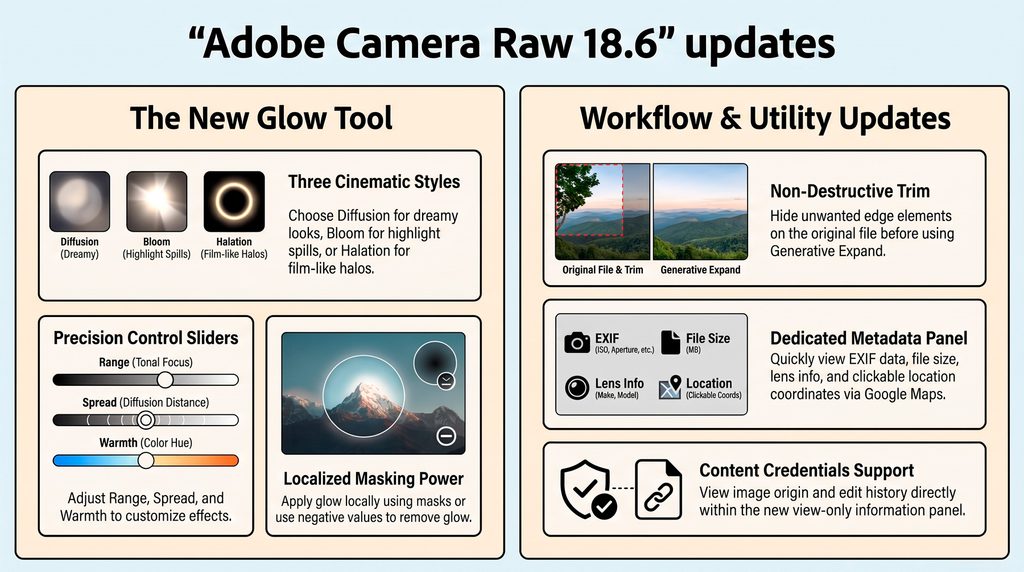
Digital photography’s clinical sharpness often lacks the soulful texture of classic film. Adobe Camera Raw 18.6 bridges this gap, introducing organic effects that eliminate the need for tedious Photoshop round-tripping.
Master the New Glow Tool
The centerpiece is the Glow tool in the Effects panel, offering three distinct styles:
- Diffusion: Delivers ethereal, broad-spectrum softening reminiscent of the “Orton effect” across the entire tonal range.
- Bloom: Focuses on specular highlight bleeding to create a natural, luminous light spill.
- Halation: Replicates film emulsion’s light leaks around high-contrast edges. Crucially, its Warmth slider uniquely targets the yellow-to-red spectrum.
Specialists can master the Range, Spread, and Warmth sliders with ease. Pro-tip: Hold Alt/Option while adjusting Range to toggle a specialized mask view for surgical precision.
Workflow Enhancements: Trim and Metadata
The non-destructive Trim tool enables seamless edge cleanup during Generative Expand workflows. Meanwhile, the new view-only Metadata Panel provides instant EXIF access, content credentials, and one-click map lookups via GPS coordinates.
This update bridges the gap between technical capture and film-inspired aesthetics by housing sophisticated creative controls within the raw engine. Update now via the Creative Cloud desktop app to explore these features.
Several of the Photoshop gurus have covered the update, we suggest the following;
- Greg Benz @ https://www.youtube.com/watch?v=Te1D8Nmal7I
- Anthony Morganti @ https://www.youtube.com/watch?v=mw_UU-jEfac
- Matt Kloskowski @ https://www.youtube.com/watch?v=ShUYo_hGqUo&t=29s
- Brian Matiash @ https://www.youtube.com/watch?v=RZ8pOEi1u4I&t=168s