
The XMP Converter, is a browser-based utility designed to transform Adobe Lightroom and Camera Raw presets into more portable 33-point .cube LUTs ensuring your creative vision remains consistent across diverse production environments.
XMP files serve as the underlying “recipe” for Lightroom Presets, enabling non-destructive editing by storing adjustments as text metadata. When you edit a photo, you are merely “dressing” the file in cosmetic garments. Underneath these stylistic layers, the Raw data remains “impenetrable” and “unchangeable.”The XMP Converter provides a bridge to “freeze” these looks. An Overview of the Lumatic Lab XMP Converter is here.
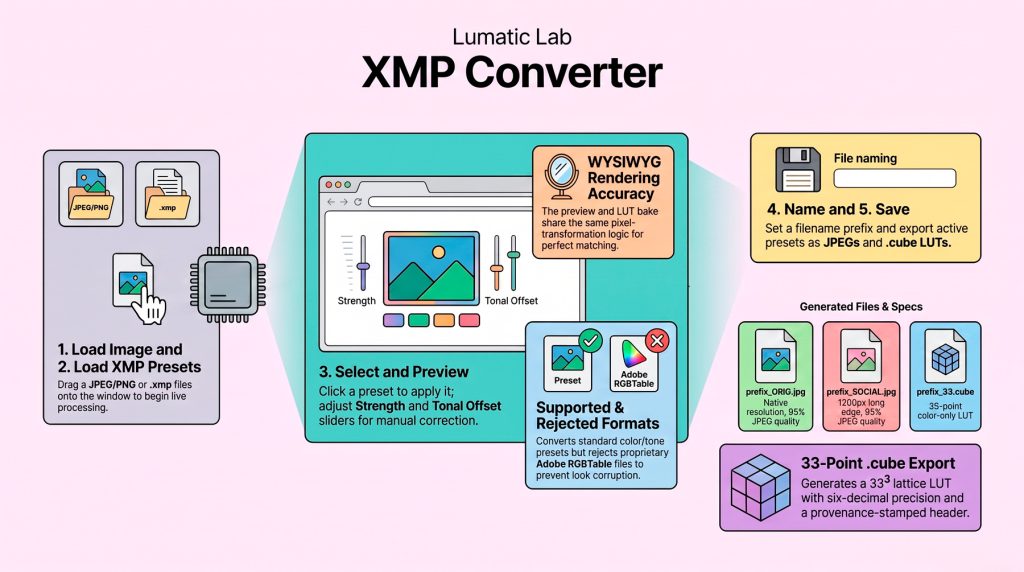
Color-Only Precision. A .cube LUT encodes color using a 33³ lattice (35,937 nodes). While it offers high technical precision for color transforms, it excludes spatial effects like grain or vignettes that a LUT cannot mathematically represent.
The Offline Guarantee. This single-file HTML tool runs entirely in your browser without an internet connection. It prioritizes professional privacy and reliability by ensuring all processing remains local to your machine.
Eliminating Silent Corruption. The tool identifies and rejects presets utilizing Adobe’s “opaque” crs:RGBTable. This “RGBTABLE UNSUPPORTED” safeguard ensures you never accidentally drop the dominant part of a grade during the conversion process.
Mathematical Certainty: The WYSIWYG Guarantee. By utilizing a single source of truth, the tool applies the exact same math to both the live preview and the 33-point LUT bake. Your final export will never diverge from your screen.
The software allows users to apply non-destructive edits to pictures, offering tools to adjust exposure, contrast, and colour strength through a live preview interface. Detailed technical specifications describe an offline HTML architecture that utilizes independent pixel buffers and 8-band mixers to ensure high-quality, consistent rendering. Support materials include a Quick Start Guide for immediate use, a Tooltip Library explaining every control, and a User Guide covering asset management. Later updates introduced in the version 2.16 addendum enable the renaming of presets within the stack and improved batch export naming.
XMP files serve as the underlying “recipe” for Lightroom Presets, enabling non-destructive editing by storing adjustments as text metadata. When you edit a photo, you are merely “dressing” the file in cosmetic garments. Underneath these stylistic layers, the Raw data remains “impenetrable” and “unchangeable.”The XMP Converter provides a bridge to “freeze” these looks.
As experts note, “Raw files themselves are absolutely, impenetrably, rock-solidly, unchangeable.” By providing a reliable way to name and export these stylistic “garments,” v2.16 ensures your organizational logic is as robust as your Raw data.