
1.Summary
The Google-owned photo editor Snapseed has received its first major update in years, bringing the app to version 4.0 on both iOS and Android. This release introduces a modernised user interface designed for a more intuitive workflow and includes a new in-app camera with manual “pro” controls and real-time film filters.
A significant technical highlight is the addition of AI-powered object masking, which uses on-device machine learning to isolate and edit specific subjects instantly. Users can now perform batch editing and enjoy expanded non-destructive tools such as dehaze, bloom, and halation effects.
Despite some user criticism regarding the relearned interface, the development team has confirmed a commitment to keeping the app completely free without subscriptions or advertisements.
2. GUI Technical Evaluation: Navigation and Layout
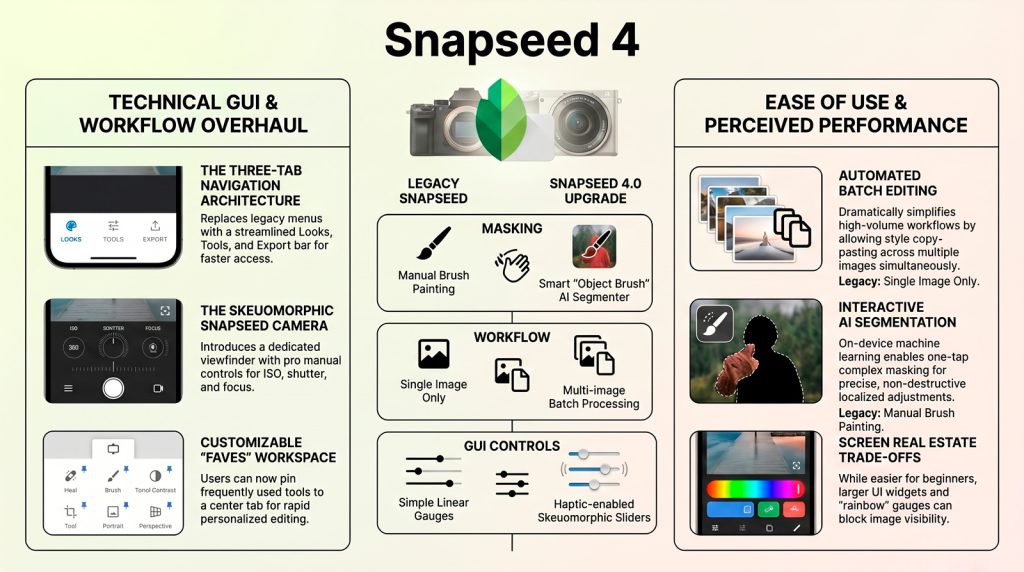
The redesigned GUI utilizes a three-tab navigation system: Looks, Tools, and Export. A new Floating Action Button (FAB) launches the skeuomorphic Snapseed Camera. Toolbox features are logically grouped into Refine, Fix, Style, and All, with “Crop” and “Rotate” now unified into a single tool for efficiency.
The new Favorites system is housed in a prioritized interface block—presented as a pale blue background with a thin black line border—to signify rapid-access utility. This “Faves” system allows users to pin frequently used tools directly to the primary workspace, significantly reducing navigation friction for complex, multi-stage processing.
3. Functional Contrast: Legacy vs. 4.0 Capabilities
| Feature | Legacy (v2.17/3.0) | Snapseed 4.0 |
|---|---|---|
| Capture | System Camera | Pro Controls (ISO, Shutter, Focus) |
| Processing | Destructive Filters | Film Emulation (KP1 / FS1) |
| Masking | Manual Brush Tool | AI-driven Interactive Segmenter |
| Workflow | Single-image Edit | Android Batch Edit Capability |
Smart Multilayer Masking utilizes the Interactive Segmenter, an optimized on-device AI model that leverages multi-stage upsampling for precise spatial separation without cloud latency.
4. Ease of Use and Technical Friction Analysis
UX evaluation reveals high “muscle memory” friction. Blocky widgets and “rainbow-shaped” slider gauges consume excessive real estate, often obscuring the active photo canvas during adjustments. Regressions include the loss of native iPadOS landscape support, a reliance on the system file picker, and frequent Double Exposure crashes on iOS.
5. Technical Specification Graphic
The 4.0 feature set is summarized in this technical graphic (rendered with a pale yellow background in the UI):
- New Effects: Dehaze, Bloom, Halation, and Color HSL.
- Film Stocks: KP1 (Kodak Portra 400) and FS1 (Fuji Superia 200).
- Pricing: 100% Free; no ads, subscriptions, or paywalls.
Snapseed remains a unique market differentiator, offering professional-grade utility without the “enshittification” of recurring fees.
A technical teardown of the vers 4 Release is available here in pdf format.