
Another in our series of 20 best practices. This time it is aimed at Mobile Phone Photography.
A full sized image of the best practices may be downloaded here, but improving your phone camera photography comes down to mastering three core habits: cleaning your lens – controlling your exposure, and framing your shot with care. Follow these 20 suggestions, make a few simple adjustments, then your mobile images will look professional. Obviously be aware when post-processing them (check our guide here) that they do not undo all your good work.
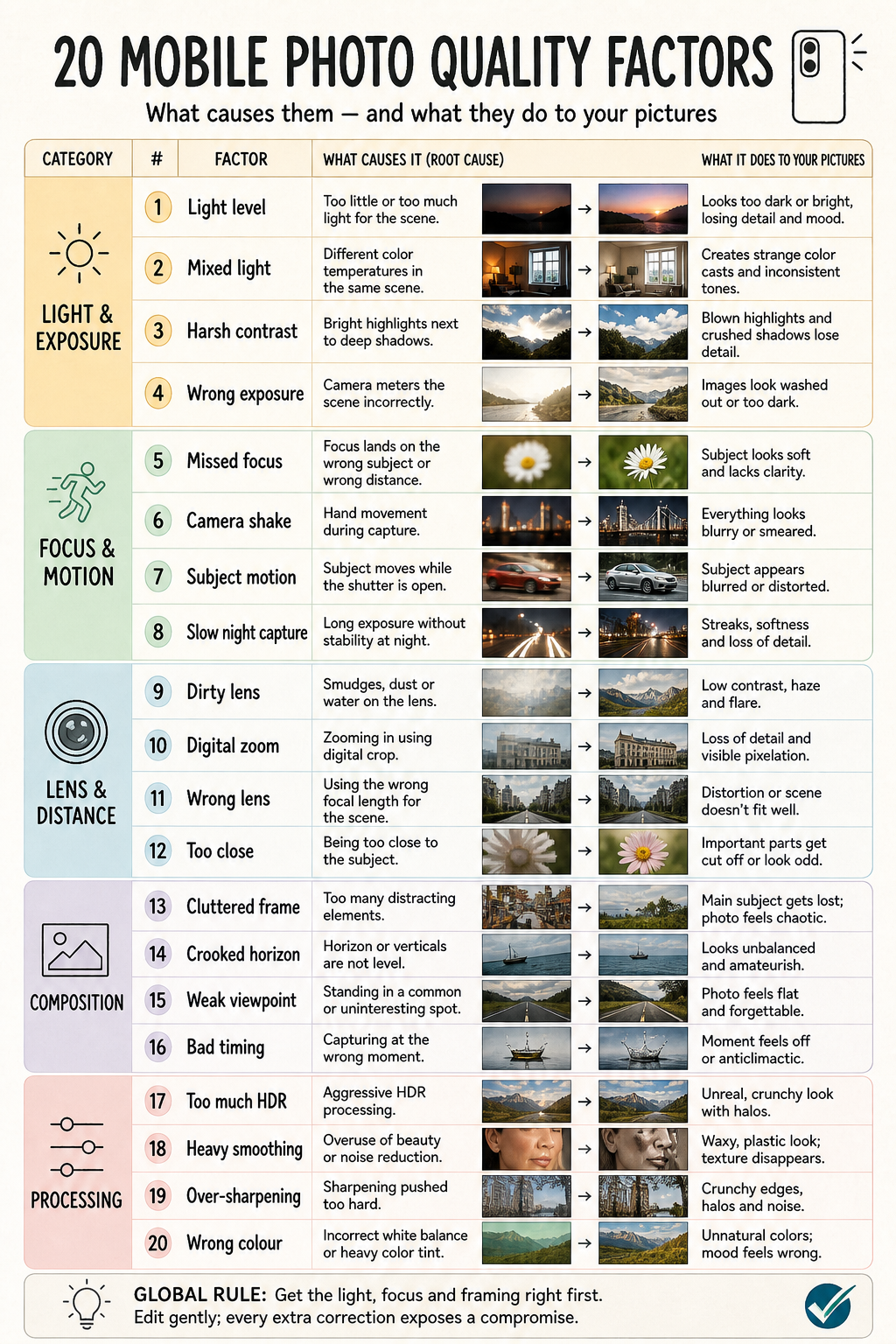
| Group | Factor | Root cause | Visual impact |
|---|---|---|---|
| Light & exposure | 1. Light level | Too little/much light | Noise, blur, clipped detail |
| 2. Mixed light | Different colour temperatures | Unnatural colour casts | |
| 3. Harsh contrast | Bright highlights beside dark shadows | Lost highlight/shadow detail | |
| 4. Wrong exposure | Metering favours wrong area | Image too dark, bright, or flat | |
| Focus & motion | 5. Missed focus | Focus lands on wrong point/distance | Main subject soft |
| 6. Camera shake | Phone moves during capture | Overall smear/blur | |
| 7. Subject motion | Subject moves during exposure | Blurred or distorted subject | |
| 8. Slow night capture | Long exposure without stability | Streaks and lost detail | |
| Lens & distance | 9. Dirty lens | Smudges, dust, moisture | Haze, flare, reduced contrast |
| 10. Digital zoom | Crop enlargement rather than optical detail | Pixelation and weak detail | |
| 11. Wrong lens | Focal length unsuitable for scene | Distortion or poor perspective | |
| 12. Too close | Camera exceeds close-focus range | Soft focus and awkward cropping | |
| Composition | 13. Cluttered frame | Competing background elements | Subject loses attention |
| 14. Crooked horizon | No levelling | Unsettled, amateur look | |
| 15. Weak viewpoint | Default eye-level position | Flat, forgettable image | |
| 16. Bad timing | Capturing before/after peak moment | Awkward gesture or weak story | |
| Processing | 17. Too much HDR | Aggressive tone mapping | Crunchy, artificial halos |
| 18. Heavy smoothing | Excessive beauty/noise reduction | Waxy texture and lost detail | |
| 19. Over-sharpening | Edge enhancement pushed too far | Halos, noise, harsh edges | |
| 20. Wrong colour | Incorrect white balance or strong tint | Unreal colour and mood |
These points align with current Apple and Google guidance on controlling focus/exposure, holding the phone steady in low light, cleaning lenses, and using zoom carefully; Adobe likewise cautions that oversharpening produces halos and excessive noise reduction removes detail. Apple camera controls, Google Pixel photo guidance, Adobe Detail guidance. The graphic may be downloaded here.
Global Rule: Light, focus, and framing are key. Edit gently – every extra correction exposes a compromise.
The Full sized image may be downloaded here