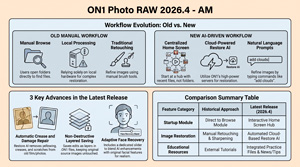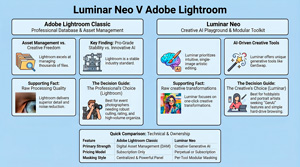
Comparative Analysis 5 Applications

This post outlines a comparative analysis by Anthony Morganti, demonstrating his photo editing workflow across five distinct software applications – Lightroom Classic, Luminar Neo, ON1 Photo RAW, PhotoLab 9, and Radiant Photo 2 to highlight their unique strengths and user interfaces. Each section details specific techniques for tonal adjustments, AI-assisted masking, and local enhancements while[…]

Read more

Luminar Neo Spring Upgrade – AM

https://youtu.be/WvNtmEhLdP8 In the video, Anthony Morganti, video details an upcoming comprehensive software update for the Luminar Neo photo editor, highlighting significant advancements in artificial intelligence and selective editing. Key improvements include the expansion of Bokeh AI to recognise non-human subjects and the introduction of more natural portrait retouching tools that preserve skin texture. The upgraded Skin AI tool[…]

Read more

Layer Masking in ON1 – AM

https://youtu.be/A4iFpVk1OGI This tutorial by Anthony Morganti (AM) provides a comprehensive guide to layer masking and compositing within ON1 Photo RAW 2026. AM emphasizes a workflow-first approach, suggesting that users establish their desired final orientation and background before introducing a subject. By utilising automated background removal alongside manual refinement tools, photographers can achieve a realistic blend between different[…]

Read more

Seamless Composites: ON1 2026 – AM

https://youtu.be/A4iFpVk1OGI see also https://www.anthonymorganti.com/blog/the-new-layer-masking-in-on1-photo-raw 1. The “Orientation First” Rule The cornerstone of a professional workflow is establishing your canvas before a single mask is drawn. You must decide on your final format—horizontal or vertical—and open that background file first to set the project’s dimensions. Pro Tip: Always hold the Shift[…]

Read more

ON 1 Editing – 2 Tips – AM

https://youtu.be/hpLJvxzefX0 Anthony Morganti details techniques for non-destructive photo editing using the ON1 Photo RAW 2026 software.He specifically highlights how Versions allow photographers to create multiple virtual copies of an image to explore alternative artistic directions without consuming extra disk space. Additionally, he explains how Snapshots function as internal bookmarks to capture incremental progress and specific milestones during a single editing session. That[…]

Read more

Get the Best Edit Possible in Lightroom – AM

https://youtu.be/w3vXcbLvjMw This video summary outlines professional Lightroom Classic techniques shared by Anthony Morganti to improve photographic post-processing workflows. Anthony describes methods for refining tonal range, such as using shortcut keys to prevent highlight clipping and shadow crushing. It highlights a clever strategy for history panel management, allowing photographers to set specific edit milestones as baseline comparison points.[…]

Read more
Morganti logo

Noise Reduction Shootout – AR

https://youtu.be/pIxhslvb9lM This source provides a comprehensive technical evaluation of five leading AI noise reduction applications, OWNED by Anthony, to determine which software best balances image clarity with detail retention. Anthony systematically tests DxO PureRAW 5, Adobe Lightroom, On1 Photo RAW, Topaz Labs Photo Studio, and Luminar Neo using a high-ISO Nikon RAW file. Through[…]

Read more
Morganti logo

Luminar Neo Masking – AM

https://youtu.be/_Hf6dEzxwyI Anthony Morganti’s detailed tutorial on Luminar Neo’s masking tools offers a thorough exploration of how to selectively apply adjustments to specific parts of an image. The video covers the variety of masking options available, their functionalities, and practical tips on combining and modifying masks to achieve precise post-processing effects.[…]

Read more
Morganti logo

Topaz Labs Sharpen in Photoshop – AM

https://youtu.be/O_W8NDNu75s In his video, Anthony Morganti introduces and demonstrates Topaz Labs Sharpen integrated into Photoshop. This tool uses Adobe’s generative AI technology but requires premium generative credits to operate. Anthony explains how the tool works, its credit cost based on image size, practical usage tips, and compares it with traditional sharpening techniques[…]

Read more
Morganti logo

Remove chain link fences – AM

https://youtu.be/1C4-CIEFTcU Summary In this video, Anthony Morganti demonstrates two modern methods to remove chain link fences from images, a common issue when photographing animals at zoos. The first method involves using Photoshop’s updated Remove Tool with specific preference settings to target and remove wires and cables, which can sometimes work[…]

Read more
Morganti logo

FREE COURSE: Luminar Neo Quick Start!

https://youtu.be/BUZB–WJI_A Summary In this introductory video, Anthony Morganti provides a comprehensive overview of Luminar Neo, a powerful photo editing software. He explains how to import images from various sources, including memory cards and computer folders, and navigate the software’s workspace, highlighting key modules like Catalog, Presets, and Edit. Anthony demonstrates[…]

Read more
Morganti logo

FREE ON1 2026 COURSE – AM

https://youtu.be/lrlECfHqg1o?t=95 Summary Verdict: A concise, hands‑on quick-start for ON1 Photo Raw 2026 covering how to import photos (including from memory cards), basic develop edits, applying effects, cropping, export settings, and where to get free sample files/presets. And now the dust has settled it’s time to sit back and learn HOW TO[…]

Read more
Morganti logo

Favorite additions to Luminar Neo – AM

https://youtu.be/ZYcrQRCTJAU Summary In this video, Anthony Morganti discusses the recent fall update to Skylum’s Luminar Neo software, focusing on his favorite new features. Despite being late to the discussion, he shares his insights on three standout additions: the photo restoration tool, the new Light Depth tool replacing Relight AI, and[…]

Read more
Morganti logo

What’s NEW in Photoshop 2026 – AM

plus ‘cheat sheet’ & video – https://youtu.be/QTjyBvE2f-g Summary In this detailed overview, Anthony Morganti explores the new features in Adobe Photoshop 2026, highlighting improvements in AI-powered tools and workflow enhancements. Key updates include enhanced subject selection and background removal, with an option to process images either locally or via Adobe’s[…]

Read more
Morganti logo

Free Course ON1 2026 – AM

Summary Anthony Morganti provides an in-depth walk-through of ON1 Photo Raw 2026, focusing on getting users quickly familiar with its core features. He emphasizes the software’s flexibility and covers browsing, viewing modes, and organizing images using flags, stars, and color labels. The video then shifts to editing basics, including tone[…]

Read more
Morganti logo

Masking in Photomator

https://www.youtube.com/watch?v=9zhsP6n1pog Summary Following on from his previous video, Anthony Morganti provides a thorough walk through of Photomator’s core editing tools, concentrating on the repair tool, clone tool, and advanced masking functions. The session starts with basic operations—cropping and exposure adjustments—then moves into a practical comparison between the repair and clone[…]

Read more
Morganti logo

Apple’s LR REPLACEMENT ? Photomator – AM

lhttps://www.youtube.com/watch?v=uQyG3V7B2pw SummaryAnthony Morganti reviews Photomator (formerly Pixelmator Photo), Apple’s rebranded photo editor now on Mac, iOS, iPad, and Vision Pro. The app is subscription-based ($7.99/month, $29.99/year, $119.99 lifetime), with occasional unconfirmed discounts. Morganti demonstrates importing RAW files, applying ratings/flags, AI noise reduction, cropping, auto-adjustments, and tonal/color editing. Features include ML-based[…]

Read more
Morganti logo

Fine Art Noir B&W Editing – AM

https://youtu.be/YUoWbQ0oVyw In this detailed tutorial, Anthony Morganti demonstrates how to achieve a classic noir “Ripley” look on photographs, inspired by the black-and-white aesthetic of the Netflix series Ripley. The series is known for its high-contrast, low-key lighting, with predominant dark areas punctuated by strategic splashes of light that highlight the subject.[…]

Read more
Morganti logo

Beginner Friendly AI Workflow – AM

https://youtu.be/NfOQB7oUFh8 Summary Anthony Morganti provides a detailed walkthrough of ON1 Photo RAW’s automatic and AI-powered editing features, designed to help beginners quickly achieve high-quality photo edits and learn the software’s workflow. He emphasizes that although ON1 is a comprehensive tool that can initially feel overwhelming, its AI tools like Brilliance[…]

Read more

Make Wildlife Photos Pop – Start to Finish in Luminar Neo – AM

Summary – https://youtu.be/cTzRQmj-8QY Anthony Morganti reintroduces a new series of Luminar Neo tutorials, starting with a wildlife image workflow. He stresses the process reflects his personal approach, not a universal standard, and aims to give viewers ideas for developing their own. Wildlife Image Workflow Steps Tools & Tips Mentioned What’s[…]

Read more

RapidRAW – A free Lightroom alternative ? AM

Original video by Anthony Morganti – https://youtu.be/YCny6zDm_v4 Anthony Moriganti recently saw two different videos from photographers talking about a new open source photo editing application called RapidRAW. Now overall, both of those photographers gave it really good reviews, so Anthony was kind of curious to see what RapidRAW was all about and made[…]

Read more
Morganti logo

Access a Feature in LR that isn’t in LR AM

Adobe Lightroom comes in several versions, each with its unique features and capabilities. AnthonyMorganti breaks down the differences between Lightroom Classic, Lightroom (desktop), mobile,and web versions, highlighting exclusive features like Quick Actions available only on mobile andweb platforms. To access these features from Lightroom Classic, Anthony demonstrates a seamless syncingprocess.[…]

Read more