
Given the relatively low cost of Luminar and the debate as to whether Adobe foresee hobbyists as a long term market sector to target; The video is extremely timely as it provides an in-depth comparison between Luminar Neo and Lightroom Classic, focusing on their features, differences, and workflows to help viewers decide which program might better suit their needs.
Anthony Morganti compares Luminar Neo with Adobe Lightroom to help photographers choose the best tool for their workflow. The following is based on his video with further contributions from our team.
Anthony’s discount link and code for Luminar Neo’s sale (and other products) is available here.
⚖️ Digital Asset Management (DAM) vs. Creative AI
The fundamental choice between Lightroom and Luminar Neo isn’t just about which tool is “better”—it’s about which workflow philosophy aligns with your needs.
- Lightroom Classic is a professional-grade database (DAM) . It is built for photographers who manage tens of thousands of images, requiring robust cataloging, advanced metadata controls, and a linear, predictable editing environment.
- Luminar Neo is a creative AI toolkit. It is designed for photographers who prioritize artistic exploration and efficient single-image editing over complex file management, offering a more modular and experimental approach.
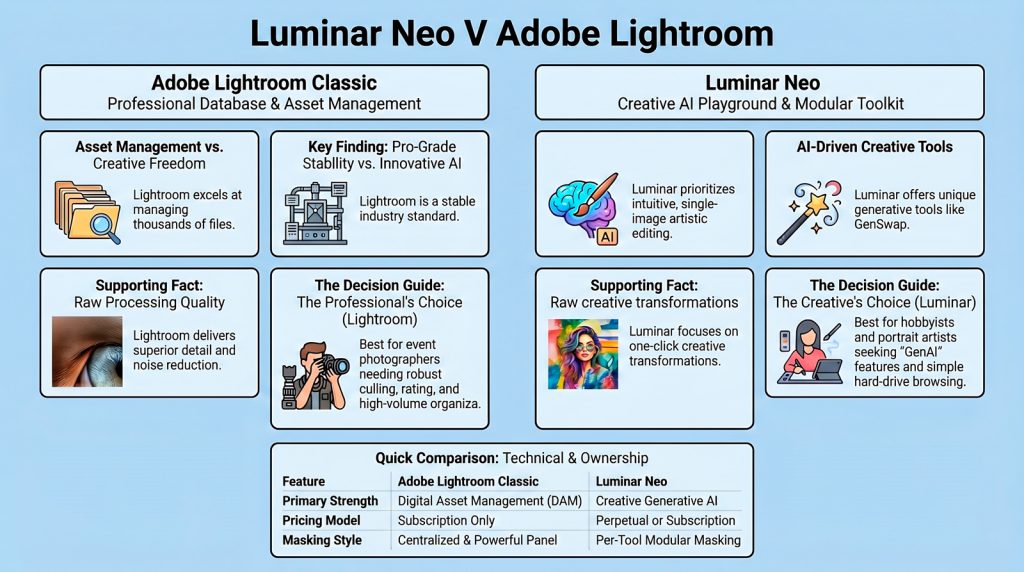
✅ Adobe Lightroom Classic: The Professional’s Database
For (Advantages)
- Superior Asset Management: Offers a powerful, if complex, import system with presets for metadata injection. It also features unique tools like AI-assisted culling (to find blurry or closed-eye shots) and color labels, making it unmatched for managing large volumes of work .
- Better Raw Processing & Noise Reduction: Delivers a higher quality base rendering of raw files with better contrast and detail retrieval. Its AI Noise Reduction is widely considered superior in quality, though it only works on raw files .
- Centralized & Powerful Masking: Features a centralized “Masking” panel where complex, combinable masks (AI Subject, Sky, Depth, Color, Luminance) can be created and refined independently of specific adjustments. This allows for a more structured and organized workflow .
- Ecosystem Integration: For tasks beyond Lightroom’s scope (e.g., complex composites, focus stacking), it seamlessly integrates with Photoshop, the industry standard for pixel-level manipulation .
- Stability & Reliability: Lightroom is known for its stability, even when handling massive catalogs of hundreds of thousands of images, rarely crashing under professional workloads .
Against (Disadvantages)
- Subscription-Only Model: Access requires a recurring monthly or annual fee. There is no perpetual license option, which some users dislike .
- Steep Learning Curve: The formal import process and the extensive feature set (especially the DAM tools) can be overwhelming and confusing for beginners or casual hobbyists .Lack of Native Advanced AI Tools: Lacks one-click solutions for complex tasks. Features like generative expand/replace, portrait retouching (frequency separation), and focus stacking are not present, requiring a jump to Photoshop or other plugins .
✨ Luminar Neo: The Creative’s AI Playground
For (Advantages)
- Innovative & Unique AI Tools: Offers powerful generative features not found in Lightroom, including Gen Swap (replace an object with something else), Gen Expand (extend canvas), and advanced Portrait Blemish Repair (iris replacement, frequency separation face smoothing) .
- Simpler & More Intuitive: The lack of a mandatory import process and a less cluttered interface make it immediately more approachable and user-friendly, especially for those who organize photos using their computer’s native file system .
- Built-In Advanced Tools: Includes features like Focus Stacking, Upscaling, and Restoration tools natively—tasks that would require Photoshop or other specialized software in the Adobe ecosystem .
- Flexible Purchasing: Available as both a perpetual (one-time) license and a subscription, offering a choice that appeals to users who dislike recurring fees .
- Modular & Flexible Editing: Allows you to apply multiple instances of the same adjustment tool and offers a non-linear history panel, providing a more experimental and flexible editing experience .
Against (Disadvantages)
- Weak Digital Asset Management (DAM): Lacks key organizational tools like keywords, color labels, and advanced metadata filtering. It is generally not considered a full replacement for Lightroom’s cataloging capabilities .
- Inconsistent Performance & Stability: Has a history of being slower, more prone to crashes, and less responsive when handling large libraries or complex edits compared to Lightroom .
- Inferior Raw Processing & Noise Reduction: The base raw conversion is often criticized for lacking contrast and muted colors. Its AI noise reduction is considered less effective and can produce blotchy results compared to Lightroom’s .
- Confusing & Granular Masking: Masking is managed on a per-tool basis rather than from a central panel. This can lead to a more cumbersome workflow where you must re-create or copy masks for different adjustments, making complex edits less intuitive .
- Generative AI Has an Expiration: For perpetual license holders, the generative AI tools (GenErase, GenSwap, GenExpand) cease to function after one year, requiring an additional ongoing payment to reactivate—a hidden cost often overlooked .
💡 The Verdict: Which One is Right for You?
Architecting a photography workflow requires choosing between a robust professional database and a generative AI playground. This conflict isn’t just about features; it’s about whether you prioritize asset scalability or experimental creative speed.
Top 3 Impactful Takeaways
- Workflow Philosophy: Lightroom Classic functions as a professional Digital Asset Management (DAM) system for high-volume management, while Luminar Neo is a modular Creative AI Toolkit for single-image experimentation.
- Generative Innovation vs. RAW Precision: Luminar excels with GenSwap and GenExpand, but Lightroom offers superior RAW processing and AI Noise Reduction (which is strictly limited to raw files).
- The Hidden Cost of AI: For perpetual license holders, Luminar’s generative features expire after one year, requiring ongoing payments to reactivate—a critical detail for long-term planning.
Based on the comparison, here is a final decision guide:
- Choose Lightroom Classic if: –
You are a professional, event high-volume photographer. Your priority is a robust, reliable system to import, cull, rate, and edit thousands of photos quickly. You need best-in-class raw processing, noise reduction, and a stable, non-destructive workflow. The subscription fee is a business expense for an industry-standard tool. - Choose Luminar Neo if:
You are a hobbyist, portrait, or fine-art photographer. You find Lightroom’s import process and database model tedious and prefer to simply open photos from your hard drive. You are excited by creative AI tools and want powerful, one-click solutions for portrait retouching, sky replacement, and generative edits without learning Photoshop. The one-time purchase option is appealing, and you are willing to accept less powerful organizational tools and occasional performance quirks for the sake of creative flexibility.
Some users find the ideal workflow is a hybrid: manage and do raw processing in Lightroom, but use Luminar Neo as an external plugin for its unique portrait and generative tools .