
The video provides a comprehensive guide on using ON1 Photo RAW 2026.4 to professionally refine dull images using autumn landscape photography as a start-point.
It details a systematic workflow that begins with technical corrections, such as managing highlight clipping and adjusting tonal balance, before moving into creative enhancements. The supporting text explains how to use specialised filters and selective masking to intensify seasonal colours and add texture to specific geographic features. Additionally, it highlights methods for directing the viewer’s focus through depth lighting and the careful application of vignettes.
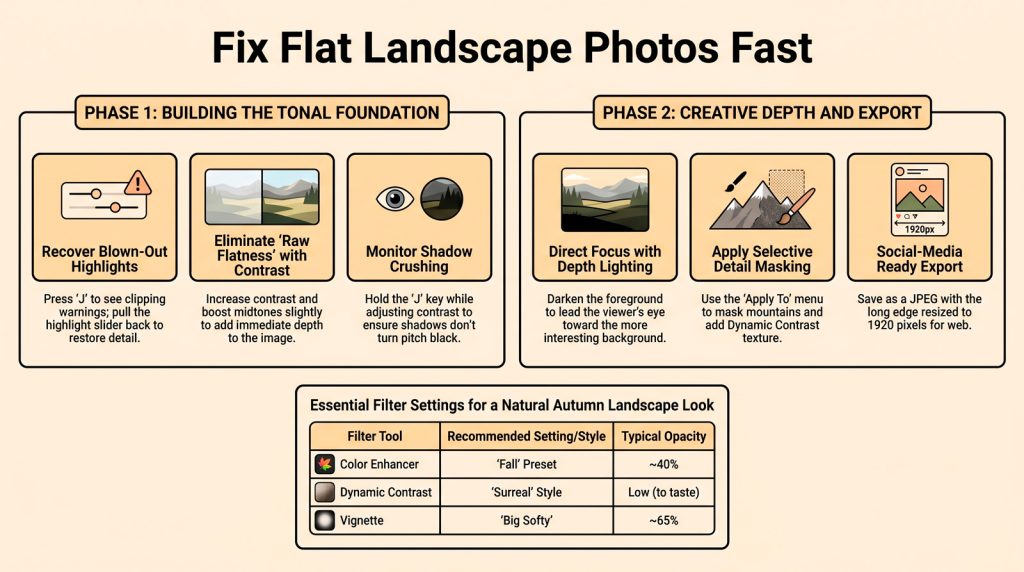
Raw files often appear flat and muddy, failing to capture the vibrant atmosphere of the field. ON1 Photo RAW 2026.4 provides a precise workflow to transform dull raw data into professional-grade autumn imagery.
Stage 1: Foundational Exposure Recovery
Data preservation is paramount. Press the ‘J’ key to trigger clipping warnings; a red overlay identifies blown highlights. Use the Develop tab’s Highlight slider until the red vanishes to recover lost detail. When adding contrast, hold ‘J’ to avoid “crushed” shadows, ensuring a balanced, natural tonal range.
The 3-Step Depth-Building Workflow
- The Fall Color Boost: Apply the Color Enhancer “Fall” preset at ~40% opacity to enhance seasonal warmth without sacrificing realism.
- Depth Lighting Control: Use the Depth Lighting filter to independently darken the foreground, guiding the viewer’s eye toward background interest.
- AI-Powered Mountain Detail: Mask mountains via the “Apply To” menu. Apply Dynamic Contrast (Surreal style), then lower the opacity to ground the aggressive texture in reality.
Analysis: The Social Media “Sweet Spot”
Finally, the material outlines best practices for exporting images, ensuring they are correctly formatted and resized for social media platforms. For high-impact sharing on Instagram and Facebook, export as a JPEG with the long edge set to 1920px. This resolution is the “sweet spot,” balancing crisp detail retention with optimized upload speeds.
Conclusion: The Final Polish
Complete the edit with a “Big Softy” vignette at 65% opacity to frame the primary subject. Now that AI handles complex masking and lighting, how will you use that saved time to rethink your composition in the field?