ON 1 – Sky Swap
ON1 Sky Swap AI eliminates the users memory block using machine learning and curated 8K UHD aerial imagery from OcuDrone.
Read moreTips, techniques, articles etc NOT specific to 2026
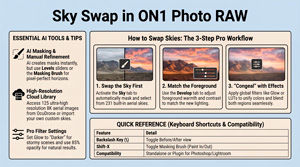
ON1 Sky Swap AI eliminates the users memory block using machine learning and curated 8K UHD aerial imagery from OcuDrone.
Read more
The ON1 2026.5 release focuses on the parts of the app you feel everyday: a modernized AI Inference Engine, an updated graphics rendering engine, and a faster, more predictable start-up and shutdown.
Read more
Until July 31, 2026, On1 Software is giving away NoNoise AI 2024.5 (latest version) for FREE. In his tutorial, Anthony Morganti, tells you how to get it. ON1 No Noise is designed to remove digital grain from high-ISO images while preserving fine details like feathers and fur. The guide demonstrates how the[…]
Read more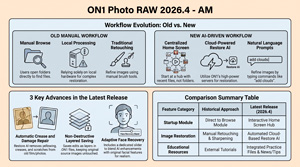
The text identifies significant updates introduced in on1 Photo RAW 2026.4, with a specific focus on the capabilities and limitations of its new Restore AI tool.
Read more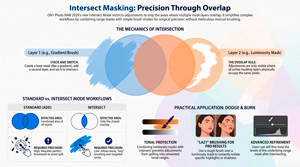
ON 1 Intersect Masking Mode is a game-changer for dodging and burning. Isolating tonal ranges through luminosity masks. Brushing maintains tonal integrity, helps prevent halos and color bleeding while significantly reducing manual effort.
Read more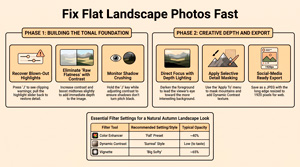
https://youtu.be/fvyP1GI8Yys The video provides a comprehensive guide on using ON1 Photo RAW 2026.4 to professionally refine dull images using autumn landscape photography as a start-point. It details a systematic workflow that begins with technical corrections, such as managing highlight clipping and adjusting tonal balance, before moving into creative enhancements. The supporting text explains how to[…]
Read more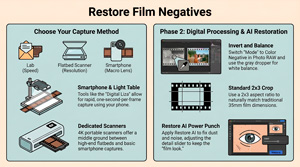
https://youtu.be/SYfJGaY0tf0 Wondering how to digitize film? The most efficient way to bring analog memories into a modern digital workflow is by combining high-speed smartphone capture with AI-driven restoration. Whether you have shoeboxes of old negatives or are a film enthusiast, mastering this transition ensures your photographic legacy is preserved with[…]
Read more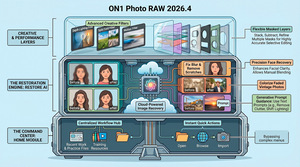
Restore AI & Home Module Top 4 Impactful Takeaways 1. The Home Module: The New Command Center The Home Module serves as the centralized hub that users encounter upon launching the application. It provides instant access to quick actions – such as opening photos, browsing folders, or importing from devices[…]
Read more
The much heralded ON1 Photo RAW 2026.4 is available today as a free update for all 2026 owners, and it’s the biggest release of the 2026 cycle. The headline addition is Restore AI, a new module inside Photo RAW MAX that brings old, faded, or any damaged photo back to[…]
Read more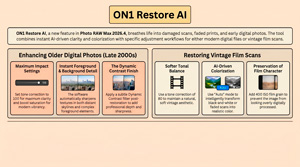
https://www.youtube.com/watch?v=qh84vmev6zo ON 1 have released an update on Restore AI, a tool within the upcoming ON1 Photo RAW Max 2026.4 software designed to modernise aged or damaged photographs. The technology employs artificial intelligence (AI) to automatically repair physical wear, sharpen textures, and apply realistic colorization to monochromatic or faded images. Users can revitalise both vintage film scans and[…]
Read more
I wanted to share an update on Restore AI, an all-new module coming to Photo RAW MAX. We originally planned for a late April release, but it will be slightly delayed. Nobody likes delays, and we don’t take that lightly. We’re taking some extra time to refine the details to[…]
Read more
https://youtu.be/hpLJvxzefX0 Anthony Morganti details techniques for non-destructive photo editing using the ON1 Photo RAW 2026 software.He specifically highlights how Versions allow photographers to create multiple virtual copies of an image to explore alternative artistic directions without consuming extra disk space. Additionally, he explains how Snapshots function as internal bookmarks to capture incremental progress and specific milestones during a single editing session. That[…]
Read more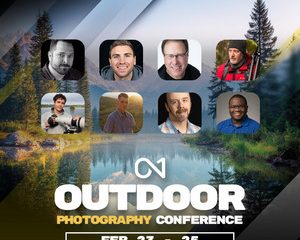
The ON1 Photo RAW 2026 Outdoor Photography Conference, is a live, virtual event happening in 48 hrs February 23-25. Starts in Starts in 4 days • 02 hours • 51 minutes • 30 seconds at time of posting. This multi-day experience is built for outdoor photographers who want to get more confident, creative, and efficient with Photo RAW – across landscapes,[…]
Read more
The current ON1 software landscape is centered around the ON1 Photo RAW core application, offered through two primary acquisition models: Perpetual Licensing and the ON1 Photo Studio subscription. Contrary to industry trends toward forced subscription models. ON1 explicitly states that non-subscription (Perpetual Licenses) for Photo RAW “will always be available.” Users have the option to own[…]
Read more
ON1 positions itself as a direct alternative to Adobe, specifically highlighting that it requires no subscription or monthly commitment, allowing users to own the software outright and edit on their own terms. In terms of workflow, ON1 claims to offer a familiar experience for those coming from Adobe:
Read more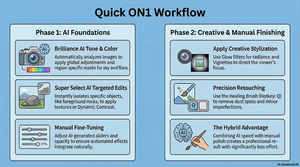
https://youtu.be/xmwJ4i7u12o To achieve professional results, photographers should utilize AI tools to handle the initial “heavy lifting” of image development, while reserving manual techniques for fine-tuning, creative styling, and precise retouching. Start with AI for Global and Local Foundations The workflow begins by using AI automation to establish a polished base[…]
Read more
https://youtu.be/vrQ56daA5B0 Brightening reflections shouldn’t ruin your entire landscape. If global sliders leave your images flat, mastering localized highlights in On1 Photo RAW offers professional glow with expert precision and surprising ease. Techniques Transcend Software Core editing principles are universal. Adapting Lightroom methods to On1 Photo RAW builds a versatile, software-agnostic[…]
Read more
Struggling to make your photo adjustments look natural? This article reveals five powerful masking tips in ON1 Photo RAW that will instantly elevate your edits from good to great. 1: Blend Adjustments with Feathering Feathering for Natural Blends – feathering softens the edges of a mask for a smoother transition.[…]
Read more
https://youtu.be/ufs3RA1lXVM The Photo Filter in ON1 Effects digitally replicates traditional camera filters by simulating the look of old-school coloured glass filters, such as cooling gels or the 81A and 85 warming filters. While it mimics these physical tools, it enhances them through the flexibility of the digital environment, offering unlimited[…]
Read more
https://youtu.be/xmwJ4i7u12o Summary This video tutorial demonstrates how to accelerate your photo editing workflow using AI tools in On1 Photo RAW 2026. The presenter highlights two primary AI features: Brilliance AI and Super Select AI. Brilliance AI automatically analyzes and enhances tone, color, and local adjustments without manual masking, saving significant[…]
Read more
What is a LUT, really? At its simplest, a LUT (Look-Up Table) is like a translator for color. Imagine you have a specific shade of blue in your camera, but you want it to look like a moody teal from a cinema movie. A LUT is the instruction manual that[…]
Read more
Finding a signature style is a huge part of photography, but the tools—presets, filters, and Look-Up Tables (LUTs)—can get confusing. While they often get lumped together, LUTs are a different beast entirely. Borrowed from cinema, they are powerful engines for color grading, not just simple filters. Here are five truths[…]
Read more
https://youtu.be/QtJksIbkJs0 Summary This video tutorial explores five advanced masking techniques in ON1 Photo RAW designed to enhance photo edits efficiently and professionally. It begins with feathering masks to soften edges for natural blending, especially when adjusting skies. The video then demonstrates how to save AI-generated subject masks as presets, allowing[…]
Read more
. . ON1 Workflow Guide – Dropdown ON1 Photo RAW Pipeline Comprehensive Workflow Reference Guide Expand all Collapse all 1 Phase 1: Input & Initial Setup Organization & Culling Import & Organize Use the Browse module to import photos. The built-in Catalog helps you organize, add keywords, ratings, and filter[…]
Read more
ON 1 2026 Non-Destructive Local Adjustments & Masking Workflow Inter-Relationships ON1 2026 brings non-destructive editing and smart AI masking together, giving you a flexible, layered workflow. You can stack local adjustments as separate layers, each one with its own mask in charge. At the heart of it, AI tools like[…]
Read more
ON1 Photo RAW 2026 is smarter and more organized as far as filters go. They are now categorized by type, making it easier to browse and you can hide filters you don’t use, turn off descriptions for a cleaner look, and even favorite your most-used filters for quick access. Plus,[…]
Read more
https://youtu.be/Obpeoj2bUq4 Summary Seamlessly Integrating On1 Photo RAW with Adobe Lightroom – This tutorial guides you through the process of using On1 Photo RAW as a plugin within Adobe Lightroom, allowing you to enhance and stylize your photographs with ease. NB: YOU MUST have a MAX subscription. Process Flow Key Learning[…]
Read more
https://youtu.be/W8ICusRcGJI?list=PLxhX4-G2OWQdab7VxPoMUPveViGSMwTh8 Summary This video tutorial explores the bleach bypass filter in On1 Photo RAW, a powerful tool for enhancing photos with increased contrast and a cinematic look. The presenter begins with a desaturated, low-contrast image to demonstrate how the bleach bypass filter instantly adds depth and vibrancy. The filter mimics[…]
Read more
https://youtu.be/XrBR3HrTnxM Summary The video presents an in-depth overview of the enhanced masking features introduced in the 2026 version of On1 Photo RAW, demonstrated using a pre-release version of the software. Highlighting the improvements over previous iterations, the presenter focuses on the ability to create precise masks, such as isolating the[…]
Read more
https://youtu.be/RwkM0Loq85U Editing Workflow and Tools This video provides a comprehensive tutorial on how to efficiently edit images using On1 Photo RAW, focusing on simplicity and effectiveness without over-manipulating the photo. The instructor guides viewers through a step-by-step workflow, starting from basic exposure and tone adjustments, moving through color correction, lens[…]
Read more