
Wondering how to digitize film? The most efficient way to bring analog memories into a modern digital workflow is by combining high-speed smartphone capture with AI-driven restoration. Whether you have shoeboxes of old negatives or are a film enthusiast, mastering this transition ensures your photographic legacy is preserved with professional clarity and archival precision.
The Top 3 Surprising Takeaways
- The Smartphone Revolution: Using a smartphone paired with the Lomography DigitalIZA setup is a counter-intuitively powerful solution. This integrated light table and film holder allow for rapid-fire digitization, capturing high-quality frames at a rate of approximately one second per frame – vastly outperforming traditional scanning hardware in speed.
- The Logic of Lab Scanning: Despite the availability of high-end DIY tools, the professional lab remains the “fastest and cheapest” route for new rolls. Utilizing lab-based scanners during initial processing offloads the labor-intensive digitization phase, allowing you to focus purely on the creative restoration process within Photo RAW.
- Beyond the Flatbed: While traditional flatbed scanners are known for high resolution, they often suffer from limited DMAX and agonizingly slow speeds—sometimes exceeding an hour per roll. Modern DSLR or smartphone macro setups provide superior flexibility and speed, overcoming the optical and mechanical bottlenecks of legacy hardware.
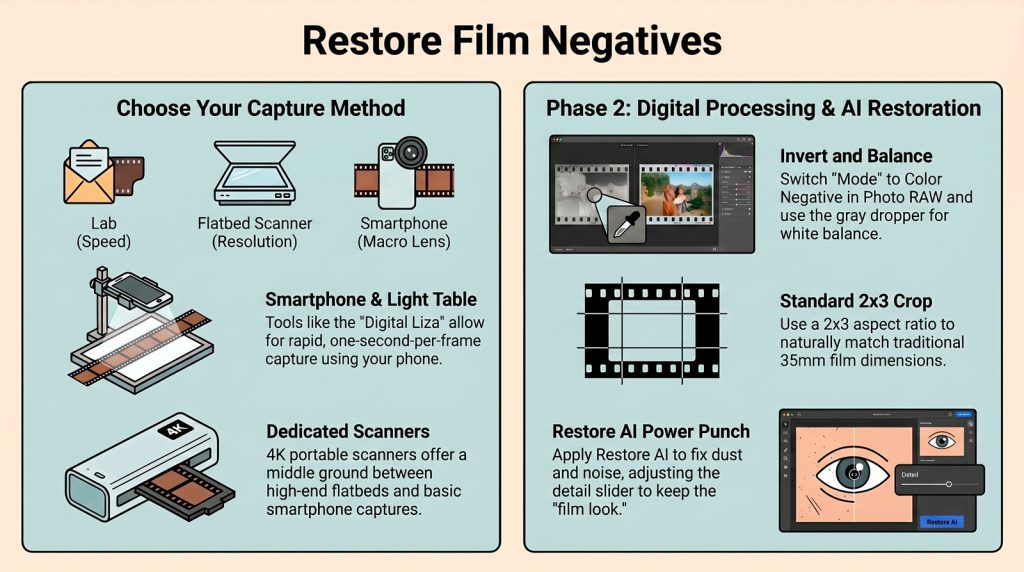
The Workflow: From Negative to Positive
To transform digitized negatives into professional-grade images, follow this technical progression within Photo RAW:
- Import and Batch Rotate: After importing, select your frames. Use Ctrl (Windows) or Cmd (Mac) to select non-sequential shots that require the same orientation. Batch rotate them to their proper landscape or portrait position before editing.
- Toggle the Conversion Mode: Navigate to the Tone and Color pane in the Develop module. Switch the Mode from “Positive” to “Color Negative.” This immediately inverts the luminance and color values to reveal the hidden image.
- Neutralize with the Gray Dropper: Select the Gray Dropper tool and click on a neutral element like a road or sidewalk. These elements are chosen because they represent a neutral gray anchor in the physical world; clicking them allows the software to instantly calculate and remove the orange mask or color cast inherent in film stock.
- Pro-Tip: Use the Crop Tool set to a 2×3 aspect ratio to perfectly match the original dimensions of 35mm film, ensuring no edge data is lost or distorted.
The “One-Two Power Punch” Analysis
Expert film workflows rely on what is known as the “one-two power punch.” As the source notes: “It’s kind of your one-two power punch to doing film scanning and restoration all in one shot.” The first punch is the technical inversion – flipping the chemical negative to a digital positive. The second punch is Restore AI. This is crucial because “quick” capture methods (like smartphones or $150 budget scanners) often introduce optical softness or sensor noise. Restore AI targets these limitations by neutralizing noise, removing “sky junk” (dust and physical artifacts), and sharpening the image to modern standards, effectively bridging the gap between analog grit and digital excellence.
Professional Film Digitization and AI Restoration Workflow
For the imaging specialist, transitioning from analog negatives to digital archives requires a sophisticated balance of throughput and precision. Historically, this meant laboring over flatbed scanners that, while high in resolution, often struggled with dynamic range (DMAX) and required hours of manual oversight. Modern professional standards have shifted toward high-speed macro capture, utilizing DSLR or smartphone systems to bypass the mechanical limitations of legacy hardware.
Advanced Digitization Strategies For newly shot film, the lab remains the optimal entry point for digitization, providing consistent, high-speed scans. However, for archival projects, tools like the Lomography DigitalIZA have revolutionized the process. By utilizing a smartphone with a macro lens on a dedicated copy stand, practitioners can capture frames at a rate of one per second. While inexpensive scanners (around $150) offer 4K output, they often lack the bit depth and optical clarity required for high-end reproduction. The DSLR/Smartphone macro approach provides the best raw data for subsequent processing.
Technical Processing and Color Neutralization Once the raw captures are imported into Photo RAW, they initially appear as inverted negatives with visible sprocket holes. The specialist must first select and batch-rotate images using Ctrl/Cmd keys to establish the correct orientation. Within the Tone and Color pane of the Develop module, the critical step is switching the Mode from Positive to Color Negative. To achieve accurate chromatic balance, the Gray Dropper tool is applied to neutral-density elements such as asphalt or concrete. This step is essential to anchor the white balance and neutralize the orange mask characteristic of C-41 chemistry.
AI-Driven Restoration and Archival Integrity The “one-two power punch” involves following the negative-to-positive conversion with a pass through the Restore AI module. This AI-driven tool addresses the physical and optical degradation common in older film stocks, including grain noise, dust artifacts, and optical softness. By utilizing a 2×3 aspect ratio for cropping and the Leveling Tool for horizon correction, the professional ensures the final asset is geometrically accurate. The goal is to produce a file that meets modern professional display standards while deciding, through the Detail Slider, exactly how much of the original film grain to preserve for historical authenticity. This workflow ensures that visual histories remain accessible and vibrant without the artificiality often introduced by standard noise reduction.
Conclusion
The intersection of analog history and AI technology allows us to preserve archives with unprecedented clarity. However, as we use AI to “perfect” these images, it raises a compelling question: Does removing the inherent grain and softness of old film preserve the memory, or does it alter the historical soul of the photograph? As digital archives continue to outlast physical negatives, the ethics of restoration will remain a debate for archivists.