
Every photograph hides information your eye glosses over.
A sky that looks smooth is quietly banding into steps. A highlight you thought was bright is actually clipped, its detail gone for good. A corner of the frame is pulling attention away from your subject without you noticing.
Image Analyst is a free, browser-based diagnostic tool built to make the invisible visible – it runs entirely on your own machine, with nothing ever uploaded and reduces the noise so the signal is impossible to miss.
Now updated to add Tone (heat) mapping – July 26
The idea is simple: load an image, switch on an analysis mode, and the photo desaturates to neutral grey while precise coloured markers highlight exactly what’s happening. By stripping colour from the base image, the markers have nothing to compete with – a magenta flag on a magenta flower would vanish in a normal view, but against grey it’s unmistakable.
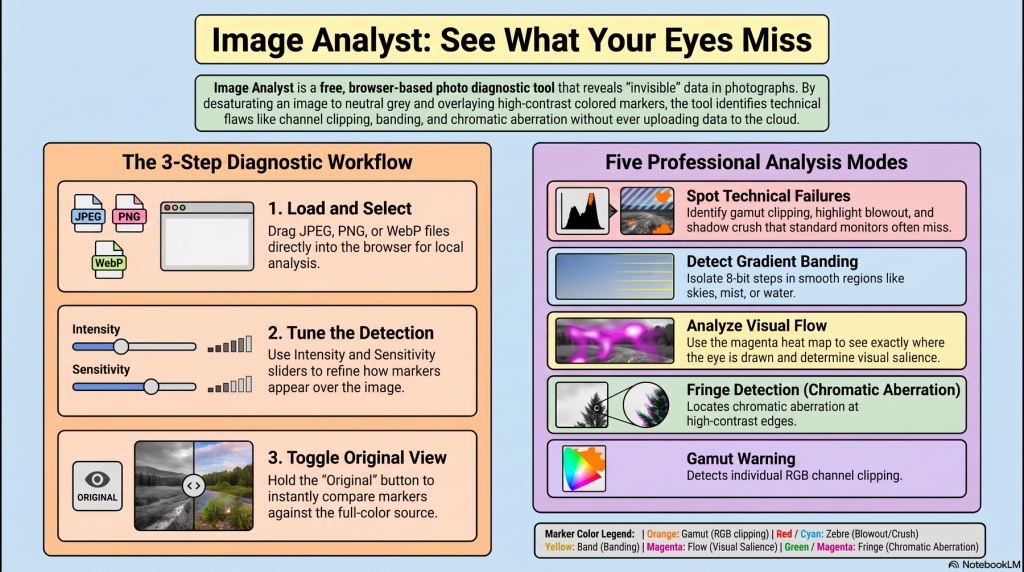
Under the hood, five analysers each answer a different question.
Tone (heat) Mapping –
The map is a direct read of the data with no model or threshold behind it, which is why it needs no tuning. Band edges will contour across smooth gradients; that is the five-step quantisation of the map, not banding in the source.
Gamut catches per-channel clipping – a saturated red maxed out in one channel while overall brightness still looks safe.
Zebra flags true highlight blowout and shadow crush by luminance.
Fringe hunts chromatic aberration, but intelligently: it only tests for colour casts where a genuine high-contrast edge exists, because that’s the only place aberration physically occurs. On clean modern glass it’ll often show very little – which is exactly the point. It’s an honest check, not a false-alarm generator.
Band is where it earns its keep for landscape work. Banding lives in smooth gradients – skies, mist, water – where 8-bit steps become visible. Image Analyst isolates it with a two-part test: a small tonal step and a smooth surrounding region. Texture fails the smoothness check; hard edges fail the small-step check; only real banding passes both. No other quick-look tool makes that distinction.
Flow is the most ambitious. Rather than crudely marking everything bright or dark, it measures local contrast – how much each area stands out from its immediate surroundings – and paints a graded magenta heat map of where the eye is genuinely drawn. It’s a composition check: is attention landing where you intended, or is a bright rock in the corner stealing the show?
Two sliders – Marker Intensity and Sensitivity – tune the read, and an Overall View runs everything at once, showing the single most significant issue per pixel. Performance stays responsive even on large files: the tool samples quickly while you drag a slider, then refines to full quality the moment you let go.
Image Analyst is deliberately read-only. It doesn’t edit your photo – it tells you the truth about it so you can plan your editing flow to suit YOUR artistic direction, then gets out of the way.
No account, no cloud, no data leaving your device. Just a clear, honest second opinion on the image in front of you. It’s a diagnostic instrument for photographers who’d rather know than guess.