
Anthony Morganti has a video here – https://youtu.be/zMJdKQNagDQ and James of Excire has one here, our summary in pdf is here.
The Evolution of Digital Asset Management
The move from film to digital photography solved many shooting limitations but created a new problem: managing vast numbers of images. High-speed digital cameras can produce thousands of photos in a single session, making image organization and retrieval the new workflow bottleneck.
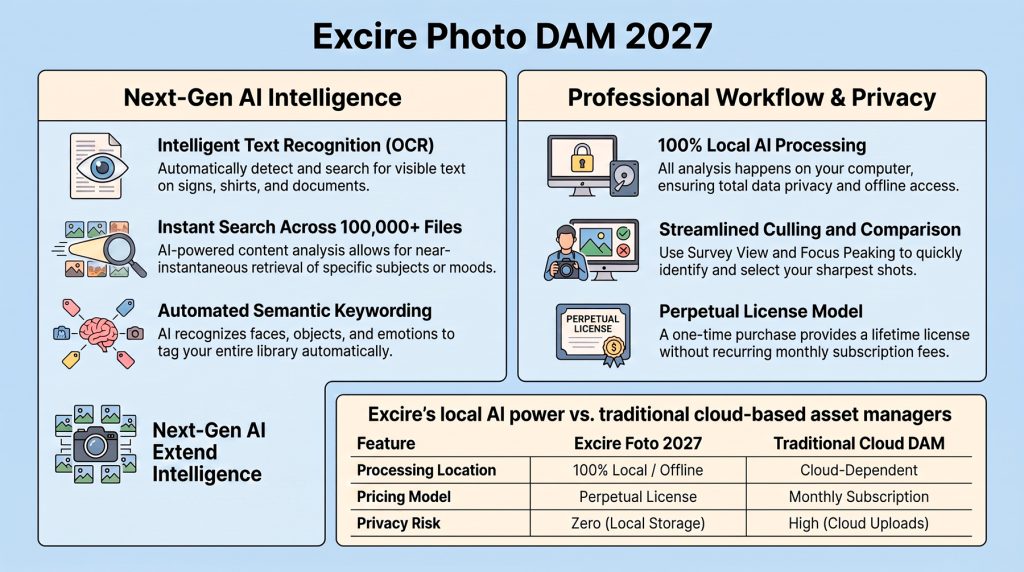
Professional Digital Asset Management (DAM) software addresses this challenge. While applications like Adobe Lightroom and Capture One include basic cataloging features, Excire Photo 2027 is designed specifically for managing very large photo libraries spread across multiple drives.
A major advantage of Excire Photo is its local-first approach. Unlike Adobe’s cloud-based AI search, which requires images to be uploaded before they can be analysed, Excire performs all AI-powered image recognition directly on the user’s computer. This provides:
- Faster searching with no cloud delay.
- Complete privacy, as images never leave the computer.
- Full offline operation.
- No subscription requirement through its perpetual licence model.
By combining AI-powered organisation with local processing, Excire Photo 2027 gives photographers greater control over their archives while avoiding the costs, privacy concerns, and workflow delays associated with cloud-dependent systems.
Technical Architecture and Core Components
Excire Photo 2027 uses advanced AI to perform deep, non-destructive analysis of image content, identifying subjects, objects, age, and gender without altering the original RAW files. Instead, all analysis is stored in its own database.
A key advantage is its ability to write AI-generated keywords to XMP metadata, making photos searchable not only within Excire but also through Windows Search and macOS Spotlight.
The software is designed for large-scale performance, processing:
- 8,376 images in just over 20 minutes.
- 183,000 images in around 17 hours, making overnight indexing of extensive photo libraries practical.
This combination of AI analysis, open metadata support, and high-speed processing makes Excire Photo 2027 well suited to managing professional-scale image archives.
| Component Name | Function | Benefit to User |
|---|---|---|
| AI Pixel-Level Analysis | Scans raw data to identify subjects, gender, and age. | Automated, high-speed organization with no manual tagging required. |
| X-prompt AI | Natural language free-text search engine. | Find specific scenes (e.g., “gorilla in the rain”) via a unified search bar. |
| X-tetics AI | Evaluates images via an Aesthetics Score (0-100). | Objectively identifies “top-tier” shots from a burst to speed up culling. |
| OCR Engine | Recognizes text, logos, and numbers within images. | Makes signs, jerseys, and documents searchable as if they were metadata. |
| Non-destructive Database | Independent metadata and preview storage. | Rapid search speeds while protecting the integrity of original RAW files. |
Key Feature Breakdown: Finding, Organizing, and Selecting
Summary
Excire Photo 2027 introduces several AI-powered tools that make large photo libraries easier to search, organise, and cull.
Key New Features
- Text Recognition (OCR): Search for words that appear inside images. Existing libraries must be reanalysed before this feature becomes available.
- World Map View: Browse photos by shooting location, view image counts by region, and quickly select photos from specific geographic areas.
- Visual Timeline: Navigate your archive chronologically and select precise date ranges, making it easy to isolate events such as weddings or trips.
- Focus Peaking: Uses colour overlays to highlight sharp areas in high-resolution images, with an adjustable sensitivity threshold to suit different cameras and lenses.
Smarter Culling and Person Tagging
Excire combines AI assistance with manual review to maximise accuracy and avoid incorrect metadata.
A recommended workflow is:
- Search for all instances of a person.
- Select matching faces in bulk.
- Assign a name to the entire selection at once.
For final image selection, use Survey View alongside AI suggestions to make quick, distraction-free keep/reject decisions.
System Requirements
Excire Photo 2027 is designed for modern 64-bit computers with local AI processing.
| Component | Requirement |
|---|---|
| Operating System | Windows 11 (ARM/Snapdragon not fully optimised) or macOS 12 Monterey or later |
| Processor | Multi-core 64-bit CPU with AVX support |
| Memory | 8 GB minimum; 16 GB+ recommended for libraries over 100,000 photos |
| Database Storage | About 900 MB per 100,000 photos |
| Preview Storage (highest quality) | About 25 GB per 100,000 photos |
Overall, the 2027 release focuses on faster search, more precise organisation, efficient AI-assisted culling, and the hardware performance needed to manage professional-scale photo collections where Excire Photo 2027 outperforms Lightroom’s search capabilities in a few key areas, particularly when it comes to processing location, speed, and the depth of its image analysis:
- Local vs. Cloud Processing: Lightroom’s AI search functionality relies on an internet connection and Adobe’s cloud servers, thus it can only search through photos you have stored in the cloud. Excire Photo, however, performs all of its AI-driven content analysis locally on your own computer. This provides enhanced privacy and allows you to work entirely offline while searching through images stored on local drives or connected external hard drives.
- Pixel-Level Content Analysis: Lightroom Classic lacks the ability to perform fast, pixel-level searches based on the actual visual content of your photos. Excire Photo uses local AI to deeply analyze images at the pixel level, automatically generating its own internal keywords to identify specific subjects—even distinguishing between closely related subjects like an elephant versus a gorilla, or a baby versus an adult.
- Speed and Handling Large Libraries: Finding specific images within Lightroom’s library module can be slow and cumbersome. Excire Photo is specifically designed to handle extremely large libraries efficiently—even collections exceeding 94,000 photos—and can return highly specific search results almost instantaneously
Conclusion:
Excire Photo DAM 2027 is more than just photo organization software; it is a comprehensive solution for the modern professional. By integrating local AI image search with OCR and geographical mapping, it provides a level of AI photo management that respects your hardware and your privacy. As a no-subscription DAM, however, @ £ 229.00 (or currently on offer @ £ 199.00) it’s not cheap !