A RAW file contains minimally processed sensor data rather than a finished picture. That extra information gives the editor greater control over white balance, tone, noise reduction, sharpening and colour. It is especially useful in difficult light, high-contrast scenes and photographs intended for careful printing.
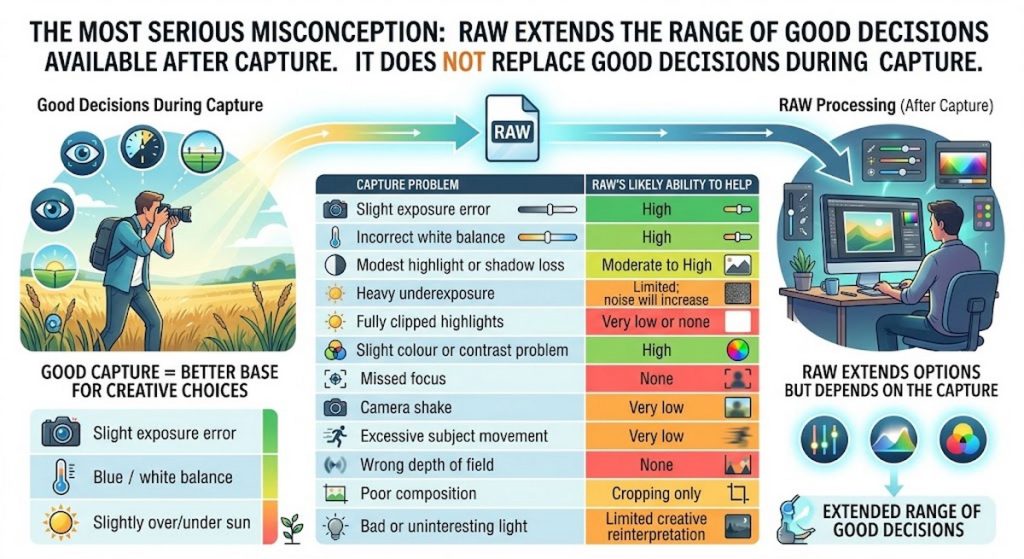
The danger is that flexibility can be mistaken for immunity. RAW cannot restore fully clipped highlights, repair missed focus, choose a better shutter speed or protect a catalogue from drive failure. The best workflow treats RAW as a strong starting point – not as permission to be careless.
Matt Kloskowski has a very good video on the subject here on Youtube
Anthony Morganti has some good information on DNG files.
| If you are doing this… | Think of it as… |
|---|---|
| Editing a RAW in Lightroom | 🟢 RAW processing |
| Editing a RAW in Adobe Camera Raw | 🟢 RAW processing |
| Opening a RAW as a Smart Object and reopening it in ACR | 🟢 RAW processing |
| Lightroom → Edit in Photoshop | 🔵 Rendered pixel editing |
| ACR → Open in Photoshop | 🔵 Rendered pixel editing |
| Camera Raw Filter on a normal layer | 🔵 Pixel editing |
| Camera Raw Filter as a Smart Filter | 🔵 Non-destructive pixel editing |
| Photoshop adjustment layer | 🔵 Non-destructive pixel editing |
Misconception 1. RAW extends the range of good decisions available after capture.
Misconception 2. RAW versus JPEG is an absolute choice
JPEG can be entirely appropriate when:
- Images must be delivered immediately.
- Storage or transmission speed matters.
- The camera’s colour processing already produces the required result.
- Lighting and exposure are controlled.
- Only minor corrections will be required.
- Large volumes of routine photographs must be handled efficiently.
RAW is most valuable when:
- The scene has difficult contrast or mixed lighting.
- Colour accuracy matters.
- Substantial adjustment may be needed.
- The photograph is unique or cannot be repeated.
- High-quality printing is intended.
- Long-term reprocessing value matters.
RAW+JPEG is a useful compromise, but it increases storage use and can complicate importing, sorting and duplicate management.
Misconception 3. RAW can rescue ‘anything’
| Potential mistake | What goes wrong | Better practice |
|---|---|---|
| Treating RAW as protection against poor exposure | Severe clipped highlights contain no recoverable detail. Deeply underexposed areas may contain heavy noise or weak colour. | Expose carefully and check the histogram and highlight warnings. |
| Assuming everything can be recovered | Focus errors, camera shake, subject movement and shallow depth-of-field mistakes are normally permanent. | Get focus, shutter speed and depth of field right in camera. |
| Deliberately underexposing | Continually lifting dark RAW files increases noise, colour blotching and banding. | Give the sensor adequate light without clipping important highlights. |
| “Exposing to the right” too aggressively | The camera histogram is normally based on a processed JPEG preview, but pushing exposure too far can still clip RAW channels. | Use the histogram as guidance and leave a small highlight margin until you know your camera. |
| Ignoring individual colour channels | The overall histogram may look safe while the red, green or blue channel is clipped. This commonly affects sunsets, flowers and coloured lighting. | Check the RGB histogram and inspect strongly saturated areas. |
| Believing white balance never matters in RAW | White balance is adjustable, but extreme corrections can amplify noise or clip a colour channel during capture. It also affects exposure judgement through the JPEG preview. | Set a reasonably accurate white balance, especially under unusual lighting. |
| Expecting the RAW file to resemble the camera preview | The rear-screen image uses the camera’s JPEG processing, picture style, sharpening and contrast. RAW software may initially render it flatter or differently. | Select an appropriate camera profile before judging the image. |
| Applying the wrong camera or colour profile | Colours, contrast and skin tones can change significantly before creative editing begins. | Establish the correct profile as the first processing decision. |
| Making extreme shadow and highlight recovery the default | Excessive recovery produces flat, grey or unnatural images, along with halos and noise. | Recover only what supports the photograph; retain believable contrast. |
| Oversaturating colours | RAW files often begin relatively muted, tempting users to apply excessive saturation. This can clip colours and destroy subtle variation. | Prefer restrained vibrance and targeted Hue, Saturation and Luminance adjustments. |
| Incorrect noise reduction | Too little leaves distracting noise; too much removes skin, foliage and fine texture. | Judge noise reduction at 100% view and balance it against detail retention. |
| Oversharpening | RAW needs initial sharpening, but excessive sharpening produces halos, brittle detail and stronger noise. | Separate capture sharpening from creative and output sharpening. |
| Judging sharpness while zoomed out | A fit-to-screen preview can hide noise, halos, missed focus and texture damage. | Inspect critical areas at 100%, but also judge the final image at its intended size. |
| Editing solely at 100% | Small defects can be exaggerated even though they disappear in the final print or web image. | Combine pixel-level inspection with normal viewing and output-size previews. |
| Using automatic lens corrections blindly | Distortion correction may crop important edges; strong vignetting correction can reveal noisy corners or stretch detail. | Compare corrections on and off and inspect the image edges. |
| Applying local corrections before global corrections | Later exposure, profile or white-balance changes can make masks behave differently. | Establish the global tonal and colour foundation before detailed masking. |
| Using too many masks | Overlapping masks can produce halos, inconsistent colour and an artificial “processed” appearance. | Use the smallest number of masks that achieve a clear purpose. |
| Editing the preview rather than the photograph | Attention shifts toward sliders, histograms and recoverable detail rather than subject, light and visual meaning. | Decide what the photograph should communicate before detailed processing. |
| Failing to calibrate the display | A bright, overly cool or saturated monitor causes dark prints and unreliable colour decisions. | Use a controlled display brightness and, ideally, hardware calibration. |
| Exporting in the wrong colour space | An Adobe RGB or ProPhoto RGB image may appear wrong in software that assumes sRGB. | Use sRGB for general web and screen delivery unless another space is specifically required. |
| Exporting at unsuitable bit depth | Moving too early to an 8-bit file can increase the risk of banding during strong later adjustments. | Retain RAW or 16-bit data during substantial editing; convert for final delivery. |
| Applying incompatible RAW settings in batches | One preset may work poorly across different cameras, lighting conditions or ISO values. | Batch-apply only suitable foundation settings, then review individual images. |
| Depending on proprietary adjustments | Edits stored only in one application may not transfer to another RAW processor. | Preserve the original RAW files and export finished master files when long-term portability matters. |
| Confusing non-destructive with permanent | Non-destructive editing protects the original, but catalogue corruption, missing sidecars or failed drives can still lose all editing work. | Back up RAW files, catalogues, sidecars and important final exports. |
| Retaining every RAW file indefinitely | Storage, backups and catalogue performance can become costly without improving the collection. | Cull carefully while protecting unique, commissioned or historically valuable images. |
This is available in PNG format.
For comfortable A4 printing, divide this poster into a five-page edition with one family per page and substantially larger text.
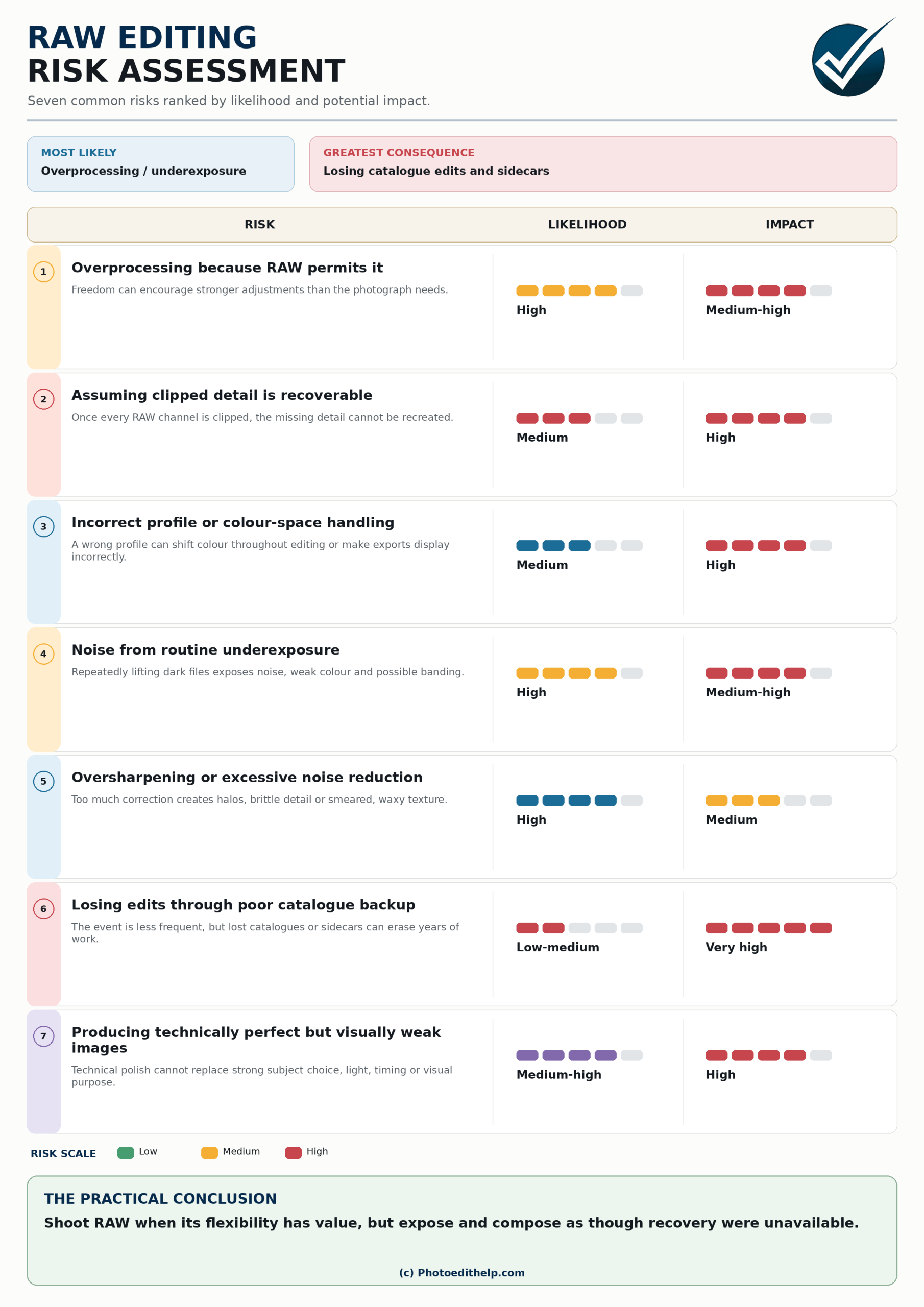
5. Risk assessments
| Risk | Likelihood | Impact |
|---|---|---|
| Overprocessing because RAW permits it | High | Medium–high |
| Assuming clipped detail is recoverable | Medium | High |
| Incorrect profile or colour-space handling | Medium | High |
| Noise from routine underexposure | High | Medium–high |
| Oversharpening or excessive noise reduction | High | Medium |
| Losing edits through poor catalogue backup | Low–medium | Very high |
| Producing technically perfect but visually weak images | Medium–high | High |
The practical conclusion is: shoot RAW when its flexibility has value, but expose and compose as though recovery were unavailable. Download this risk table (in PDF). Good RAW editing is less about moving every slider and more about protecting the quality of the captured information. Start with a technically sound file, make each adjustment for a clear reason, and judge the finished photograph – not the apparent power of the software.