
Scottish Raptors and Owls
Raptors in Scotland face many conservation threats, including illegal persecution, habitat change or loss, declining prey populations, windfarms and climate change.
Read more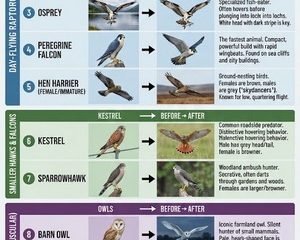
Raptors in Scotland face many conservation threats, including illegal persecution, habitat change or loss, declining prey populations, windfarms and climate change.
Read more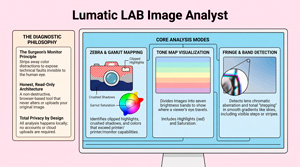
The UPDATED Interactive Image Analyst is a FREE browser-based diagnostic tool designed by LumaticLAB to help photographers identify technical flaws without altering the original file..
Read more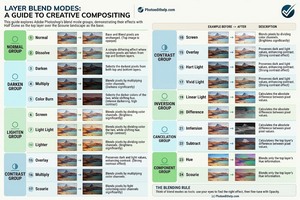
Blend Modes Explained Simply. In addition to being able to edit image properties like brightness, contrast, hue, and saturation, you can also obtain additional visual effects by applying a variety of Blend Modes.
Read more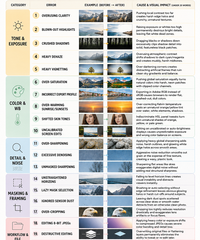
Post-processing is where an image gets refined – or completely ruined by heavy-handed adjustments. Here are the top 20 post-processing mistakes grouped logically into workflow categories, along with their root causes and visual impacts on your final images.
Read more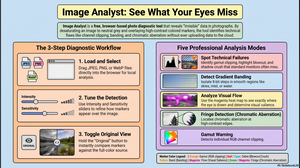
Every photograph hides information your eye glosses over. A sky that looks smooth is quietly banding into steps. A highlight you thought was bright is actually clipped, its detail gone for good. A corner of the frame is pulling attention away from your subject without you noticing. Image Analyst is[…]
Read more
We’ve made a small update to this little tool. It is similar to Adobe’s Photoshop Color Picker and has saved us quite a lot of time when creating and the website and documenting our apps. Creative professionals often grapple with the subjectivity of color—the “which blue?” ambiguity. This friction compromises[…]
Read more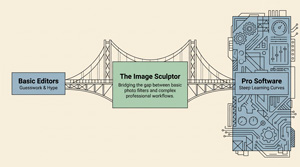
Image Sculptor – Professional Portability Without the Price Tag. Image Sculptor by Lumatic Lab is a free, privacy-focused web application designed for photography enthusiasts who require more creative control than basic editors offer without the complexity of professional software. It also helps in today’s economically challenged world by being optimized[…]
Read more
Blend modes are a cornerstone of non-destructive photo editing, allowing you to combine layers in complex ways by controlling how their pixels interact based on mathematical formulas . While most blend modes treat the Opacity and Fill sliders identically, a specific group known as the “Special 8” creates unique results when you adjust Fill instead of Opacity, unlocking powerful creative effects.
Read more
The converter is designed to require no technical knowledge. As with all our Apps it is FREE, runs on modern web browsers and entirely locally so your personal data is not at risk and your images will not be ‘scraped’ or used for AI training purposes.You do not need a login, there is no fee to pay,[…]
Read more
The Color Palette Generator is a sophisticated web application built with Next.js to assist photographers and web designers master color theory. It features a professional-grade color picker and harmony panels that automatically calculate diverse schemes, such as monochromatic and triadic relationships. Users can extract palettes directly from uploaded images, fine-tune selections using HSL or HEX inputs, and test designs through color[…]
Read more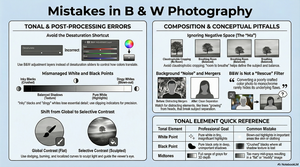
Many black-and-white photographs appear dull. This staff article offers professional techniques to inject visual impact into monochrome work. Whilst the document and graphic mention Adobe products, the techniques and issues are applicable to most photo editing applications. It highlights the fundamental mistake of relying on colour contrast rather than luminance, explaining that successful images require a deep[…]
Read more