
Adobe Relight in Photoshop was released on September 28, 2026. IT is claimed by Adobe that Relight is a groundbreaking generative AI feature. It was added to Photoshop Beta (versions 27.10.0 and 27.12.0).
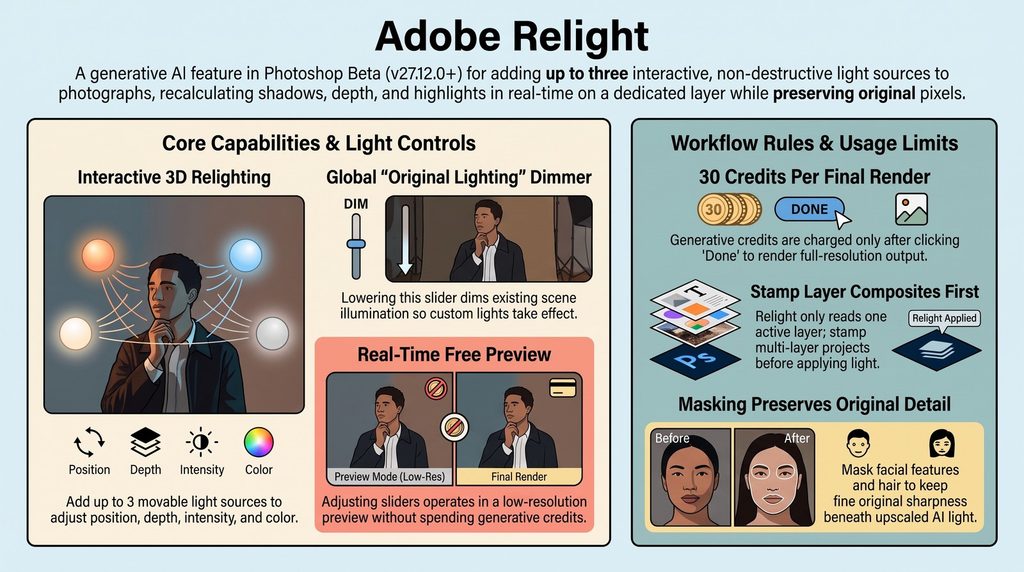
Relight is designed to solve complex lighting challenges after a shoot is finished when Relight enables creators to place up to three interactive, non-destructive, and fully movable light sources onto an image. Instead of painting a flat digital glow, the tool recalculates ambient geometry, light attenuation, and directional shadows across the subject in real time. Users can incorporate up to three interactive, non-destructive light sources into their images, modifying properties such as placement, hue, and brightness while consuming generative credits upon final rendering.
The feature has sparked an intense debate across the creative industry. Retouchers and commercial compositors praise its ability to end tedious manual light painting and rapidly speed up complex lighting setups.
However, critics point out that the cloud up-scaling pass can introduce an overly smooth, synthetic finish, leaving portrait subjects looking like Unreal Engine 3D avatars or introducing subtle, unwanted shifts to facial features and hair. We have grouped the most common critical complaints below :
Generative Credit Costs & Monetization
- High Credit Draw: Selecting Done to render the final image costs 30 generative credits, and every subsequent re-edit charges an additional 30 credits. NOT THE CASE WHEN USING OUR LumaticLAB RELIGHT (POC)
- Feedback on Testing Limits: Multiple users argue that charging 30 credits for a tool currently in beta restricts testing and feedback collection. Those on smaller subscription plans (such as single-app or 20GB Photography plans) note that allotments are consumed rapidly.
- Counterpoints from Community Experts: Community representatives highlight that cloud GPU rendering is computationally costly (around $0.15 per render) and point out that higher-tier Pro plans include substantial monthly allowances (4,000 credits)
2. Interface & Usability Feedback
- On-Canvas Light Icon Obstruction: Users frequently report that the circular light handle sits directly over the subject while working, making it difficult to evaluate subtle visual details. Adobe community managers have confirmed that an option to hide the light icon is on their development list.
- 3D Depth Navigation: Moving lights in 3D space using the Close/Far depth control feels unintuitive to some creators, leading to feature requests for a visual 3D workspace or depth indicator.
- Shortcut & Focus Conflicts: Entering numeric values into adjustment fields steals keyboard focus, causing
Ctrl+Z/Cmd+Zto undo typed text instead of reverting lighting changes.
3. Image Quality & Technical Limitations
- Texture Softening: Although final renders maintain the document’s pixel dimensions, fine details (such as facial skin texture, hair, and clothing fabrics) can appear softer due to the generative upscaling process.
- 8-Bit Internal Processing: Relight operates on 8-bit image data internally. While 16-bit and 32-bit documents remain in their native mode, smooth gradients on the Relight layer may exhibit minor banding, and 32-bit HDR headroom is not preserved.
4. Feature Requests & Workflow Adaptations
- Desired Controls: Community members have requested gobos/cookies (light-shaping masks) for casting shaped shadows, as well as presets for distinct light qualities like flash versus continuous studio lighting.
- Handling Composites: Relight processes only a single selected layer at a time. To relight a complex composite, users must stamp all visible layers onto a new top layer (
Ctrl + Alt + Shift + Eon Windows /Command + Option + Shift + Eon macOS) before creating the Relight layer. LAYERS ARE NOT implemented in the LumaticLAB RELIGHT (POC)
5. Beta Updates & Troubleshooting
- Missing Tool Fixes: Users who cannot locate the Relight command in Photoshop Beta build
27.12.0usually resolve the issue by signing out and back into the Creative Cloud Desktop application to refresh update availability. - Institutional Account Restrictions: Students or enterprise users experiencing render failures often find that generative AI privileges have been disabled at the administrator level
A Video worth watching is from Anthony Morganti and is available here.
Our RELIGHT (POC) is available here with full documentation available here.