
The UPDATED Interactive Image Analyst is a FREE browser-based diagnostic tool designed by LumaticLAB to help photographers identify technical flaws without altering the original file. The software functions as a non-destructive monitor, providing objective data on issues like tonal distribution, colour gamut, and lens aberrations allowing YOU to make informed creative decisions with confidence. Full documentation is available here in (ZIP) format. There is also a slide deck here that gives an insight to the issues.
Use it on its own to analyse an image, plan your editing workflow, then create the finished result in your favourite editor. Or pair it with LumaticLAB Image Sculptor or Mono Sculptor, where the Analyst diagnostics become fully interactive, updating instantly so instead of guessing whether an edit has improved an image, you’ll know.
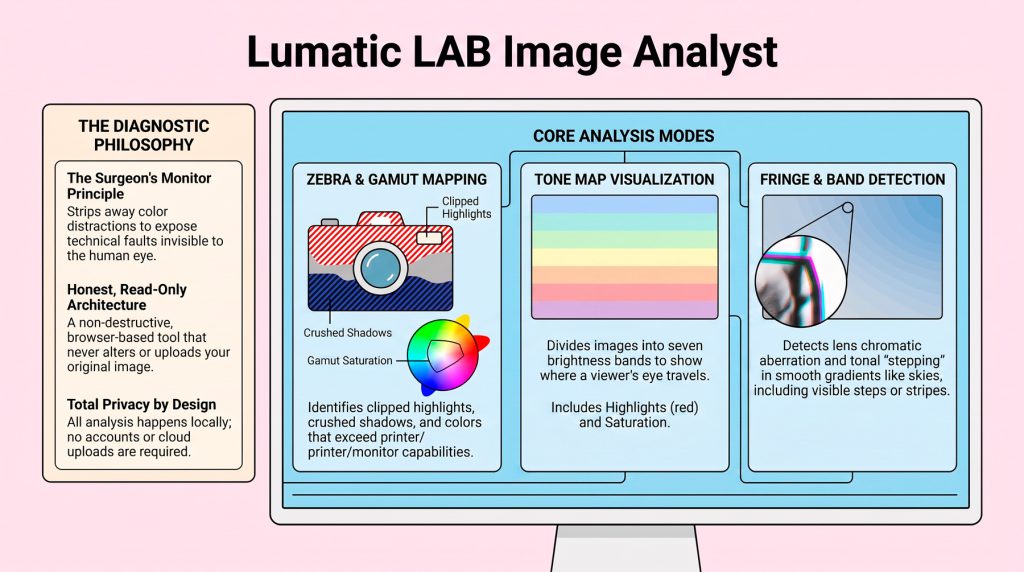
Built around the principle of “Learn to See”, Image Analyst acts like a surgeon’s monitor for your photographs. By temporarily stripping away colour distractions and overlaying clear diagnostic markers, it exposes issues that are often invisible to the human eye – helping you separate genuine technical faults from deliberate artistic choices. We have also created a pdf document to help beginners understand the basics of the various forms of analysis.
Professional Diagnostics Made Simple
Image Analyst combines advanced image analysis with plain-language explanations, making professional-quality diagnostics accessible to photographers of every skill level. Key analysis modes include:
- Overall View – Instantly checks for clipping, gamut problems, banding and chromatic aberration in a single pass.
- Tone Map – Visualises the complete tonal distribution of your photograph, revealing whether shadows, midtones and highlights are balanced.
- Gamut – Highlights colours that exceed the capabilities of your monitor or printer, helping avoid unpleasant surprises in print or on screen. As the eye is to the most saturated patch, so orange gamut warnings often mark unintended focal points.
- Zebra – Clearly identifies clipped highlights and crushed shadows where image detail has already been lost.
If zebra lights up somewhere unimportant, it’s stealing focus. - Tone Map – The eye travels from dark toward light and settles on the brightest, highest-contrast area — so the band colours show, at a glance, where a viewer’s eye will go. If the brightest bands sit on your subject, the composition leads the eye correctly; if they’re scattered to the edges or pooled in empty sky, the eye wanders and the image feels unfocused.
- Fringe – Chromatic aberration is a lens fault where colours focus at slightly different points, leaving thin magenta, green, or blue fringes along high-contrast edges. It’s generally worst toward the frame’s corners and with wide apertures.
- Band – Banding is a visible stepping in tones that should blend smoothly — a gradient like a sky breaks into distinct stripes instead of a seamless transition. It appears when there aren’t enough tonal values to render a gradient, often worsened by heavy editing, compression, or 8-bit files. Smooth areas show it most.
- Rule of Thirds Overlay – The rule of thirds divides the frame into a three-by-three grid with two evenly spaced horizontal and vertical lines. Placing your subject along a line, or on one of the four points where lines cross, tends to feel more balanced and natural than centring it. Despite the name – It’s a guide, not a rule.
Our pdf document is designed help beginners gain a basic understanding of the various forms of analysis.
Privacy Built In
Everything happens locally inside your browser. Images never leave your computer, no accounts are required, and nothing is uploaded to the cloud. Built on the LumaticLAB Honest, Read-Only, Local™ architecture, Image Analyst delivers objective diagnostics while keeping your photographs completely private.
Learn Faster. Edit Smarter.
Whether you’re just beginning your photography journey or refining a professional workflow, Image Analyst helps you develop the most valuable photographic skill of all – seeing your images objectively. The goal is not perfection. It is to understand each test, decide which “faults” are actually part of the look you want, and learn what to change to build your own style.
By revealing problems before you publish, print or share, Image Analyst transforms image evaluation, giving you the confidence to create photographs that look exactly the way you intended.