
Anthony Morganti discusses significant updates introduced in on1 Photo RAW 2026.4, with a specific focus on the capabilities and limitations of its new Restore AI tool.
This version of the software features a redesigned customisable home screen to improve user workflow by providing quick access to recent projects and tutorials. The headline feature, exclusive to the Max version, uses cloud-based technology to automatically repair damaged or aged photographs through colourisation and sharpening. While the AI excels at reviving scanned film and old prints, the author warns that it can produce unnatural results when applied to human faces or wildlife. Consequently, Anthony advises photographers to balance these automated tools with manual retouching to maintain the authentic appearance of subjects.
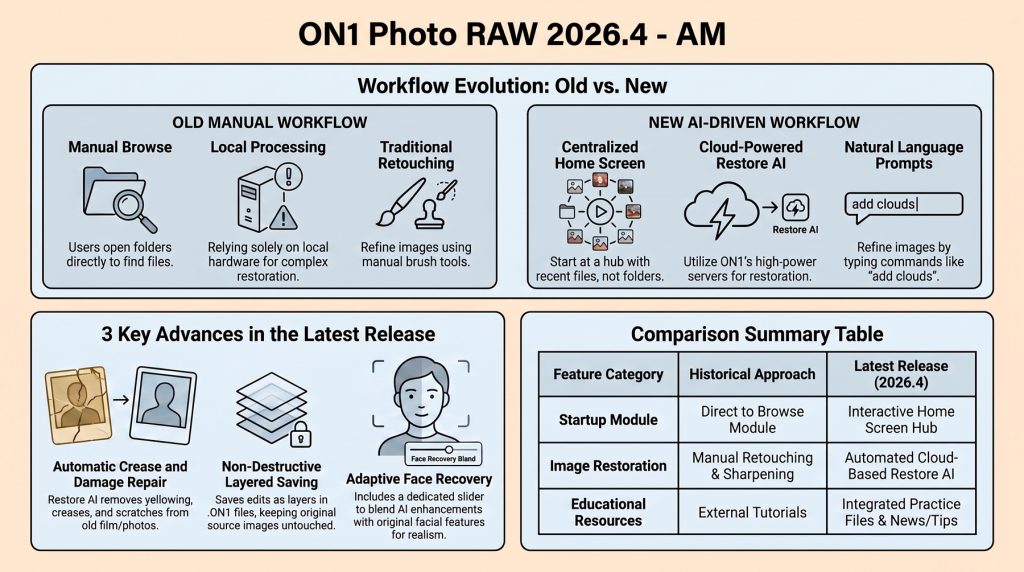
While AI automation provides a powerful starting point, expert results often require a hybrid approach. Features like Face Recovery currently lack nuance, sometimes producing “cartoony” results. However, this technology is expected to improve considerably over the next 6 to 12 months.
- The Intuitive Home Screen. This new startup hub simplifies navigation by centralizing recent folders, albums, and images. It also includes practice files, allowing users to sharpen their skills using professional sample images provided today.
- Cloud-Powered Restore AI. Exclusive to the Max version, this tool utilizes ON1 servers to automatically repair physical damage, restore faded colors, and sharpen old photographs with remarkable speed and professional-grade precision right here.
- Text-Based Refinement. Use “Refine the Results” for natural language edits like adding clouds. For best results, experts recommend inputting all instructions—including sharpening and object removal—simultaneously rather than using multiple iterative steps.
- The Portrait & Wildlife Caveat. Face Recovery can produce inaccurate results. Photographers should exercise caution with portraits and wildlife to avoid misrepresenting authentic features. Manual tools remain better for preserving a subject’s true likeness daily.
- Non-Destructive Layered Workflow. Saving in the “ON1 Photo” format creates a layered file, preserving the original image as a base. This non-destructive approach ensures source files remain untouched while allowing further manual edits.
Overall, the guide serves as both a functional walkthrough and a critical evaluation of modern AI-assisted image restoration, but for now, manual retouching remains superior for maintaining the authentic likeness of familiar subjects or wildlife. – Steve Warner