
Recently there have been several updates to Lightroom Classic (LR Classic) and Adobe Camera Raw (ACR).
Key updates include masking refinements that allow users to adjust edges and feathering more precisely, alongside a render to DNG feature for creating a clean workspace from heavily edited files. Technical tools like autofocus point displays to check sharpness and a vectorscope for professional-grade colour balancing. These features collectively aim to simplify complex editing tasks while providing photographers with more granular control over skin tones and compositional layouts.
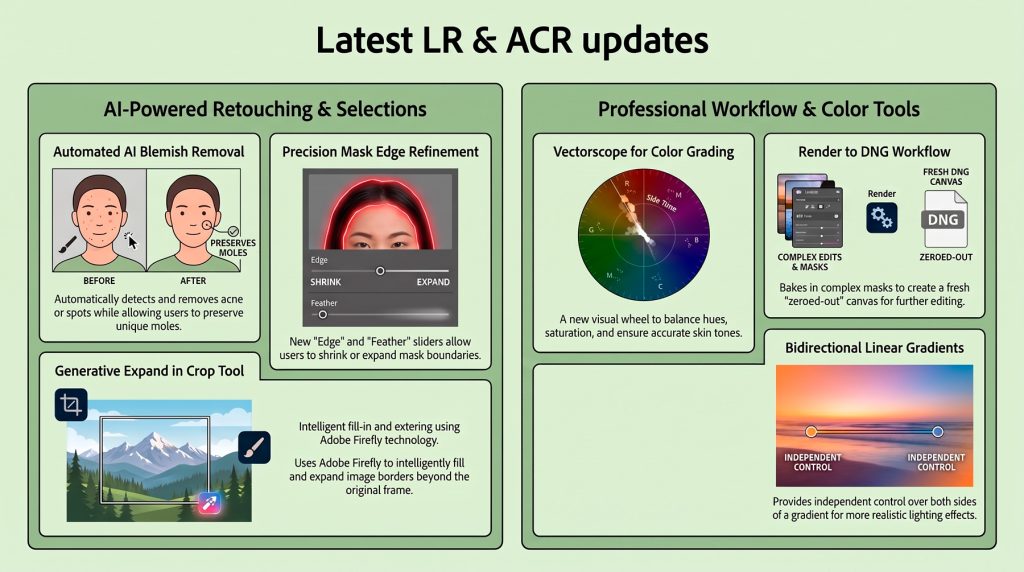
The Impactful Takeaways
- AI Blemish Removal (ACR v18.5): ACR now intelligently maps skin defects. Use the Fade slider to balance acne removal with mole preservation, and the Refine tool’s Restore brush to manually protect tattoos or jewelry the AI misidentifies.
- Generative Expand: Use Adobe Firefly or Content-Aware Fill to extend canvas edges within the crop tool, rescuing tight crops and expanding panoramas effortlessly.
- Vector Scope for Color: Visualize hue and saturation with a dedicated skin tone line, providing a precise visual target for professional color balancing and skin accuracy.
- Workflow Power-Ups: Render to DNG flattens complex masks and resets sliders to zero, enabling “slider recovery” to push dynamic range even further. Bidirectional Gradients allow independent feathering and control for each edge of a mask.
Reflection & Analysis
We have entered an era of “granular AI” where character preservation is paramount. These tools provide the technical precision required to eliminate distractions while maintaining a subject’s authentic identity. At the same time they do support our White Paper on the future direction for Adobe products in the consumer marketplace