
ON1 Effects 2026 treats presets as editable recipes rather than fixed looks. The Preset Drawer is the starting point: it lets you browse style collections and move between Presets and Filters. A preset can provide a useful direction quickly, but its individual filters remain visible in the Effects stack, where their settings can be inspected and changed. This non-destructive approach makes presets a practical starting point for learning how a look is built, not simply a one-click finish.
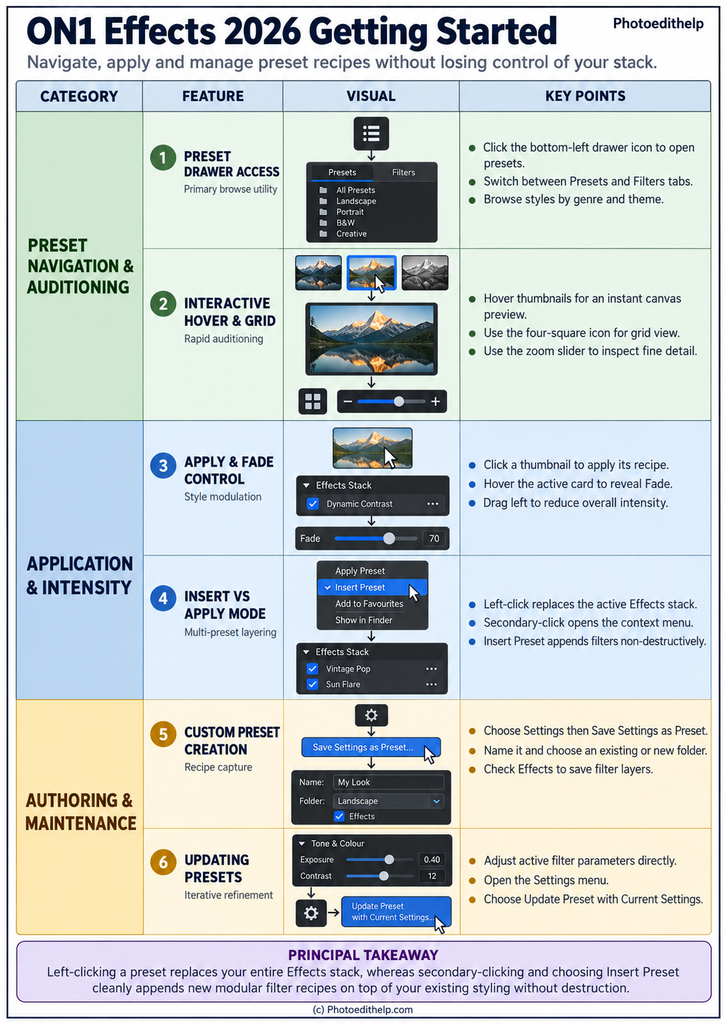
Auditioning should happen before commitment. Hovering over a preset thumbnail gives a rapid preview on the image, while the grid view makes it easier to compare several candidates. Once a preset is applied, the Fade control reduces the opacity of the Effects filters applied by that preset. This is often the quickest way to make a strong look more believable. Fade does not replace careful adjustment, but it is a useful global control when the recipe is broadly right and simply too forceful.
The key operational distinction is between applying and inserting. Selecting another preset normally replaces the current Effects recipe, so it is appropriate when testing alternative complete looks. Insert Preset is different: use the context menu to append another preset’s Effects filters to the existing stack. This supports modular work, such as adding a texture or tonal treatment after an established base look. Inspect the stack afterwards, because each added recipe can contain several filters and their combined effect can become excessive quickly.
When a combination works, save it as a custom preset from Settings. Give it a clear name, place it in a sensible folder, and ensure Effects is selected when the filter layers are the part you want to retain. You can refine a saved recipe later by adjusting the active filters, then choosing Update Preset with Current Settings. Update deliberately: it changes the preset definition for future use, while photographs already edited with the earlier version keep their existing settings. Clear naming and restrained recipes make a personal preset library easier to trust and reuse.
PRINCIPAL TAKEAWAY
Left-clicking a preset replaces your entire Effects stack, whereas secondary-clicking and choosing Insert Preset cleanly appends new modular filter recipes on top of your existing styling without destruction.
(c) Photoedithelp.com