
Restore AI & Home Module
Top 4 Impactful Takeaways
1. The Home Module: The New Command Center
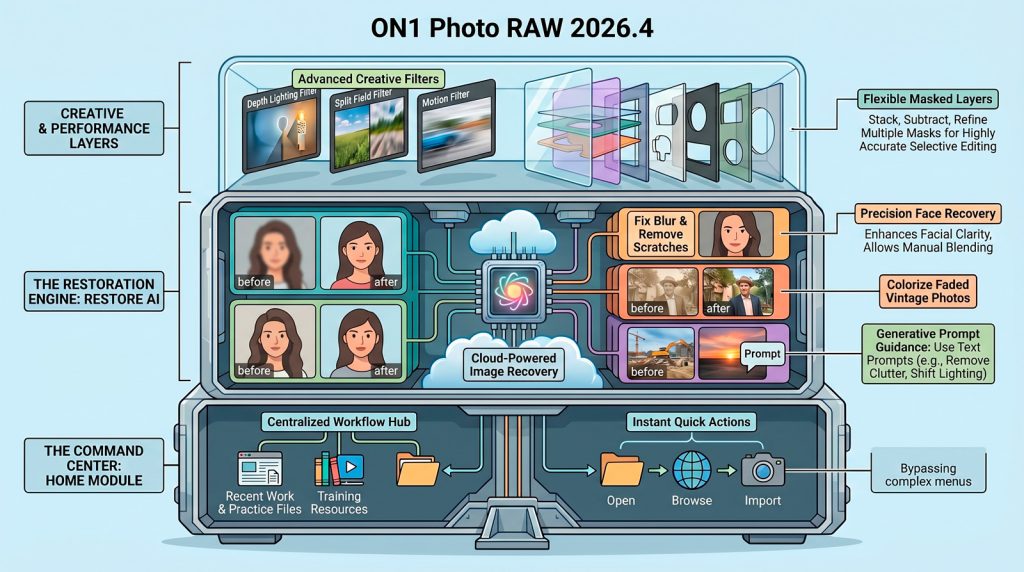
The Home Module serves as the centralized hub that users encounter upon launching the application. It provides instant access to quick actions – such as opening photos, browsing folders, or importing from devices – alongside a clear view of recent work and integrated training resources. The module includes pre-installed practice files that link directly to tutorial content, ensuring users can learn features in a hands-on environment.
Reflection: This redesign significantly reduces “menu fatigue” by placing the most critical starting points front and center. For new users, the inclusion of practice files lowers the barrier to entry, allowing them to master complex tools without the pressure of using their own high-stakes images first.
2. Restore AI: Cloud-Powered Resurrection (Max Exclusive)
Exclusive to ON1 Photo RAW Max, Restore AI is a specialized tool designed to repair blurry, faded, or physically damaged photos. It utilizes powerful cloud-based AI models to reconstruct lost detail, remove scratches and dust, and correct color degradation. Because these models are processed on server-grade hardware, the software bypasses the hardware limitations of standard consumer computers.
Reflection: This feature represents a shift toward “digital archeology.” However, photographers must note that Restore AI is not a non-destructive adjustment; it generates a new pixel-based image. The emotional value of salvaging “shoebox” film prints is immense, but the technical reality requires a focused workflow to integrate these new pixels into a layered project.
3. The Generations Pane: Prompt-Based Precision
The Generations Pane introduces a text-to-image guidance system. Users can influence the AI by providing specific instructions, such as “make his uniform green” or “remove the orange netting.” This allows the photographer to correct “hallucinations” or “best guesses” made by the AI during the initial restoration pass.
Reflection: This marks a significant shift in the photographer’s role from “manual repair technician” to “creative director.” The AI acts as the laborer handling the heavy lifting of reconstruction, while the photographer provides high-level intent, acting as the editor-in-chief of the final visual narrative.
4. Creative Filters: Post-Capture Lighting and Motion
The update introduces four distinct creative filters: Depth Lighting for independent foreground/background control, Split Field for emulating diopter effects to balance wide-angle perspective, Double Exposure with subject protection and randomization, and the Motion filter for adding artificial camera movement like panning or zoom.
Reflection: These tools offer a form of “time-traveling” photography. They allow users to manipulate lighting conditions and physical movement long after the shutter has clicked, providing a level of creative freedom that was previously only possible through complex in-camera techniques or tedious manual masking.
According to Dan Harlacher, VP of Product, ON1 – “Restore AI is designed to take your photos from ho-hum to amazing. It can sharpen soft photos, recover lost detail, and correct faded and shifted colors better than anything I’ve ever seen. ON1 Photo RAW is like if Photoshop and Lightroom got together and had a baby and you kept all the good stuff.”
Supporting these innovations is a significantly upgraded Masked Layers system. This advanced workflow backbone allows photographers to stack, combine, and subtract multiple masks with exceptional flexibility, providing the precision necessary to blend newly generated Restore AI pixels with original image data.