
The Adobe Vectorscope
Adobe text details various manual and automatic sliders for managing exposure, contrast, and white balance, alongside advanced tools like Point Color and Curves for precise adjustments.
Read moreItems delivered by Adobe eg: Julieanne Kost
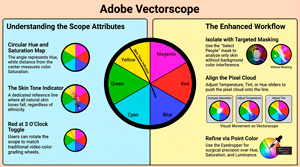
Adobe text details various manual and automatic sliders for managing exposure, contrast, and white balance, alongside advanced tools like Point Color and Curves for precise adjustments.
Read more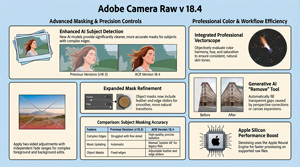
In the video, Julianne Kost details the functional upgrades and creative tools introduced in Adobe Camera Raw version 18.4, with a primary focus on AI-driven masking and colour precision. Significant improvements have been made to subject isolation and mask refinement, including the addition of a bidirectional linear gradient for more complex exposure adjustments. A professional vectorscope is now integrated into the[…]
Read more
Julieanne Kost talks about Adobe’s Lightroom Classic 15.4 update that introduces a suite of AI-driven enhancements designed to streamline photographic workflows and improve editing precision. She highlights key elements in the release, discussing refined masking capabilities and assisted culling tools that use intelligent scoring to evaluate subject focus and facial expressions. The software now includes a robust duplicate detection[…]
Read more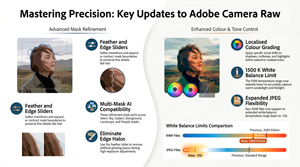
Julieanne Kost explores sophisticated software upgrades designed to improve the functionality of Camera Raw for digital photographers. The integration of AI-driven precision within Camera Raw (ACR) marks a significant evolution in the efficiency of modern post-processing, offering photographers a non-destructive workflow with unprecedented pixel-level fidelity. These enhancements represent a vital shift from[…]
Read more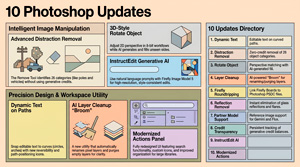
Julieanne Kost outlines ten significant enhancements to Adobe Photoshop aimed at streamlining creative workflows and improving image manipulation. She details advanced AI-powered tools designed for the automatic removal of distractions and reflections, alongside a new feature for adjusting the perspective of isolated objects. Significant updates to dynamic text allow for flexible placement along curved paths, while layer cleanup utilities help[…]
Read more
Adobe’s update to Lightroom Classic version 15.3 introduces significant enhancements centered on Firefly AI integration and improved workflow efficiency. More on Firefly here from Julieanne Kost of Adobe. Lightroom Classic has officially shed its “slider-only” skin, becoming a cloud-connected AI powerhouse. In version 15.3, your creative vision is no longer tethered to a progress[…]
Read more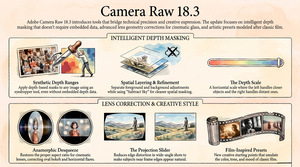
https://youtu.be/2WDnMKtmCeY The video tutorial by Julieanne Kost introduces the new features in Adobe Camera Raw 18.3, focusing on depth range masking, lens correction, and film-inspired presets. The provided text outlines the sophisticated updates introduced in Adobe Camera Raw 18.3, focusing on tools that refine both technical accuracy and creative expression. A[…]
Read more
https://youtu.be/tVCV0VmoZnw Julieanne Kost uses custom Lightroom Classic presets to speed up photo editing by automating complex masking tasks using presets for masking. Rather than manually selecting individual elements, these tools allow photographers to generate sets of masks for landscape and portrait photography with a single click. She explains the technical process of importing the files and[…]
Read more
https://youtu.be/YaTBt6nLOd0 The introduction of Clarity, Dehaze, and Grain as dedicated adjustment layers significantly enhances non-destructive workflows by removing the need for complex workarounds like Smart Objects and offering superior integration into the layer stack. Elimination of Smart Object Requirements Unlike traditional filters or the previous method of applying these effects via[…]
Read more
https://youtu.be/OZ4BSDXrRH8 In her tutorial, Julieanne Kost introduces the AI status icon in Lightroom Classic, a feature designed to alert photographers when edits are applied in a suboptimal sequence. To avoid the time-consuming process of manually updating calculations, she recommends a specific workflow order starting with Denoise, followed by distraction removal and Generative AI tools. This structured approach ensures that[…]
Read more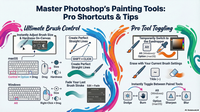
https://youtu.be/6Ealkbzfud0 Summary Julianne Kost provides 10 essential tips for efficiently using Photoshop’s painting tools, focusing on brush size, hardness, cursor options, tool switching, and advanced eraser functionalities. She explains how to quickly adjust brush attributes via keyboard shortcuts and HUD controls, customize cursor visibility for precision, and maintain brush settings[…]
Read more
https://youtu.be/bMXJwZuzP14 Summary In this detailed tutorial, Julieanne Kost demonstrates how to create a complex composite image in Photoshop by combining traditional and new techniques. Starting with setting up a high-resolution Photoshop document, she imports photos as smart objects from Lightroom Classic to preserve quality and allow non-destructive editing. The tutorial[…]
Read more
https://youtu.be/F5yy-XpLXOs Summary Julianne Kost introduces the new early access features in Lightroom Classic: assisted calling and auto stacking, designed to enhance productivity during photo import and organization. Assisted culling uses AI models to analyze portraits, automatically filtering images based on criteria like subject sharpness and eye focus. Users can adjust[…]
Read more
https://youtu.be/FcR0JvW6-T8 Summary In this video, Julianne Kost presents five new features in Adobe Camera Raw designed to enhance photo editing efficiency and quality. The automatic dust removal tool simplifies eliminating dust spots with visualization and batch processing options, including preset creation. The reflections removal feature is improved with a refined[…]
Read more
https://youtu.be/dKXqg50v1sA Summary Julian Kost presents 15 new features in Lightroom Classic that enhance photo editing efficiency and quality. Key additions include automatic dust removal, improved reflection removal, and enhanced object detection that now includes shadows and reflections. New color adjustment tools, such as the point color variance slider, allow for[…]
Read more
https://youtu.be/FcR0JvW6-T8 Summary Julianne Cost presents five new features in Adobe Camera Raw designed to enhance photo editing efficiency and quality. The first feature, automatic dust removal, allows users to easily detect and eliminate dust spots using a visualization tool, with options to copy, paste, and save these corrections as presets.[…]
Read more