
Skylum is consolidating its software by rebranding its primary editor simply as Luminar, aiming to create a unified ecosystem across desktop and mobile platforms.
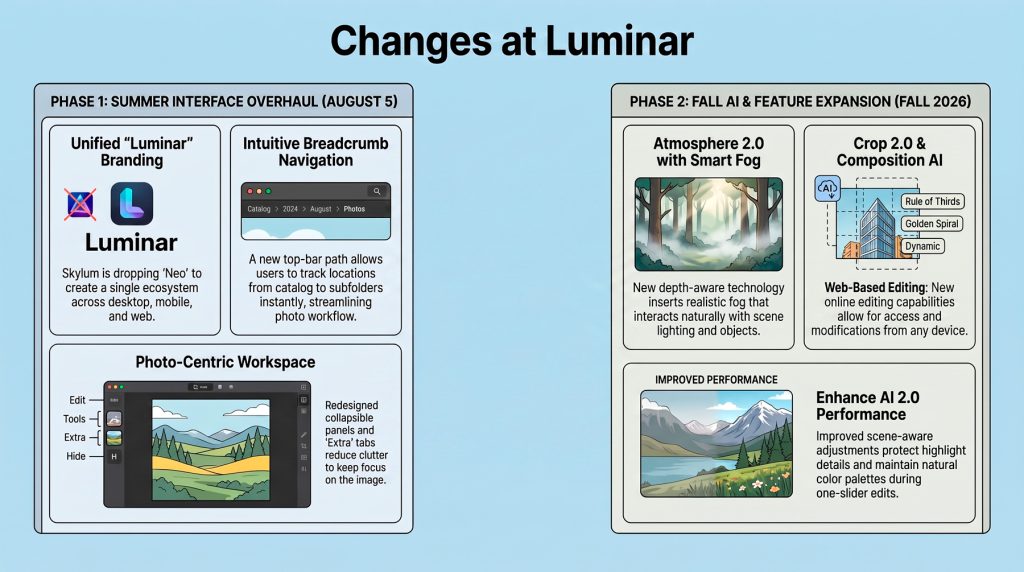
A significant interface overhaul is scheduled for August 2026, featuring a minimalist design that maximises image space and simplifies navigation for a more immersive editing experience. Current users will receive this visual update for free, while a more comprehensive feature upgrade follows in the autumn, will be a paid upgrade. This later release introduces intelligent AI tools designed for realistic atmospheric effects, automated composition suggestions, and natural-looking image enhancements. By refining the AI photo editing experience, this Luminar update aims to prioritize your creative vision over technical hurdles.
According to Skylum, this isn’t just a name change; it is a pivotal shift in their photo editing software strategy that reflects a strategic shift towards user-centric design and more sophisticated, scene-aware technology.
A Guide to the 2026 Luminar Evolution
1. Goodbye “Neo,” Hello Unified Ecosystem Architecture The removal of the “Neo” suffix signals a move toward brand consolidation across desktop, mobile, and web platforms. For professionals, this means a stable, unified ecosystem that ends the exhausting cycle of frequent rebranding. This UI redesign ensures that your editing environment remains consistent across devices, creating a more reliable foundation for long-term professional use.
2. The “Extra” Tab—A High-Speed Generative AI Hub A major win for the photo editing workflow is the new “Extra” tab. It centralizes Generative AI tools—Gen Erase, Gen Swap, and Gen Expand—alongside powerful utilities like Upscale and HDR Merge. By grouping these computational tools, Skylum effectively eliminates “context switching,” allowing you to stay in the creative flow without hunting through disparate menus.
3. Atmosphere 2.0 and the Refinement of Accent AI Arriving in the Fall 2026 release, Atmosphere 2.0 and Enhance AI 2.0 (featuring the flagship Accent AI) represent a shift toward “scene-aware” adjustments. These tools analyze depth and lighting to protect highlights, ensuring even maximum enhancements look natural. The design philosophy is clear: to keep the photographer’s “attention focused on the photograph.”
4. Navigation Redefined: Breadcrumbs, Modules, and RAM Efficiency The interface now features breadcrumb navigation and a reorganized right panel with collapsible modules (Presets, Tools, Edits, Info, Extras). Beyond aesthetics, technical performance is improved; masking is now more stable and consumes less RAM—a critical detail for editors working with large files. Furthermore, the new Creative Library integrates tutorials and marketplace assets directly into your workspace to support professional growth.
5. AI-Assisted Composition with Crop 2.0 Included in the Fall 2026 paid upgrade, Crop 2.0 automatically proposes multiple compositional variations based on image analysis. It is an artistic partner that encourages “thoughtful framing” by offering guides like the golden spiral, helping you find the strongest perspective instantly.
Sklum say the 2026 roadmap creates a professional-grade foundation for the future of digital editing. While the August 5th, 2026 UI overhaul and rebranding are free for current license holders, the advanced AI features in the Fall release require a paid upgrade. Mastering this intuitive new interface is your first step toward a more efficient, creative future.