
LUTs Should Work Everywhere – Not Just Where They Were Made
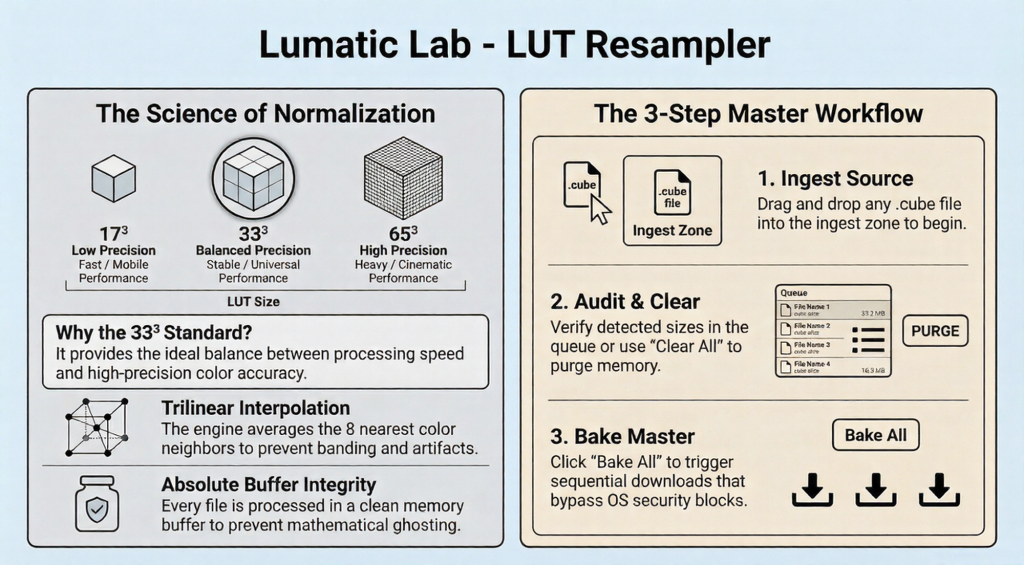
Creative tools don’t agree on standards – Some LUTs are built at 17³ for speed – Others at 65³ for cinematic precision. But most real-world editing environments quietly expect something in between but 33³ is the practical sweet spot for: – Reliable performance, Smooth tonal response and Cross-platform compatibility. That’s exactly what LUT Resampler creates.
The Hidden Problem
When LUTs aren’t aligned to a stable grid size, you can run into:
- Sluggish performance – Software rejection – Unexpected colour behaviour – Workflow friction
The Smart Fix
LUT Resampler doesn’t just resize LUTs. It rebuilds them. Using precision trilinear interpolation, every colour point is recalculated onto a clean 33³ master grid -preserving tonal flow and creative intent with No banding, No stepping, No compromise.
Why 33³?
Because it’s where precision meets practicality.
| LUT Size | Reality |
|---|---|
| 17³ | Lightweight but limited |
| 33³ | Stable and compatible |
| 65³ | Powerful but demanding |
By converting any LUT into this balanced format,LUT Resampler ensures your work stays:
- Portable – Predictable – Ready for any environment
Built for Real Workflows
- Batch processing keeps things efficient.
- Clean-buffer processing keeps results independent — preventing rounding drift across large jobs.
- Sequential downloads avoid operating system security interruptions.
The Result
- Your LUTs stop being tied to one ecosystem, they become Flexible, Reliable and Deployable anywhere.
- Because your creative decisions shouldn’t be limited by technical formats.
- An easy to understand overview of the entire process may be downloaded here
Technical Notes ::
Different LUT resampling methods don’t just affect smoothness — they change how colour relationships survive the transition from one cube size to another. The following are a few tables to try and give you an insight.
LUT Resampling Methods
| Method | How It Works | Strengths | Weaknesses | Best Use Case |
|---|---|---|---|---|
| Nearest Neighbour | Chooses closest grid point | Fastest | Severe banding, colour stepping | Real-time preview only |
| Trilinear | Interpolates across cube axes | Smooth, predictable | Slight colour flattening | Basic pipelines |
| Tetrahedral | Interpolates inside cube tetrahedrons | Highest colour fidelity | Slight contrast shifts | Professional resampling |
| Pyramidal | Multi-stage interpolation | Stable | Softens micro-contrast | Some video engines |
| Cubic | Curve-based smoothing | Very smooth gradients | Can blur colour separation | Film emulation LUTs |
| Sine-based | Frequency-domain interpolation | High theoretical precision | Rare, computationally heavy | Scientific workflows |
Practical Behaviour in Real Images
| Method | Gradient Handling | Skin Tone Accuracy | Saturation Stability |
|---|---|---|---|
| Nearest | Poor | Unstable | Breaks easily |
| Trilinear | Good | Acceptable | Slight desat |
| Tetrahedral | Excellent | Strong | Very stable |
| Pyramidal | Good | Slight softening | Moderate |
| Cubic | Excellent | Soft | Slight bleed |
| Sine | Excellent | Excellent | Excellent |
Downsampling Risk by Method
| Method | Banding Risk | Hue Drift Risk | Contrast Loss |
|---|---|---|---|
| Nearest | Extreme | High | Severe |
| Trilinear | Moderate | Moderate | Mild |
| Tetrahedral | Low | Low | Mild |
| Pyramidal | Low | Moderate | Moderate |
| Cubic | Low | Moderate | Moderate |
| Sine | Very Low | Very Low | Minimal |
Industry Reality Check
Most modern grading tools default to:
- Trilinear (fast, acceptable)
- Tetrahedral (higher-end pipelines)
Tetrahedral is widely considered the safest balance between for Fidelity, Stability and Performance
Rule of Thumb
- If quality matters → use Tetrahedral, If speed matters → use Trilinear BUT Avoid Nearest unless debugging