
Summary
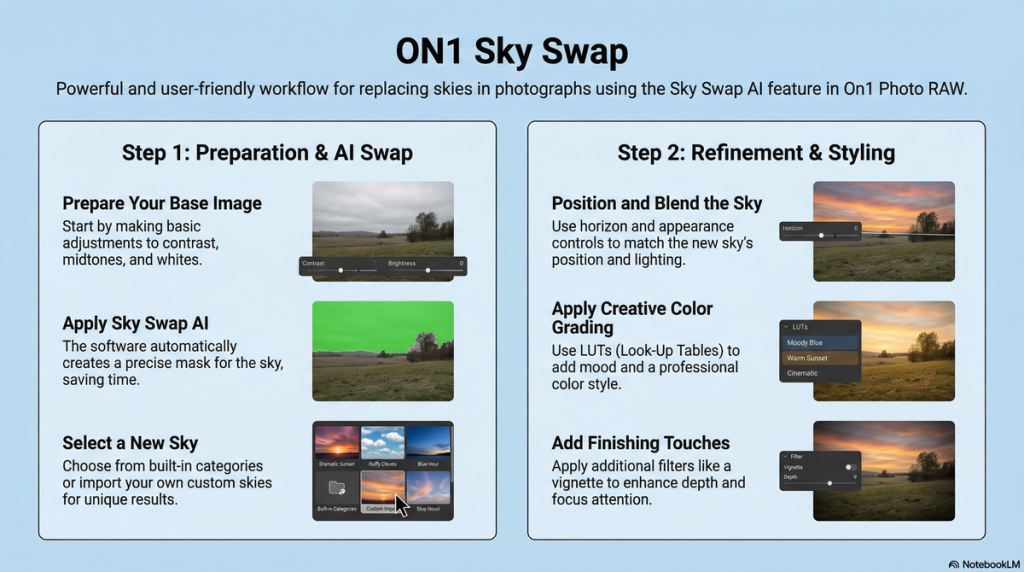
This video tutorial demonstrates how to enhance landscape photographs with dull skies by using the Sky Swap AI feature in On1 Photo RAW. Dylan walks viewers through a simple process to replace boring, overcast skies with dramatic, stormy skies.
Starting with basic image adjustments such as contrast and midtone tweaks, the tutorial then shows how to automatically mask and swap the sky using built-in and imported custom skies. Additional fine-tuning includes positioning the sky, adjusting brightness and warmth to match the foreground, and applying creative color grading using LUTs for added mood. The video also highlights importing custom skies and LUTs from the ON1 creative library.
Finally, Dylan adds a vignette effect to complete the dramatic look. The tutorial emphasizes ease of use and the powerful creative control available in On1 Photo RAW 2026 for transforming ordinary landscape photos.
Key Insights
- Sky Swap AI automatically creates a mask for the sky, eliminating manual selection.
- Basic image preparation involves adjusting contrast, midtones, and whites to improve the base photo before sky replacement.
- On1 Photo RAW offers a wide variety of built-in sky categories, including stormy, blue, and moody skies.
- Users can import custom skies and LUTs, expanding creative options beyond the default library.
- The “My Skies” category houses all imported skies for easy access.
- Sky positioning controls (like horizon shift) allow precise placement and removal of unwanted elements.
- Appearance adjustments such as brightness and warmth help blend the new sky naturally with the foreground.
- LUT filters provide extensive color grading options to add mood and style to the final image.
- Multiple filters, such as vignette, can be layered to enhance the artistic effect.
- The process is non-destructive, quick, and user-friendly, suitable for photographers of all skill levels.
Key Learning Points
- Preparing the image with basic tonal adjustments improves the final sky swap results.
- Automatic sky masking saves time and increases accuracy compared to manual masking techniques.
- Choosing the right sky category is essential to complement the existing lighting and atmosphere of the foreground.
- Importing custom skies allows for personalized and unique edits tailored to specific creative visions.
- Fine-tuning sky position helps avoid distractions and achieves a natural horizon line.
- Adjusting sky brightness and color temperature ensures harmony between the sky and foreground.
- Applying LUTs can dramatically change the mood, from vibrant color to desaturated or black-and-white styles.
- Importing custom LUTs expands artistic possibilities and can be tailored to an individual’s editing style.
- Adding vignette effects subtly guides viewer attention and enhances image depth.
- The entire workflow within On1 Photo RAW is integrated, making sky replacement and grading seamless without switching software.
Conclusion
On1 Photo RAW Sky Swap AI feature revolutionizes landscape editing by simplifying sky replacement with automatic masking, extensive sky libraries, and custom import options. The workflow – from basic tonal prep to creative grading – empowers photographers to transform dull, overcast scenes into dramatic compositions effortlessly.
Additional tools like LUTs and vignette effects provide layered control to perfect the mood and style. This comprehensive approach makes it accessible for both beginners and professionals looking to elevate their landscape photography quickly and creatively within a single application.