
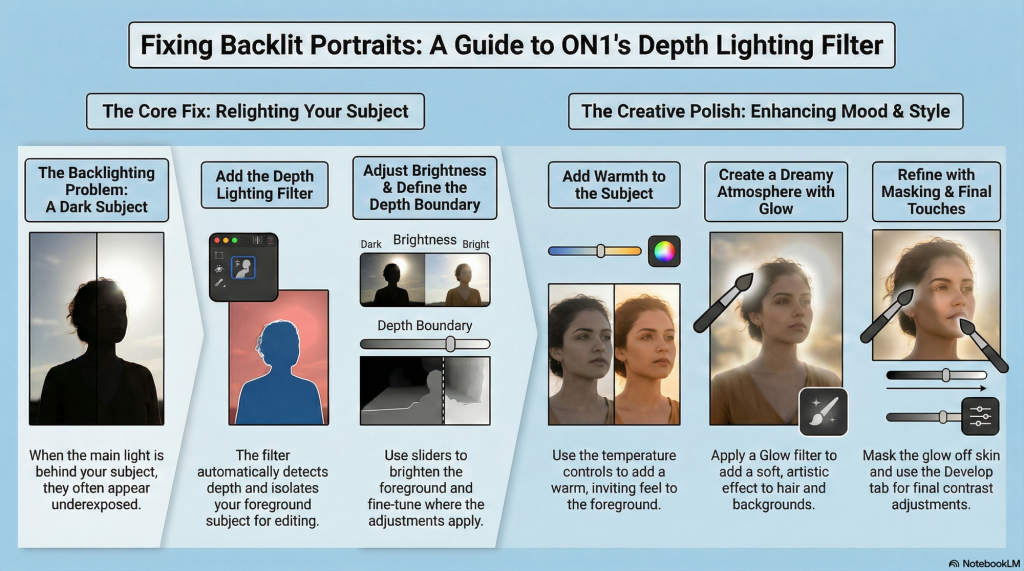
The following builds on our previous post to provide a higher level overview of the tutorial for On1 Photo RAW 2026 that focuses on the depth lighting filter, a tool designed to fix backlit portraits by separating the foreground from the background.
This feature allows editors to selectively brighten the subject and adjust colour temperature for a more inviting and professional appearance. Beyond simple illumination, the guide describes how to apply artistic glow effects while using masking techniques to ensure skin textures remain realistic.
Final adjustments in the Develop tab further refine the image, creating a dreamy, airy aesthetic through non-destructive tonal tweaks. Ultimately, the source illustrates how photographers can leverage depth-sensing technology to transform flat, poorly lit photos into polished works of art.
Powerfully Fix Backlit Photos with Depth Lighting
The 5 Key Takeaways
1. Go Beyond Brightness with Depth Detection The filter intelligently maps your photo’s depth, automatically separating your subject from the background. Analysis: This automates the tedious first step of masking, providing an intelligent depth map as a powerful starting point.
2. Precisely Control Your Light with the Depth Slider The depth slider defines the boundary between foreground and background in terms of depth. Hold Option/Alt for fine-tuning. Analysis: For pros, this replaces tedious masking with real-time, intuitive depth control for a more believable final image.
3. Edit Light and Mood in One Step The filter adjusts brightness and color temperature, adding warmth for a pleasing overall color harmony. Analysis: This combines a technical fix (lighting) and a creative one (mood) into a single, efficient step, saving valuable time.
4. Add Glow, But Keep it Real Add a glow filter for a dreamy effect, then mask it off the skin while keeping it on the hair and background. Analysis: This selective application adds an ethereal quality without over-editing, balancing creativity with professional realism.
5. Finish with a Final Polish Final tweaks to midtones create an airy feel, while a contrast boost prevents a flat look. Analysis: This step is non-destructive, meaning pros can endlessly refine the tone without degrading the original file—a crucial safety net.
Conclusion
Depth-aware tools are no longer a gimmick. Integrate this new dimension of control to master difficult lighting and redefine your creative workflow.