
Monotone and Full-Colour LUTs
The objective of this post is to outline the functionality and application of Look-Up Tables (LUTs) in digital photography and image processing. We distinguish between monotone LUTs, which primarily adjust brightness and contrast to create monochrome or tinted looks, and full-colour LUTs that transform the entire colour palette for cinematic or artistic effects.
The page explains how these tools interact differently with black-and-white or colour input images, depending on whether the goal is tonal refinement or creative colour mapping. Additionally, the source details how various blend modes, such as Multiply or Soft Light, modify the intensity and character of the final edit.
These techniques allow photographers to achieve specific visual styles ranging from subtle enhancements to high-impact, dramatic transformations. Underpinning the text is the principle that the most effective result relies on the synergy between the LUT type and the specific blend mode used.
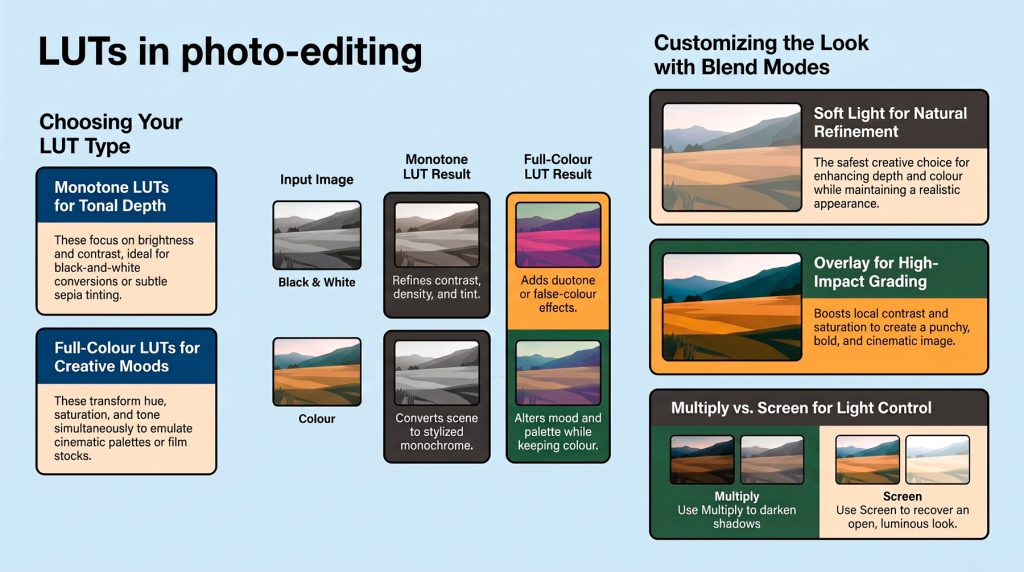
A Look-Up Table (LUT) is like a preset that instantly changes the appearance of a photograph by remapping its brightness and colour values. Think of it as applying a carefully designed “look” rather than making lots of individual editing adjustments.
The result depends on both the type of LUT and the type of image you apply it to. A monotone LUT focuses mainly on brightness, contrast and tonal relationships, often producing black-and-white images or adding a subtle tint such as sepia. A full-colour LUT changes colours as well as tones, creating anything from natural film-like colour to bold cinematic or artistic effects.
When applied to a black-and-white image, a monotone LUT refines the image’s tonal range, while a full-colour LUT can add creative colour mapping, producing effects such as duotones or false colour. When applied to a colour image, a monotone LUT converts the scene into a monochrome interpretation, whereas a full-colour LUT preserves colour while changing its overall mood, palette and contrast.
There is no “best” combination. The most effective choice depends on whether your goal is accurate tonal reproduction, subtle enhancement or a distinctive creative style.
A Look-Up Table (LUT) remaps colours and tones to produce a consistent visual style. Whether the result is subtle or dramatic depends on both the type of LUT and the type of image it is applied to.
| Input Image | Monotone LUT | Full-Colour LUT |
|---|---|---|
| Black & White Image | Refines tonal relationships, contrast, density and tinting (e.g. sepia, selenium, cyanotype). Since no original colour exists, the LUT cannot restore realistic colour. | Introduces colour by mapping grey values to specific colours. Creates duotone, split-tone or false-colour effects rather than natural colour. |
| Colour Image | Converts or maps colours into monochrome or limited-colour palettes while preserving luminance relationships. Useful for classic black-and-white or stylised looks. | Alters both colour and tone simultaneously. Can emulate film stocks, cinematic grading, seasonal moods or artistic colour palettes while retaining a full-colour appearance. |
Key Points
- Monotone LUTs primarily reshape tonal information and, optionally, add controlled colour tinting.
- Full-colour LUTs modify hue, saturation, brightness and contrast together.
- Black-and-white images respond through tonal remapping because they contain only luminance.
- Colour images offer the greatest creative flexibility because every colour channel can be independently transformed.
Effect of Blend Modes When Applying LUT Layers
Blend modes determine how strongly the LUT influences the underlying image. They can significantly change the final appearance without altering the LUT itself.
| Blend Mode | Effect on B&W Image | Effect on Colour Image | Typical Use |
|---|---|---|---|
| Normal | Applies the LUT exactly as designed. | Applies the complete colour grade without modification. | Maximum LUT accuracy. |
| Multiply | Darkens shadows and midtones, increasing density and perceived contrast. | Produces richer colours, deeper shadows and a moodier appearance. | Dramatic or low-key images. |
| Screen | Brightens tones while reducing shadow density. | Creates a lighter, softer grade with brighter highlights and reduced contrast. | High-key or airy looks. |
| Overlay | Boosts local contrast by darkening dark areas and brightening light areas. | Increases both colour saturation and tonal contrast, creating a more vivid image. | Punchy, high-impact grading. |
| Soft Light | Gently increases contrast while maintaining smooth tonal transitions. | Produces a subtle enhancement of colour and depth without appearing overly processed. | Natural-looking refinement. |
Blend Mode Summary
| Blend Mode | Contrast | Brightness | Colour Intensity | Overall Character |
|---|---|---|---|---|
| Normal | As defined by LUT | As defined by LUT | Full | Faithful LUT reproduction |
| Multiply | High | Lower | Moderate–High | Deep, rich, dramatic |
| Screen | Lower | Higher | Moderate | Bright, clean, airy |
| Overlay | Very High | Balanced | High | Bold, punchy, cinematic |
| Soft Light | Moderate | Slightly Higher | Moderate | Gentle, natural, refined |
Practical Notes
- Normal is the preferred mode when evaluating or comparing LUTs because it reproduces the intended transform most accurately.
- Multiply is particularly effective with monochrome LUTs, strengthening blacks and adding visual weight.
- Screen can soften heavy colour grades and recover an open, luminous appearance.
- Overlay delivers the strongest visual impact, making textures, colours and contrast more pronounced, though it can clip highlights and shadows if overused.
- Soft Light is often the safest creative choice, enhancing depth and colour while preserving a realistic appearance. Reducing layer opacity with Soft Light typically produces a polished, understated result suitable for portraits, landscapes and general photography.
A briefing document (PDF) is available here.