
Historically there was no direct conversion method or official tool to convert .np preset files into LUTs. For those of us who had developed their own presets, before DxO took ownership, this was a real pain, until now – You can just use our .NP to LUT Convertor. ( NOW UPGRADED )
The standard method for creating a LUT from a photo editing preset is a multi-step process involving an intermediary file. So, to convert the look of a Silver Efex preset into a LUT, you would need to:
General Workflow to Create a LUT from a Preset
The general process involves applying the preset to a reference image, exporting that image, and then using a third-party tool to generate a LUT file (.cube, .png, etc.) from the color/tone data in the exported image.
- Export the
.nppreset from Silver Efex v4: - Import the
.npinto a compatible version of Silver Efex Pro: You may need an older or specific version of Silver Efex that can still read the.npformat (e.g., Silver Efex Pro 2 to 4). - Apply the preset to a Neutral Reference Image (HALD/Fuji cube):
- Export the Reference Image with the Preset Applied:
- Download the LUT file: The generator will process the image and provide a downloadable LUT file in a standard format, such as
.cube. OR - You can just use our .NP to LUT Convertor
Important Considerations
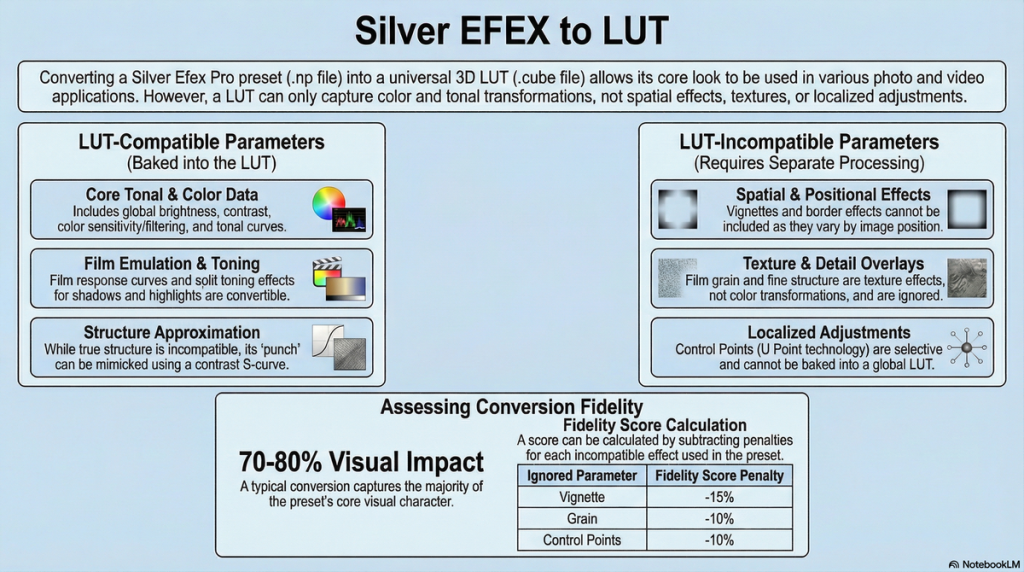
LUT-Compatible Parameters (that can be converted to 33³ LUT):
- Film type emulation (filmTypesPresets) – core film response curves
- Global adjustments – brightness, contrast, soft contrast
- Tonal adjustments – adaptive brightness/black/white points, highlight/shadow brightness
- Color sensitivity adjustments (sensR, sensG, sensB, sensCy, sensMg, sensYe)
- Toning effects – split toning with hue/strength values (toneHue, toneStrength)
- Basic curve adjustments and color filtering
However, be aware there are some parameters that are NOT COMPATIBLE and will require separate processing if they are essential to you :-
- Grain effects (grainSlider*) – texture overlay, not color transformation
- Vignetting (vig, vignette) – spatial effects varying by image position
- Border effects (border, imageBorders) – geometric/spatial modifications
- Control Points/U Point technology – localized adjustments
- Structure effects (globalStructure, fineStructure, hiStructure, etc.) – content-aware edge enhancement/clarity