
Built in accordance with the Absolute Rendering Standard, this build primarily serves as an ACV Curve Parser, utilizing Cubic Spline Interpolation to transform Adobe curve data into high-precision 3D Look-Up Tables (LUTs).
Key functionalities of the ACV Convertor include a split-screen comparison tool, real-time luma histograms, and the ability to batch-process multiple presets into professional grading assets. Throughout various version iterations, the developers focused on maintaining source integrity by rendering effects directly from an immutable pixel buffer to ensure accuracy.
The interface adheres to strict visual standards, offering a middle-gray workspace and turquoise accents to facilitate neutral tonal evaluation. Ultimately, the system provides a robust pipeline for photographers to audit, visualize, and export complex color transformations.
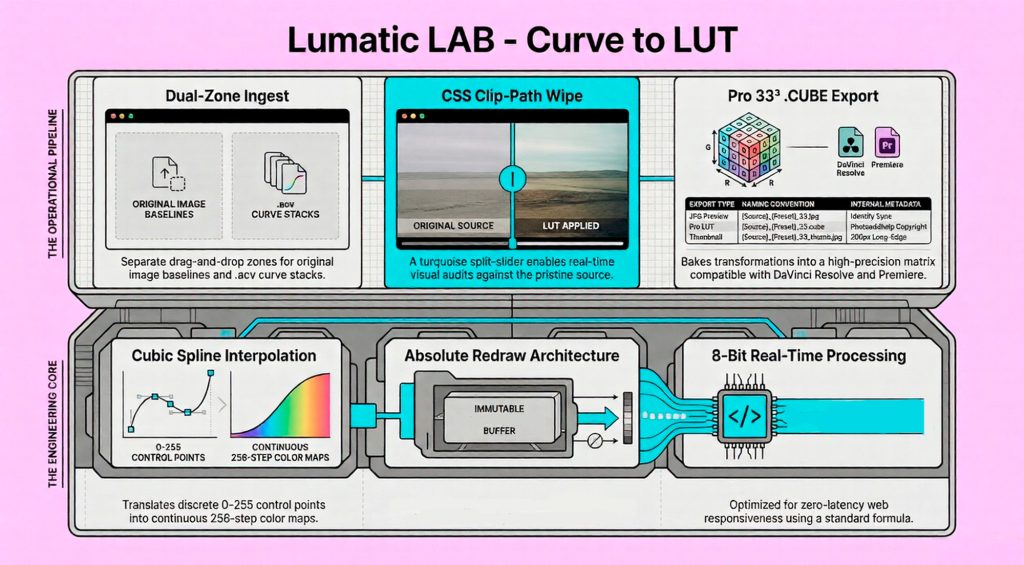
We follow a privacy-first approach, processing all information locally on the user’s device without requiring accounts or cloud uploads. It is specifically built to be accessible for beginners, ensuring that early creative work remains portable and compatible with professional workflows. While the tool is highly versatile, it requires a minimum screen resolution for optimal performance.
Quick Start Guide
- Initialize: Open the file in a browser. Background can be set to Dark/Light/ or 59%
We recommend GRAY as it is best for neutral evaluation of impacts on the image. - Load Assets: Drop your photo into Zone 1 and your Adobe Curves into Zone 2 ( may be loaded individually or as a Batch
- Audit: Click any item in the Curve Stack. The image and histogram will update instantly.
- Wipe Test: Move the center slider to check for color artifacts or clipping.
- Bake: Hit EXPORT PRO LUT to generate your professional grading asset.
- Cleanup: Hit CLEAR ALL in the stack panel to start a new testing round.
Technical Specifications
- Uses Cubic Spline Interpolation algorithm to translate discrete Adobe control points (0–255 range) into a continuous 256-step Look-Up Table (LUT).
- Buffer Management: Employs an Absolute Redraw Architecture.
- Color Science: – Luma Formula: 8-bit integer processing per channel for real-time web responsiveness.
- Comparison Engine: Uses a CSS Clip-Path Wipe. This allows zero-latency visual comparison by overlaying the processed canvas on top of the original image element without duplicating memory-heavy pixel arrays.
Asset Management
To support rapid iterative testing, the tool features a centralized stack management system:
- Binary Ingest Panel: Separate drop zones ensure that Chromebook users can reliably ingest both
image/*buffers and binary.grddata without browser-prevention errors. - Clear All: Flushes the entire recipe library and resets the active index while keeping the target image locked in the viewport.
The Tonal Engine
The Tonal Tuning panel allows for non-destructive adjustments to the gradient application:
- Intensity (Mix): Blends the original image pixels with the gradient lookup table.
- Exposure: Applies a final multiplicative scalar to the processed buffer to compensate for density shifts.
FAQs
- Do I need to install anything?– No – fully browser-based
- Are they free? – Yes
- Are my files uploaded? – No – local-only processing
- Can I use LUTs later in commercial applications ? – Yes – any application that supports LUTs.
- Why 33³ LUTs? Smooth tones, accurate colours, broad compatibility
- I’m just a beginner, have you a document to help me understand ? – Yes click this link
Limitations
- Screen resolution : minimum 1080p
- Most any modern web browser.
- If using a Chromebook : Chromebook Plus or better
- Preset compatibility : Nik Presets Version 4 only