
B & W Lite is a streamlined, offline image processing FOUNDATION tool designed to help beginners understand how to convert photographs into monochrome masterpieces using a precise, unified transformation engine.
The software operates within a single HTML file, utilising a dual-buffer system to ensure that interactive previews perfectly match the final high-resolution exports and 3D Look Up Tables (LUTs). Beyond basic grayscale conversion via channel mixing, the utility allows for specific tonal mapping and contrast adjustments, all while enforcing strict validation rules for any imported data.
By focusing on essential adjustments and exporting standard .cube files, this technical guide positions the tool as a reliable foundation for more complex grading in professional suites.
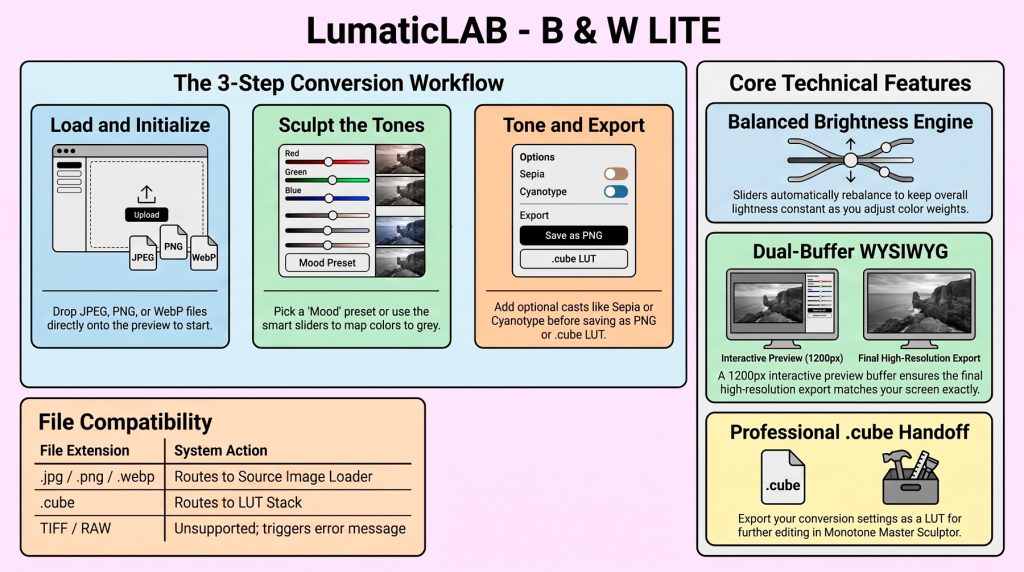
For many photographers, the journey into monochrome begins and ends with a desaturation slider. The result is often a “flat” image—an uninspired representation of what was once a vibrant scene. Imagine a classic landscape: a weathered red barn set against a lush field of green trees. In a standard desaturation, both the reds and greens often collapse into the same muddy “grey mush,” losing all tonal separation.
This frustration stems from a lack of control over how specific colors translate into luminance. Learn to master the Monochrome.
B & W Lite v2.0, can act as an entry point to the Lumatic Lab Mono workflow. It addresses this by treating black-and-white conversion as a process of “shaping” light and shadow. Rather than simply stripping away data, the tool allows creators to sculpt the luminance of an image based on its underlying color weights.
1. The Magic of “Linked” Channel Sliders
Traditional channel mixing is notoriously fickle because shifting one color usually breaks the overall exposure—the “usual difficulty” that leads to endless micro-adjustments. B & W Lite solves this by normalizing its three primary sliders: Cyan – Red, Magenta – Green, and Yellow – Blue.
Unlike traditional editors where channel mixing often leads to unpredictable exposure spikes, B & W Lite utilizes “Core Spec” logic. All sliders operate on a range from -50 to +150 and are normalized so their sum always equals the overall Brightness value.
2. Why You Should Let the “Randomize” Tool Lead
B & W Lite provides two distinct pathways to begin a conversion, providing both “complete looks” for beginners and “raw starting points” for experts.
- Moods: These provide a comprehensive aesthetic by setting the mix, brightness, contrast, and toning simultaneously. The full suite includes High Key, Low Key, Night, Midday, Overcast, and Golden.
- Channels: These offer raw conversions based on the six primary color channels (Red, Green, Blue, Cyan, Magenta, and Yellow). These serve as clean foundations for those who wish to build a custom look from scratch, such as using the Red channel to lighten skin tones or the Blue channel to dramatically deepen a sky.
Creative reasoning can often lead to predictable, safe results. The RANDOMIZE [R] feature breaks this cycle by inventing fresh channel mixes instantly. Critically, your Contrast setting dictates the “wildness” of these results; a higher contrast setting specifically widens the range of channel values the tool draws from, increasing the amplitude of the randomization.
“Try Randomize on a photograph you know well. This is the fastest way to discover a look you would not have arrived at by reasoning. Embracing this serendipity often reveals striking tonal separations ” – Prototype Notes “
3. The Pro-Grade .cube Handoff
Despite its approachable interface, B & W Lite delivers deep technical precision. It utilizes a single transform() object for a “WYSIWYG guarantee,” ensuring the interactive preview and the 33³ .cube LUT export are identical.
Note that these exports are colour-only – no spatial terms like vignettes or per-zone sculpting. These are reserved for the Monotone Master Sculptor ecosystem. By saving your vision as bwlite_look_33.cube, you create a perfect technical handoff for further professional refinement.
Simplicity as a Gateway
B & W Lite v2.0 utilizes a clean, offline HTML5 architecture. For the professional, this ensures zero-latency renders and total data privacy, as all processing remains local to your machine. B & W Lite is deliberately simple. When you find yourself wanting finer control, that’s the moment to move up to Monotone Master Sculptor.
Conclusion:
B & W Lite v2.0 serves as a powerful reminder that monochrome photography is about more than the absence of color – it is about the active sculpting of light. By mastering the relationship between color channels and grey values, you move beyond “filtering” an image toward true tonal separation.
The software is designed as a bridge; the .cube export is validated and sanitized – checking data counts and ranges – to ensure a robust handoff to Monotone Master Sculptor. As you approach your next edit, ask yourself
Supported File Types:
- Input: JPEG, PNG, WebP, .cube (via LUT stack)
- LUT Stack: .cube (up to 100 slots)
- Output: PNG (Full Resolution), .cube LUT (33³)
Is your current process simply removing saturation, or are you actively deciding how each color should contribute to the story?