
We’ve made a small update to this little tool. It is similar to Adobe’s Photoshop Color Picker and has saved us quite a lot of time when creating and the website and documenting our apps.
Creative professionals often grapple with the subjectivity of color—the “which blue?” ambiguity. This friction compromises brand integrity and halts high-speed forensic workflows.
The Standardized Lexicon Lumatic LAB eliminates hex code memorization via a three-dimensional logic tree (Tone, Saturation, Hue). It generates precise descriptors like “Medium Vivid Cyan,” while v2.9 logic buckets near-neutrals by tone alone to ensure standardized, cross-platform interoperability.
Luma Weight for Design Balance The “Luma Assessment” interface calculates perceived brightness using standard Rec. 601 luminance. This facilitates tonal mapping, allowing designers to perfectly match visual weight across divergent hues for superior accessibility.
Forensic Privacy and Speed Operating with 100% local processing, the “Copy Identity” protocol formats data into a specific ASCII string: [Name] ([HEX]). This structure is engineered to be human-readable for clients yet machine-searchable for developers.
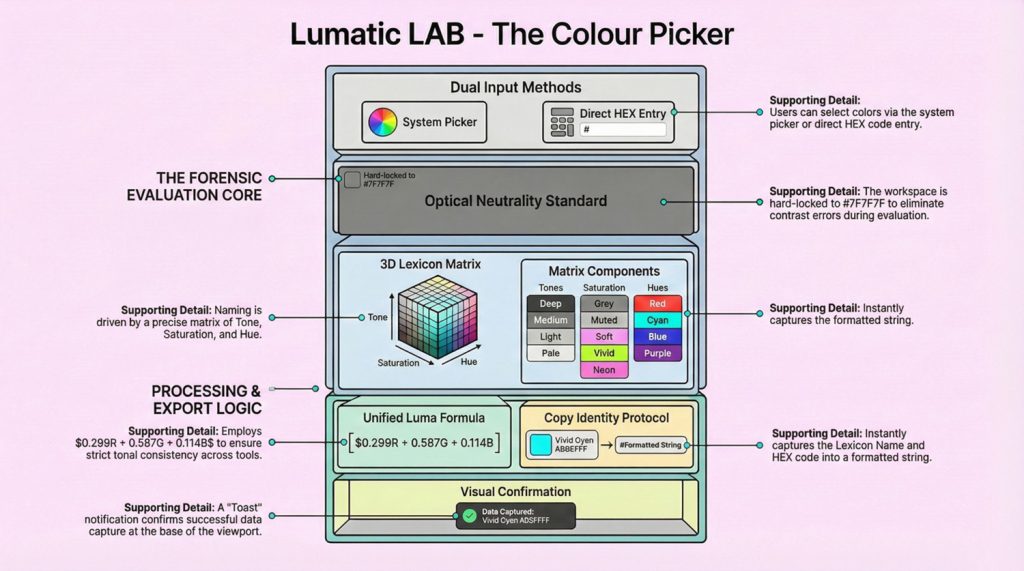
This shift from visual guesswork to exact mathematical weight transforms color into standardized, professional data. It’s very simple to use but if you need it there is a User Guide here and a Slide Deck here otherwise :
- Open a browser (Chrome, Edge etc).
- Launch the tool by clicking here.
- Drag the webpage off ‘Bookmarks’ and resize it (if you wish) as shown below.
- Pick: Click the Color Square to open the system picker or type a HEX code directly.
- Identify: The Lexicon Name (e.g., Light Muted Red) and Luma Weight update instantly in the viewport.
- Copy: Click Copy Identity to save the formatted string
[Name] ([HEX])to your clipboard for use in emails or logs.
Technical Notes:
- Unified Luma Standard: Employs the mandatory formula to ensure tonal consistency across all Lumatic LAB tools.
- Lexicon Matrix: Naming is driven by a 3-dimensional matrix (Tone, Saturation, and Hue) for professional grade color communication.
- Optical Neutrality: Viewport is hard-locked to #7F7F7F to eliminate simultaneous contrast errors during color evaluation.