
Headline: [Report] ON1 Photo RAW 2026.4: Is the Move to Cloud Generative AI a Smart Business Move?
Within 48 hours of its release, ON1 Photo RAW 2026.4 has signaled a pivotal shift in the company’s technical architecture and market positioning. A Senior Strategist in the space sees this update as more than a feature dump; it is a calculated refactoring of the photo editing workflow. By clearly bifurcating the ecosystem into “Base” and “Max” tiers, ON1 has addressed the reality that while the base version covers approximately 95% of standard photographic workflows, the high-compute demands of modern restoration require a different infrastructure.
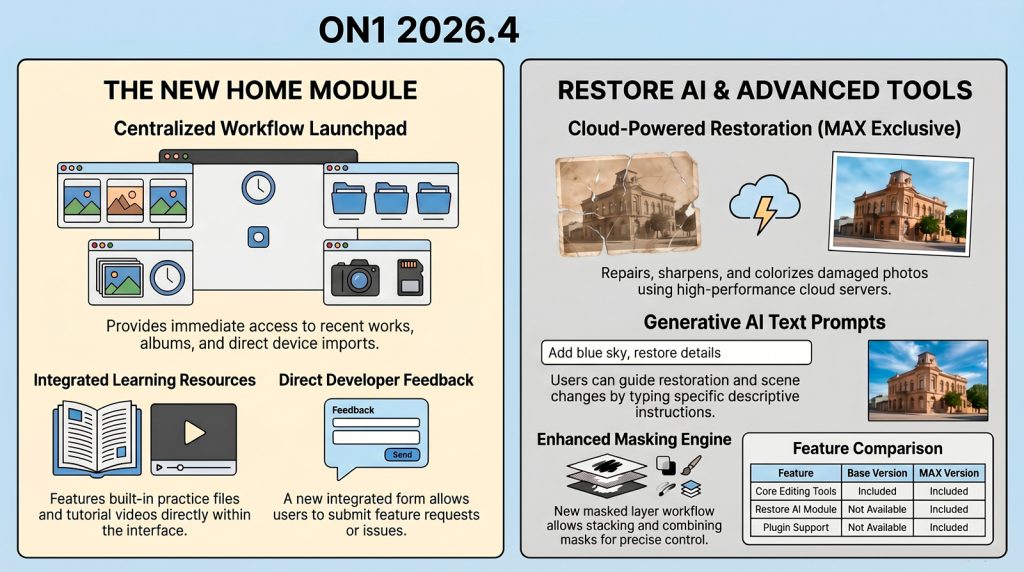
The most significant architectural change is the introduction of Restore AI, a feature exclusive to the Photo RAW Max edition. Unlike existing AI tools in the suite that utilize local hardware, Restore AI leverages a non-destructive cloud-based workflow. This offloads the intensive processing required for high-fidelity sharpening and damage repair to ON1’s servers, ensuring that professional-grade results are accessible regardless of local GPU limitations. This strategy allows the software to remain lightweight for daily tasks while providing heavy-duty generative power on demand.
Workflow efficiency has been further addressed via the new Home Module. This central hub replaces the traditional Browse-first entry point, offering a streamlined interface for file management. It’s important to note that ON1 maintains its “non-catalog” philosophy here; the “import” function focuses on copying and organizing rather than loading a complex database. For professionals, the integration of a direct “Submit Feedback” form within this module is a welcome addition, potentially shortening the loop between the User and the development team.
As ON1 claim to be committed to foundational stability over “feature bloat.”, this release includes a significant refactoring of memory efficiency and a transition toward a monthly update cycle to ensure long-term performance. While the new filters—such as Depth Lighting and Split Field—provide creative flexibility, the underlying engine remains the priority. The move toward generative cloud AI is, as the release stream suggested, a “smart business decision” that positions ON1 to compete with Adobe and others without forcing users into a credit-based or high-subscription model.
Conclusion :
As we witness the transition of heavy-compute tasks to the cloud, one must wonder: will the future of professional editing eventually relegate local hardware to mere interface controllers, or will the “faithfulness” of local processing remain the gold standard for authenticity?
FOCUS ON – RESTORE AI module
Most importantly Restore is a Photo RAW Max exclusive that introduces a sophisticated server-side processing model to the ON1 ecosystem.
This tool is specifically engineered for AI photo restoration of physically damaged or low-fidelity images. The technical workflow requires the user to first crop into the specific area needing repair before submitting the data to ON1’s cloud servers.
Users can choose from four distinct cloud models:
- Auto: Enhances vibrancy and tonal range.
- Faithful: Preserves the original aesthetic while repairing damage.
- Monochrome: Specialized for black-and-white archives.
- Generative: Allows for advanced creative edits via text prompts.
The generative feature is particularly powerful, allowing professionals to use prompts like “make the army uniform green” or “remove construction netting and scaffolding” to save hours of manual cloning.
However, a critical caution is required for Face Recovery. While the module provides “green boxes” to identify faces and masking/blending sliders for fine-tuning, the AI can sometimes alter features to an unrecognizable degree. Furthermore, Restore AI is currently not recommended for wildlife images, as it can distort animal anatomy, violating ethical accuracy standards.
All results are saved as new files (supporting PSD, ONPHOTO, and TIFF), ensuring a strictly non-destructive editing environment for large-scale archival projects.
CREDITS:
We’d like to thank the following who created videos that were watched before our evaluation was conducted.
Anthony Morganti – https://youtu.be/vB-NFQuWOLA who has a FREE Quick Start Course on ON1 Photo Raw 2026 @ https://bit.ly/4bbe44I and there are some FREE ON1 Presets with the course.
Free Will Photos – https://youtu.be/NpnBpNNJpRA