
Jim Nix explores Techniques to Brighten Dark Photos
Protecting your highlights shouldn’t mean burying your subject in the dark. While underexposing to save detail is a smart capture strategy, a simple global exposure boost is a blunt fix that often destroys the mood; professional results require a nuanced, selective approach to light management.
The “J Key” Map Hit the J key to reveal your technical roadmap. Blue overlays signal “crushed shadows” where detail is lost to black, while red indicates “blown highlights.” This visual guide allows for data-driven decisions, ensuring you recover depth in your shadows and highlights without guessing where detail remains.
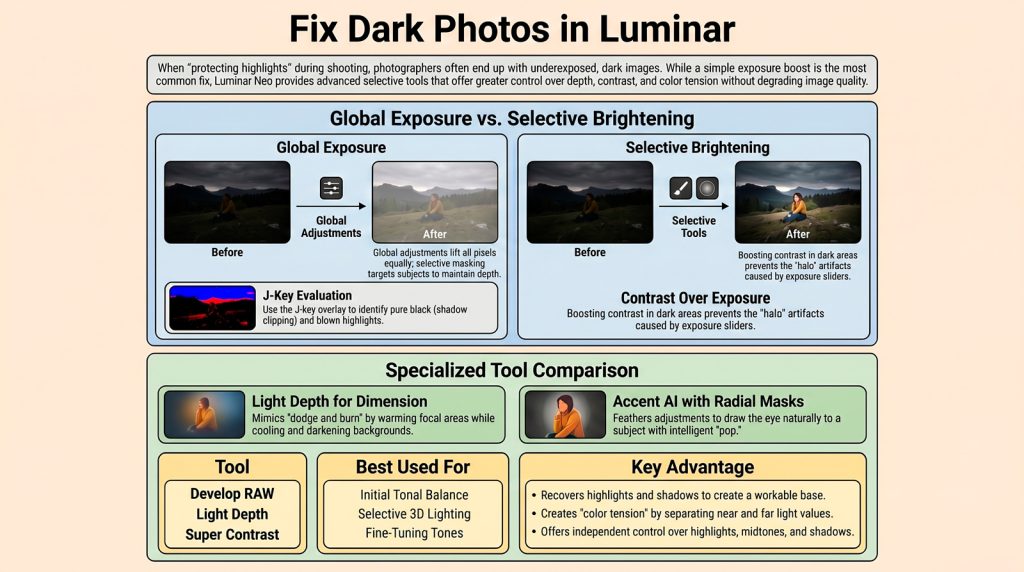
Light Depth over Global Exposure For professional dimensionality, prioritize the Light Depth tool over the exposure slider. By manipulating the Brightness Near and Brightness Far sliders, you can create “color tension”—the practice of warming your subject while cooling the periphery. This adds a level of depth that a flat global lift cannot replicate.
The Anti-Halo Hack When darkening foregrounds to create focus, avoid dropping the exposure slider, which often creates amateur-looking halos. Instead, use an object mask on the ground specifically and increase contrast. This produces a natural-looking darkness and depth without creating technical artifacts around your subjects.
Selective Pop with Accent AI To draw focus, apply Accent AI via a feathered radial mask. This “super tool” simultaneously balances color, light, and exposure. The key is using a soft gradient edge, ensuring your subject “pops” while maintaining a seamless, professional transition into the rest of the frame.
By moving beyond global fixes, you transform photo editing from a rescue mission into an act of creative control.
“This is playing with light. This is like dodge and burn in some ways, but all I’m doing is trying to control the light in a photo.”
“A dark photo is not a mistake; it is a canvas for intentional light manipulation.” – Jim Nix