
This video by ON 1 outlines a sophisticated workflow for enhancing macro photography using the latest version of ON1 Photo RAW.
The instructions detail how to refine an image of a spider through AI-driven noise reduction, precise blemish removal, and strategic compositional cropping. By utilizing Super Select AI masking, users can apply targeted adjustments to specific areas, such as adding dynamic contrast to the subject while softening the background with a glow effect. The text highlights the importance of a non-destructive editing process, ensuring that tonal balances and color profiles can be adjusted without permanent data loss.
Finally, the tutorial provides a framework for exporting high-quality files specifically formatted for social media platforms. Overall, the source serves as a comprehensive roadmap for transforming raw close-up shots into professional-grade digital art.
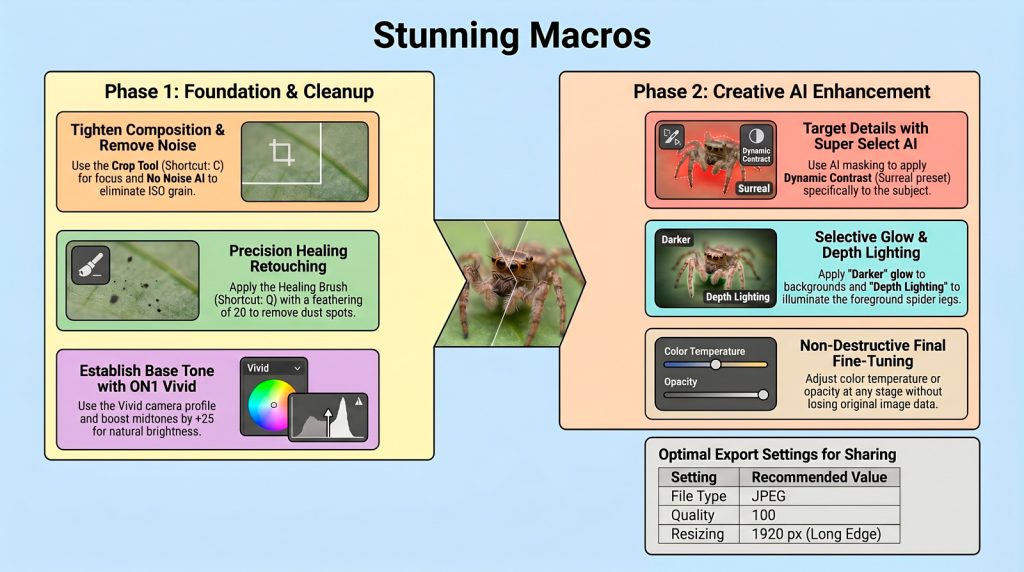
Workflow – Capturing professional macro detail is challenging, but ON1 Photo RAW 2026.4 transforms workflows with surgical precision. These intelligent tools allow photographers to enhance intricate textures and atmospheric mood with ease.
Intelligent Subject Targeting – The Super Select tool simplifies AI Masking by identifying complex subjects like garden spiders with a single click. Using “Erase” mode protects the subject while applying a “Darker Glow” filter to the background, creating instant drama and focus.
Non-Destructive Noise Mastery – Use No Noise AI to clean distracting grain, even in ISO 1250 shots, without sacrificing detail. This tool preserves the spider’s intricate textures while smoothing the background, ensuring a clean, professional finish.
Depth Lighting for Dimension – To make macro subjects “pop,” the Depth Lighting filter is essential. By specifically illuminating the foreground and the front of the subject, this tool adds 3D dimension and impact to your macro shots.
Expert Analysis – These AI tools are essential because they automate complex masks that once took hours, allowing for rapid creative experimentation. As the source context notes, “With Photo RAW and especially effects, the world is your oyster.”
Conclusion – The future of macro editing balances AI efficiency with professional control. To further optimize your post-processing, try the Lumatic Labs Curve Converter. It is FREE, SECURE, and nothing leaves your hardware.