
Jim Nix’s video details upcoming user interface enhancements for Luminar, specifically focusing on a free update scheduled for August; Anthony Morganti focuses mainly on their roadmap and continues the discussion on the User interface; Freewill focuses about pricing. The 3 of them also have lots of other videos focussing on Luminar.
All 3 highlight how a series of small, intuitive changes collectively streamline the creative process by reducing unnecessary clicks and screen clutter. Key improvements include a collapsible catalog view for better focus, faster preset previews, and a more efficient way to manage HDR merging through a filmstrip right-click menu. Furthermore, the navigation layout has been condensed, allowing users to switch between presets, tools, and edit history without moving their cursor across the entire screen. All 3 agree these updates foster a smoother workflow and higher performance, resulting in a more enjoyable and responsive editing experience.
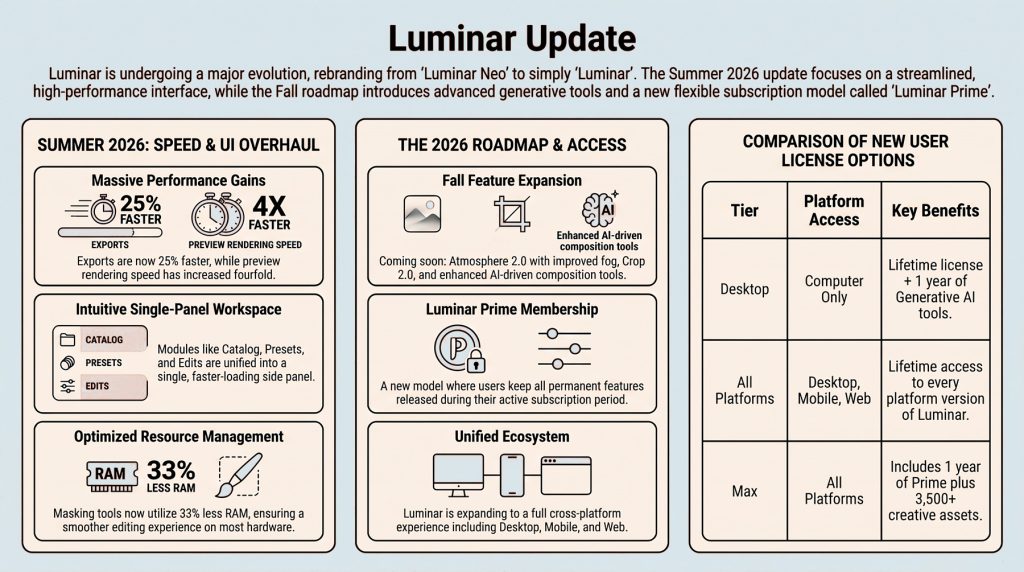
The videos serve to inform users that while new features are arriving later, this immediate update focuses on usability and speed.
A couple of reminders:
- Luminar Neo is now simply called Luminar.
- This FREE Summer Update for all Luminar (Neo) users focuses on a refreshed interface that makes editing faster, more fluid, and more intuitive. I’ve been using it for a while now, and I really like the improvements.
- A major Fall release is also on the way (NOT FREE), bringing new creative tools, a web editor, enhancements to masking and presets, and much more.
As editing should be about vision, not fighting clunky software. The consensus appears to be that the August ’26 update solves the “swivel-chair” friction points, delivering a high-velocity experience optimized for modern hardware.
The Top 3 Takeaways
- Radical Performance Gains. Skylum has cured export lag with 25% faster exports and 33% less RAM for masking. On the M4 Mac, real-time rendering is 4x faster, providing near-instant preset previews.
- Unified Interface & Web. Now simply Luminar across desktop, mobile, and the upcoming Luminar Web, the UI eliminates module switching. A right-hand menu consolidates workflow, while users can now trigger HDR Merges directly from the filmstrip.
- The “Luminar Prime” Membership. This “keep-what-you-paid-for” model includes 3,500+ assets and fall features like Atmosphere 2.0. Crucially, users retain permanent features even if they cancel, ensuring an ethical approach to professional software ownership.
Overall, The improved GUI finally prioritizes the photographer’s time over flashy, unnecessary modules.