
1. What a gradient does
A gradient is a progressive transition between two or more colours.
Colour stops set the colours and their positions along that transition. A gradient can fill a shape, form part of a background, suggest light or depth, or guide attention. Choose a gradient for the way colour moves through space, not just for its palette.
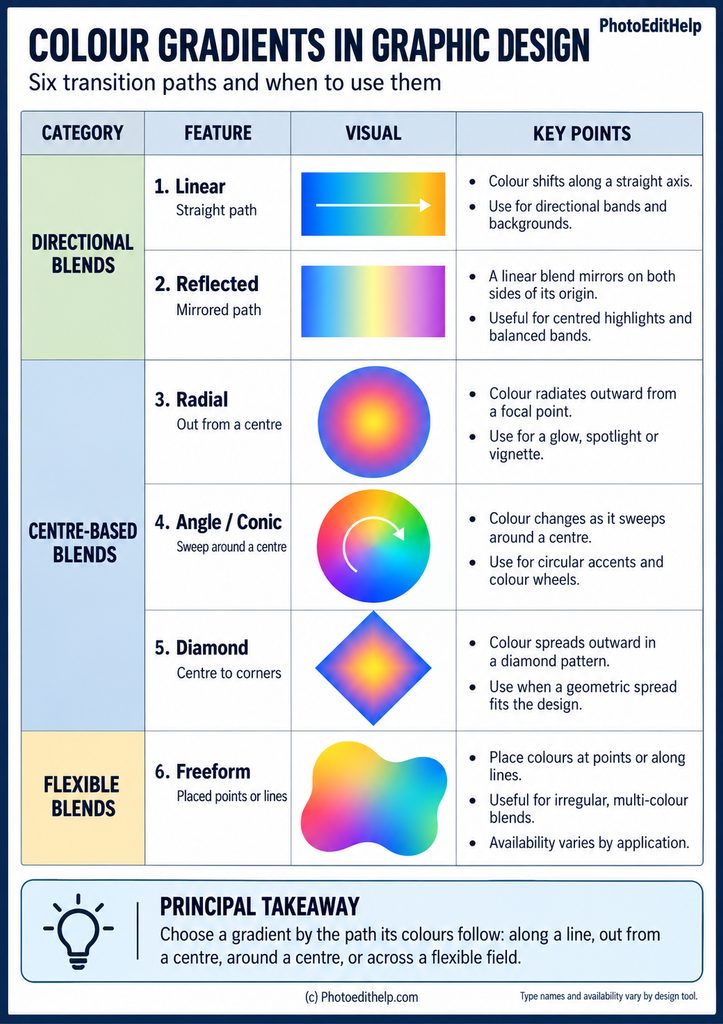
Names and options vary between applications: Photoshop and many other applications, offer Linear, Radial, Angle, Reflected and Diamond types, whilst Adobe Illustrator also offers Freeform. Treat these as common tool – specific constructions rather than a universal list.
2. Compare the transition paths
Start with the transition path. A linear gradient moves along a straight axis, useful for directional bands, backgrounds or a light-to-dark shift.
A reflected gradient mirrors a linear blend on either side of its origin, creating symmetry. A radial gradient spreads out from a central point, often in a circle or ellipse; it can suggest a spotlight or glow. Angle, sometimes called conic, gradient changes colour as it sweeps around a centre, suiting circular accents and colour wheels. A diamond gradient spreads from the centre towards a diamond-shaped boundary. Freeform gradients place colours at points or along lines for less regular blends.
3. Build a balanced blend
Make the blend deliberate. Begin with a few colours, then adjust the stops’ order, spacing and positions. The direction and length of a gradient affect where its transition falls; extra stops add colour phases or can make a sharper boundary. Use broad, smooth transitions for atmosphere and closer stops for a defined edge.
Check how adjacent colours differ in lightness: weak contrast can hide form, while highly saturated opposites may compete. If text sits over a gradient, place it over a calmer area and test contrast at its final size. A gradient alone does not guarantee readable text.
4. Choose with intent
Choose geometry to support the design’s purpose. Use linear blends to lead the eye across a page, radial blends to focus attention, and reflected blends for balanced highlights. Angle or conic blends work around circular forms; diamond blends suit geometric compositions; freeform blends allow several local colour areas.
Repeating gradients can create bands or rings, but repetition is a setting applied to a gradient, not a separate transition path. Compare the result with a flat-colour version and remove it if it adds noise. Test the design at its intended size, on its actual background, and in the colours in which it will be published.
PRINCIPAL TAKEAWAY
Choose a gradient by using the path you want its colours follow: along a line, out from a centre, around a centre, or across a flexible field.