
ON1 Photo RAW 2026 is smarter and more organized as far as filters go. They are now categorized by type, making it easier to browse and you can hide filters you don’t use, turn off descriptions for a cleaner look, and even favorite your most-used filters for quick access. Plus, improved search helps you find exactly what you need in seconds. This video from ON1 shows the detail
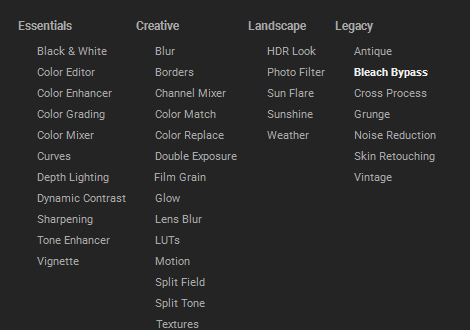
The various image filters are organized and categorized under four main headings for user selection: Essentials, Creative, Landscape, and Legacy.
The filters found within these categories are as follows:
• The Essentials category includes fundamental adjustment tools such as Black & White, Color Editor, Color Enhancer, Color Grading, Color Mixer, Curves, Depth Lighting, Dynamic Contrast, Sharpening, Tone Enhancer, and Vignette.
• The Creative category encompasses filters designed for artistic effects, listing Blur, Borders, Channel Mixer, Color Match, Color Replace, Double Exposure, Film Grain, Glow, Lens Blur, LUTs, Motion, Split Field, Split Tone, and Textures.
• The Landscape category contains filters specifically suited for outdoor and environmental images, including HDR Look, Photo Filter, Sun Flare, Sunshine, and Weather.
• The Legacy category features older or specialized effect filters, Antique, Bleach Bypass, Cross Process, Grunge, Noise Reduction, Skin Retouching, and Vintage.
Over the next few weeks we shall be seeking the best videos to create our own guides to these filters. As each one is completed it will be added to the Blog and the relevant filter in the list will have a link (in blue) to the original video.