
https://www.youtube.com/watch?v=wi199MG-FdA
The video tutorial by Julieanne Kost provides a comprehensive overview of Adobe Firefly’s capabilities to enhance creativity and streamline workflows through its Boards feature. Starting from the Firefly homepage, users can create boards to upload and organize images, enabling a dynamic workspace for creative projects.
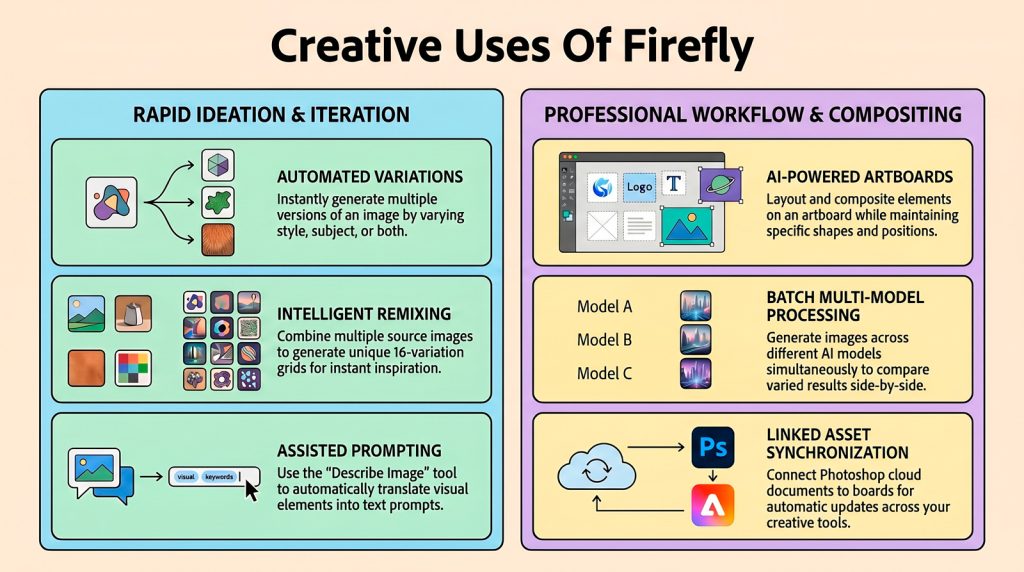
The tutorial demonstrates how to use Adobe Firefly Boards as a versatile, infinite canvas for managing creative workflows. Users can generate and refine images using multiple AI models, create variations of existing subjects, and even produce short animations from text or stills.
The platform supports sophisticated editing tasks, such as removing backgrounds, upscaling resolution, and seamlessly compositing disparate elements into cohesive artboards.
Beyond creation, the software acts as a collaborative workspace where teams can organize assets, share feedback via pinned comments, and synchronise cloud documents from Photoshop. By leveraging batch processing and descriptive prompting tools, designers can significantly accelerate their ideation and project delivery.
A key feature is the ability to generate variations of images effortlessly. For example, by uploading an isolated image of bird wings, users can create multiple variations by adjusting style or subject parameters, sparking fresh ideas. Firefly also allows quick photo editing, such as removing elements from images using brush tools, and instantly generating multiple edited versions to choose from. Background removal is simplified with one-click tools.
Prompt assistance is another valuable feature. Firefly can analyze images to generate descriptive text and sub-prompts, aiding users who struggle to articulate their creative vision. These prompts can be edited, combined, or enhanced with Firefly’s AI suggestions to refine results.
Batch processing accelerates the creation of multiple images simultaneously across different AI models, allowing users to experiment and select the best outputs. Firefly supports multiple reference images in a single generation, enabling more precise control over the desired visual outcome.
Text editing in images is streamlined with Firefly’s ability to detect and replace text, or creatively modify it (e.g., adding neon glow) through image generation based on prompts and references. Boards serve as versatile creative workspaces to organize image collections for various purposes like social media layouts, client presentations, or ongoing projects.
Additional features include image upscaling with creative enhancements, easy downloading/exporting in multiple formats, and integration with linked cloud documents for seamless multi-device editing and updates.
Julieanne offers practical tips for maximizing Firefly’s potential, such as creating multiple boards, using shape and text tools for organization, exploring preset inspirations, and managing generation history for efficient workflow tracking.