
The Gradient Converter v3.4, is an offline tool designed to transform various colour data formats into Lumatic Sculptor palettes.
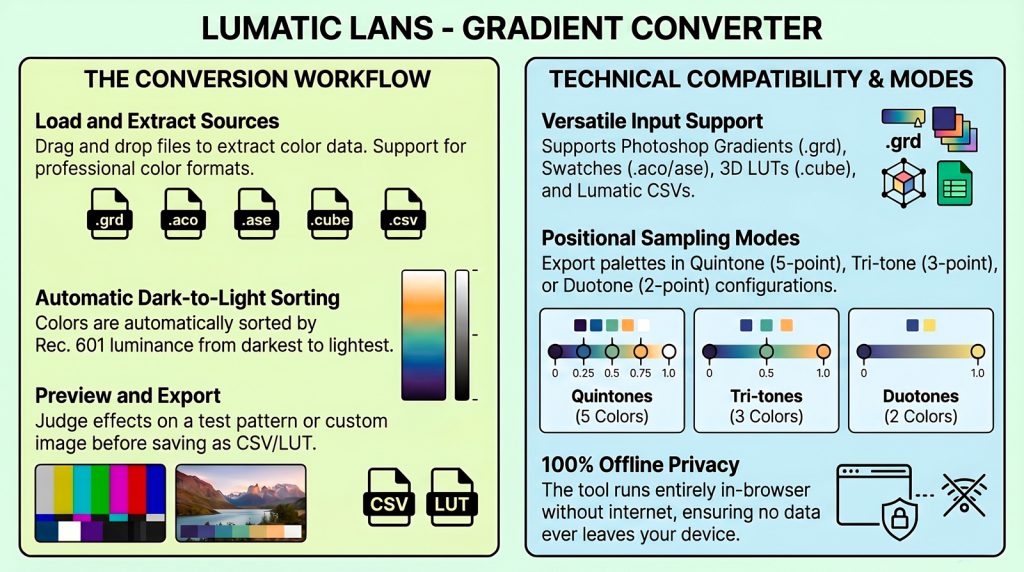
Users can import files such as Photoshop gradients, Adobe swatches, and 3D LUTs to extract colour information, which the software automatically organises by luminance from dark to light. The interface includes a preview viewport where users can judge gradient effects on test patterns or custom images before exporting them as CSV or .cube files. To ensure reliability, the technical records confirm the system’s parser resilience, demonstrating that it successfully rejects corrupted data while maintaining accurate round-trip compatibility with its own exports. Detailed user guides and tooltip libraries further explain the control layout, keyboard shortcuts, and specific sampling modes available for creating duotone, tri-tone, or quintone palettes.
Ultimately, these sources serve as a comprehensive manual for digital artists needing to standardise colour assets for use in specialised editing software and ,of course, as it’s LUMATICS LAB – IMAGE SCULPTOR, it’s FREE AND SECURE.
Transcoding color data between Adobe environments and Lumatic ecosystems often triggers frustrating compatibility failures. Lumatic Lab Gradient Converter v3.4 is the definitive solution for bridging professional swatches, gradients, and LUTs into your production pipeline.
Takeaways
- The “Local-Only” Powerhouse: This single, offline HTML file requires no installation. It ensures absolute privacy by processing .grd, .aco, .ase, .cube, and .csv files entirely on your local hardware.
- Intelligent Luma Sorting: Palettes are automatically organized from dark to light using Rec. 601 luma (0.299R + 0.587G + 0.114B), ensuring mathematically consistent post-production results.
- Neutral-Axis LUT Extraction: Beyond standard swatches, the tool extracts color palettes directly from 3D LUT (.cube) files by analyzing the r=g=b neutral tone ramp.
Technical Reflection & Impact
Professional reliability is anchored in the tool’s “Parser-Resilience.” The converter validates and sanitizes all inputs, rejecting malformed fixtures—including those with wrong magic numbers, count overflows, bad version fields, or truncated data—to prevent silent errors within the creative pipeline.
Forward-Looking Conclusion
This tool bridges the gap between Adobe assets and Lumatic’s Image Sculptor or Monotone Master Sculptor workflows.
It also sits alongside the Lumatic Lab – Curve to LUT Converter and is also FREE, SECURE, and once again, nothing leaves your hardware.