
Post-processing is where an image gets refined – or completely ruined by heavy-handed adjustments. Here are the top 20 post-processing mistakes grouped logically into workflow categories, along with their root causes and visual impacts on your final images. A pdf image of the table may be found at https://tinyurl.com/3yrha4s6 for you to print & keep as a reminder when post – processing
The Top 20 Post-Processing Mistakes
| Category | Error | Cause & Visual Impact (Under 20 Words) |
| Tone & Exposure | 1. Overusing Clarity | Pushing local contrast too far creates harsh edge halos and crunchy, unnatural textures. |
| 2. Blown-Out Highlights | Raising exposure or whites too high permanently destroys bright details, leaving flat white dead zones. | |
| 3. Crushed Shadows | Dragging blacks or shadows down excessively clips shadow detail into solid, featureless black patches. | |
| 4. Heavy Dehaze | Overusing atmospheric contrast shifts shadows to dark cyan/magenta and creates muddy, harsh midtones. | |
| 5. Heavy Vignetting | Over-darkening corners creates distracting artificial frames that ruin clean sky gradients and overall balance. | |
| Color & WB | 6. Over-Saturation | Pushing global saturation equally turns natural colors into harsh, neon patches with clipped color channels. |
| 7. Incorrect Export Profile | Exporting in Adobe RGB instead of sRGB causes browsers to render flat, washed-out, dull colors. | |
| 8. Over-Warming Sunrise/Sunsets | Over-correcting Kelvin temperature casts an unnatural orange/yellow tint over water, white elements, and shadows. | |
| 9. Shifted Skin Tones | Indiscriminate HSL panel tweaks turn skin unnatural shades of orange, yellow, or pale green. | |
| 10. Uncalibrated Screen Edits | Editing on uncalibrated or auto-brightness displays causes unpredictable exposure and wrong color balance on other screens. | |
| Detail & Noise | 11. Over-Sharpening | Applying heavy global sharpening adds noise, harsh outlines, and glowing white edge halos across smooth areas. |
| 12. Excessive Denoising | Aggressive noise reduction smooths out grain at the expense of fine texture, creating a waxy, plastic look. | |
| 13. Unmasked Sharpening | Sharpening flat areas like skies exaggerates digital noise without adding real structural sharpness to subject edges. | |
| Masking & Framing | 14. Unstraightened Horizons | Failing to level horizon lines creates visual instability and distracts viewers instantly. |
| 15. Lazy Mask Selection | Brushing or auto-selecting without edge refinement leaves obvious glowing halos or harsh cut-offs around subjects. | |
| 16. Ignored Sensor Dust | Leaving dark dust spots scattered across clear skies or smooth water detracts from an otherwise clean photo. | |
| 17. Over-Cropping | Cropping too tightly reduces resolution drastically and exaggerates lens artifacts or focus flaws. | |
| Workflow & File | 18. Editing 8-Bit JPEGs | Applying heavy color or exposure shifts to compressed JPEGs causes severe color banding and detail loss. |
| 19. Destructive Editing | Overwriting original files or flattening layers permanently eliminates the ability to tweak or re-edit later. | |
| 20. Editing with Eye Fatigue | Staring at an image too long warps perception, leading to over-edited, hyper-saturated photos you’ll regret later. |
The Golden Rule of Editing: When you think an edit looks finished, back off the main global sliders (Clarity, Saturation, Contrast) by 10–15%. Your eyes adapt to heavy adjustments faster than you realize.
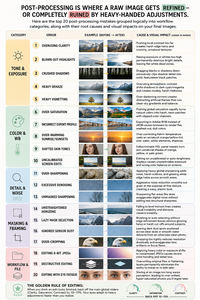
- A full size version of this may be downloaded from here :: https://tinyurl.com/3yrha4s6