
Master Your AI Prompts: A Lightweight, Local Solution
Managing a growing library of prompts shouldn’t feel like a chore. Today we are releasing LumaticLAB’s Prompt Manager, a sleek, browser-based organizer designed to keep your creative prompts structured and secure. Running entirely offline in your desktop browser, this tool requires no database setup. You can easily organize up to 15 groups, holding up to 10 prompts each for EACH CSV FILE.
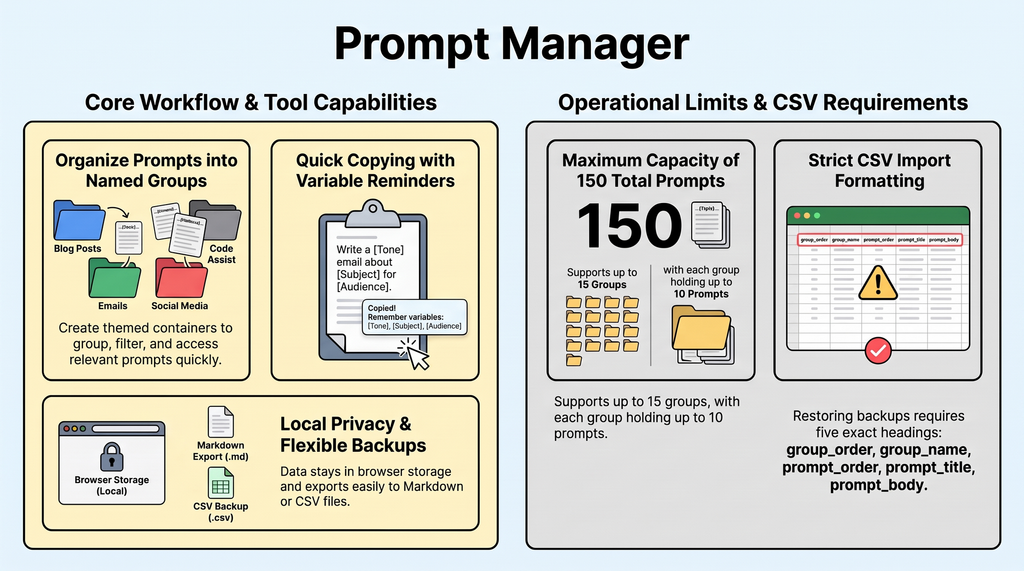
- Absolute Privacy: Your prompt data is stored locally in your browser’s cache (
localStorage). Nothing is sent to external servers. - Local-First Privacy: Runs as a single HTML file using browser
localStorageand CSV backups. Prompts are never transmitted to a server (Tailwind CSS loads via public CDN). - Flexibility – Smart Reminders: Use bracketed placeholders like [Animal] to flag text that may logically be changed, while keeping it consistent with the prompt’s intent before you copy-paste.
- Simple Backups: Instantly export your collection as a clean CSV file or download individual prompts as Markdown files.
- Structured Capacity Limits: Keeps prompts organized with limits of 15 groups and 10 prompts per group (150 total), title/group search, and three viewing backdrops (
Dark,50% Gray,White). - Workflow-Friendly Features: Offers quick clipboard copying, individual Markdown downloads, and support for manual bracketed text reminders (e.g.,
[Animal]) to customize prompts before pasting.
Whether you are generating images or writing copy, this workspace bridges the gap between chaotic notepad files and complicated database systems, offering a focused space to master your AI workflows.
- Organize your AI prompts into structured, easy-to-navigate groups.
- Utilize bracketed placeholders to make your reusable prompts dynamic.
- Manage local data storage and secure your prompt library with CSV backups.
Eliminate context-switching friction and stop losing track of high-performing AI prompts in random text files. The LumaticLAB Prompt Manager provides a streamlined, browser-based hub to organize and access prompt collections locally.
Why The Prompt Manager Matters
In an era of Software as a Service (SaaS) – a cloud-based delivery model where applications are hosted remotely and accessed over the internet via a subscription. This single portable HTML file offers immediate productivity value without cloud accounts, database maintenance, or subscription bloat.
Documentation – read in the following order.
- Prompt Manager Deck
- First Walk Through
- Tool Tip Guide
- Full User Guide
A STARTER SET of miscellaneous prompts to practice on.
By operating entirely in your browser, it eliminates context-switching friction while ensuring your personal prompt workflow remains lightweight, fast, and secure.
Important Takeaways
- Local Storage First: The application runs entirely in the browser and saves data locally; if you clear your browser profile data, your prompts will be lost unless backed up.
- Capacity Limits: Each workspace (csv file) supports a maximum of 15 groups and 10 prompts per group.
- CSV Portability: Backups are saved as standardized UTF-8 CSV files, which can be imported to restore your database or move it to another computer. That makes sharing prompts very easy.