
Summary
Nikoruato, an Italian landscape photographer based near Venice, presents a comprehensive black and white post-processing tutorial using an Icelandic waterfall image. The tutorial focuses on utilizing the TK Grayscale plug-in and TK9 version 3 panel by Tony Kuyper to achieve fine art black and white conversions.
Nikoruato demonstrates both basic and advanced techniques including exposure adjustment, lens correction, mask creation, and luminosity masking to enhance different areas like the sky, land, and waterfall.
The workflow involves Photoshop editing to remove imperfections, refine selections, and apply curves and gradients for contrast and visual flow. Additional creative effects such as glow highlights and shadow protection are added for a polished finish.
Throughout, practical tips and shortcuts are shared, with a promotional code offered for the tools used. The tutorial concludes emphasizing photography as a personal, emotional art form.
Key Insights
- Black and white conversion benefits greatly from targeted luminosity masks for precise control over different image areas.
- The TK Grayscale plug-in combined with TK9 version 3 offers powerful but user-friendly tools for black and white editing.
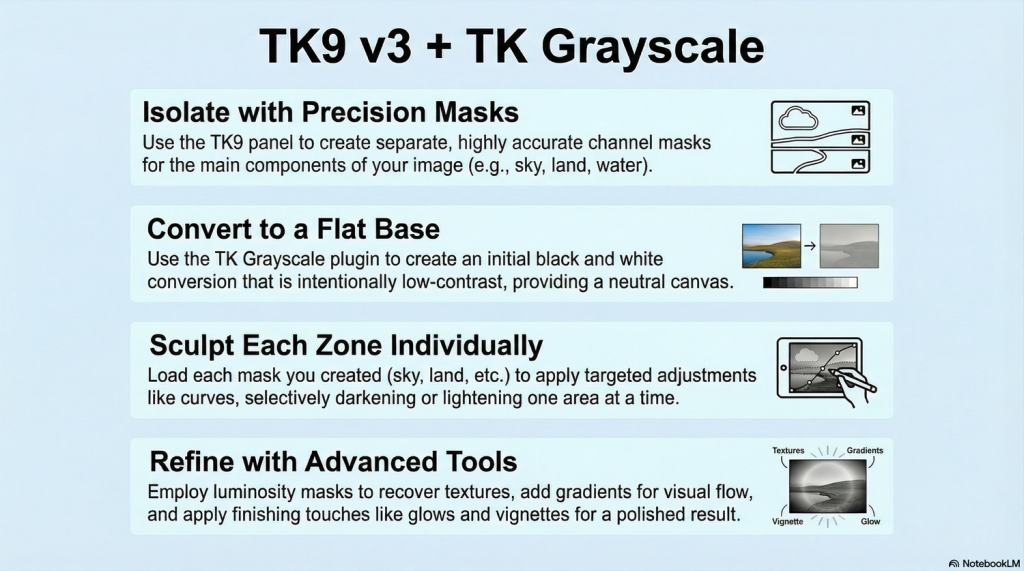
- Separating the image into distinct masks (sky, waterfall, land) allows for customized adjustments per area.
- Gradients and radial masks are effective to control exposure and contrast non-destructively across sections.
- Using curves on selections enhances tonal range while luminosity masks help preserve texture and detail.
- The “highlight contrast” effect can add subtle glow and dimension to key parts of the image.
- Layer groups and opacity adjustments help blend edits smoothly for natural results.
- Protecting highlights and shadows via blend modes and specific actions ensures balanced final output.
- The workflow combines Lightroom and Photoshop tools seamlessly, emphasizing non-destructive editing.
- Nikoruato’s approach is both technical and artistic, highlighting the emotional connection to the scene.
Key Learning Points
- Begin with lens corrections and exposure adjustments to create a balanced base before black and white conversion.
- Create and refine masks carefully using selection brushes and feathering to isolate image components accurately.
- Use channel masks in Photoshop to store and recall precise selections for repeated adjustments.
- Convert to black and white with a flat profile initially, then enhance contrast and tones via luminosity masks and curves.
- Apply different adjustments to sky, land, and waterfall separately to shape their individual mood and texture.
- Recover lost textures with luminosity masks by carefully painting on masks with low flow brushes.
- Use gradient tools to add visual flow and direct the viewer’s eye through the image.
- Employ camera filter effects and landscape masks within Photoshop to add clarity and dimension selectively.
- Introduce creative effects like highlight glows through overlay blend modes and special workflow extras for artistic flair.
- Finalize the image by protecting shadows and highlights, checking for clipping, and applying subtle vignettes for depth.
Conclusion
Nikoruato’s tutorial offers a detailed, step-by-step guide to creating compelling black and white landscape images using advanced masking and tonal control techniques. By combining the TK Grayscale plug-in’s ease with the precision of TK9 luminosity masks, photographers can transform ordinary shots into fine art.
The workflow emphasizes patience, creativity, and technical mastery, encouraging photographers to connect emotionally with their images. This tutorial is invaluable for those seeking to elevate their black and white photography with professional-grade post-processing tools and methods.